Table of Contents:
- Introduction
- Why Dispatch & Billing Mismatches Are So Common in Stone Crusher Operations
- What Is Stone Crusher Weighbridge Software?
- How Weighbridge Integration Eliminates Dispatch Errors
- The Ideal Digital Workflow for Crusher Operations
- Hidden Risks of Manual Weighbridge Operations
- Beyond Weighment: Building an Intelligent Crusher Management System
- The Cost of One Missing Truck
- How NWAY ERP Helps Stone Crusher Businesses
- Conclusion
Introduction
It’s month-end.
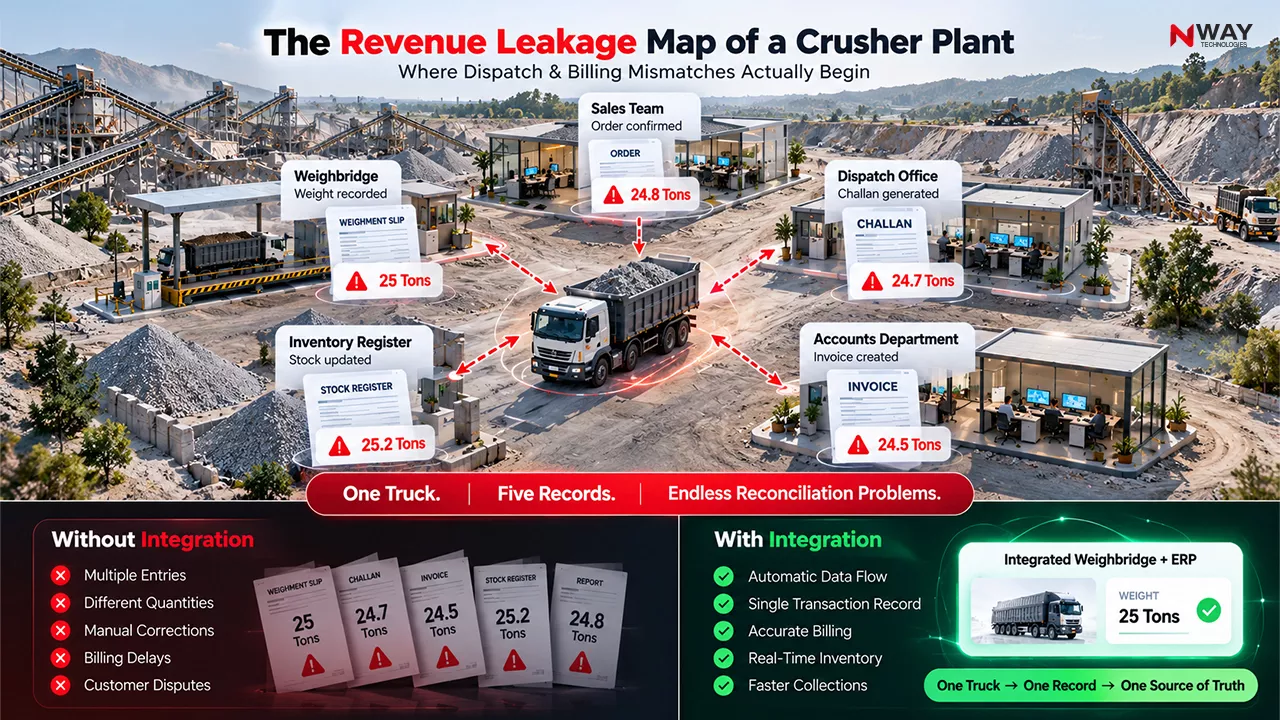
The accounts team at a crusher plant is trying to reconcile dispatch records with invoices. Production shows 12,500 tonnes dispatched. Billing records show only 11,850 tonnes invoiced. The weighbridge operator insists all loads were recorded. Dispatch supervisors claim every truck left with valid challans.
So where did 650 tonnes go?
Usually nowhere dramatic: a slip that never reached accounts, a weight typed in wrong, a truck that left before its second weighment, a load of 20 mm billed as dust. Each one is small. Together they’re lakhs of rupees a month.
Weighbridge integration software fixes this by making the weighbridge the starting point of every sale. The weight goes straight into the dispatch slip, the invoice, the stock and the accounts, and nobody types it twice
This scenario is surprisingly common across stone crushing and aggregate businesses in India.
As crusher operations grow, the volume of daily vehicle movements increases significantly. Hundreds of transactions involving trucks, loaders, weighbridge operators, dispatch clerks, customers, transporters, and accounts teams must remain perfectly synchronized.
Unfortunately, many crusher businesses still rely on a combination of:
- Weighbridge software
- Excel sheets
- Manual dispatch registers
- Standalone accounting systems
- Physical weighment slips
When these systems operate independently, operational gaps emerge.
The result?
- Dispatch mismatches
- Billing errors
- Stock inconsistencies
- Customer disputes
- Revenue leakage
Modern stone crusher weighbridge software solves this challenge by connecting weighbridge operations directly with dispatch, inventory, billing, accounting, and ERP processes. Weighbridge & boom barrier integration solutions increasingly focus on linking weighbridge, dispatch, stock, and billing workflows into one operational platform.
What Is Stone Crusher Weighbridge Software?
Weighbridge integration software connects your weighbridge directly to your dispatch, billing, inventory and accounting system. When a truck is weighed, the gross, tare and net weights are captured automatically from the weighbridge indicator and attached to the vehicle, customer, material and order. From then on, the challan, invoice and stock update all use that same verified weight.
Stone crusher weighbridge software is a specialized operational platform that integrates:
- Weighbridge systems
- Vehicle management
- Dispatch operations
- Sales management
- Billing processes
- Inventory tracking
- Accounting workflows
- ERP systems
Instead of managing separate records, businesses operate through a single source of truth.
Modern solutions connect weighbridge measurements directly to dispatch documentation, invoices, stock records, vehicle tracking, and accounting systems
Why Dispatch & Billing Mismatches Are So Common in Stone Crusher Operations
Stone crusher businesses operate in a high-volume environment where materials are sold by weight.
Every transaction depends on accurate weight records.
A typical workflow includes:
- Vehicle entry
- Weighment
- Material loading
- Dispatch slip generation
- Invoice creation
- Customer billing
- Stock adjustment
- Financial posting
If even one step becomes disconnected, discrepancies occur.
Common Causes of Mismatches
Manual Weight Entry
Operators manually enter weights into different systems.
This creates risks such as:
- Typing errors
- Duplicate entries
- Lost records
- Incorrect quantities
Separate Billing Software
The accounts team often re-enters weighment data for billing.
This creates another opportunity for error.
Delayed Invoice Generation
Invoices may be generated hours or even days after dispatch.
As transaction volumes increase, tracking accuracy decreases.
Non-Synchronized Inventory
Production and dispatch records may not update inventory simultaneously.
This causes stock variance issues.
Quick Insight
Even a seemingly small mismatch of 2% in dispatched quantity can significantly impact annual profitability for high-volume crusher operations handling thousands of tonnes every month.
How Weighbridge Integration Eliminates Dispatch Errors
Before Integration
| Process | Traditional Method |
|---|---|
| Weighment | Captured separately |
| Dispatch | Manual register |
| Invoice | Re-entered manually |
| Inventory | Updated later |
| Accounting | Separate process |
| Reporting | Manual reconciliation |
After Integration
| Process | Integrated ERP Workflow |
|---|---|
| Weighment | Automatic capture |
| Dispatch | System-generated |
| Invoice | Auto-generated |
| Inventory | Real-time update |
| Accounting | Integrated posting |
| Reporting | Live dashboards |
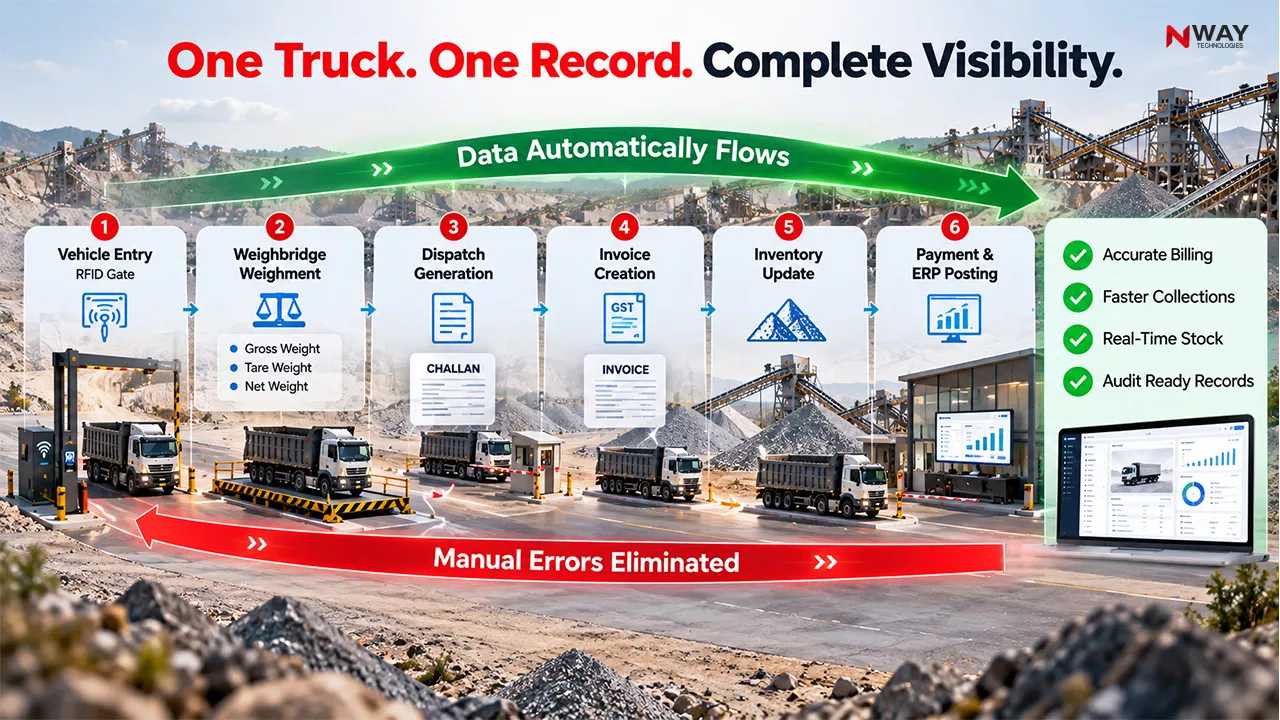
The Ideal Digital Workflow for Crusher Operations
Step 1: Vehicle Registration
The system identifies:
- Vehicle number
- Transporter
- Driver
- Customer
- Material type
Step 2: Automatic Weighment
The weighbridge automatically captures:
- Gross weight
- Tare weight
- Net material quantity
These solutions increasingly emphasize automatic capture of gross, tare, and net weights to reduce manual intervention.
Step 3: Dispatch Authorization
Dispatch is created directly from the weighment record.
No duplicate data entry.
Step 4: Invoice Generation
Invoices pull quantity data directly from weighbridge transactions.
Step 5: Instant Stock Adjustment
Inventory gets updated automatically.
Step 6: ERP Posting
Financial entries move directly into accounting and ERP modules.
Expert Tip
Never allow dispatch records and invoice quantities to be maintained in separate systems. The moment data is entered twice, the probability of mismatch increases dramatically.
Hidden Risks of Manual Weighbridge Operations
Many crusher owners focus only on billing discrepancies.
However, the actual business risk is much broader.
- Revenue Leakage – Loads may leave without proper billing.
- Stock Variance – Management loses visibility into actual inventory.
- Customer Conflicts – Differences between invoice quantity and delivered quantity create disputes.
- Delayed Collections – Customers with disputes delay payments.
- Audit Challenges – Reconciliation becomes difficult during audits.
- Productivity Losses – Staff spend significant time resolving avoidable discrepancies.
Still Reconciling Dispatch Records in Excel?
Beyond Weighment: Building an Intelligent Crusher Management System
The most successful crusher businesses are no longer implementing standalone weighbridge software.
They are moving toward integrated ERP ecosystems.
Key Modules That Should Connect with Weighbridge Data
Inventory Management
Track:
- Aggregate
- Dust
- GSB
- M-Sand
- WMM
- Other materials
Fleet Management
Track:
- Vehicle utilization
- Trip history
- Fuel consumption
- Driver productivity
Equipment Management
Monitor:
- Crusher runtime
- Loader efficiency
- Excavator productivity
- Maintenance schedules
Financial Management
Control:
- Sales
- Receivables
- GST
- Cost centers
- Profitability
Project Management
Useful for EPC contractors operating captive crusher plants.
Did You Know?
Several crusher management platforms now integrate not only weighbridges but also GPS systems, fuel tracking, gate automation, cameras, number plate recognition, inventory management, and ERP reporting within a centralized ecosystem
[Related Reading: Top 10 Benefits of ERP for the Stone Crusher Industry ]
The Cost of One Missing Truck
Consider a crusher dispatching:
- 150 trucks daily
- Average load: 25 tonnes
- Material value: ₹700 per tonne
Daily dispatch value:
= ₹26.25 lakh per day
Now assume just one truck per day remains incorrectly billed.
Daily leakage:
Annual impact:
= ₹52.5 lakh
This demonstrates why dispatch accuracy is a business issue, not merely an operational issue.
Best Practice Checklist for Stone Crusher Businesses
Operational Controls
- Integrate weighbridge directly with ERP
- Use automated weighment capture
- Eliminate duplicate manual entries
- Maintain digital dispatch slips
- Track vehicle movement digitally
- Implement real-time inventory updates
- Generate invoices automatically
- Monitor dispatch-to-billing reconciliation daily
- Maintain audit-ready transaction records
- Use management dashboards for monitoring
How NWAY ERP Helps Stone Crusher Businesses
Stone crusher operations require visibility into production tracking, weighbridge slips, royalty management, dispatch control, inventory and plant operations.
NWAY ERP can help businesses centralize:
Production Tracking
Monitor output by:
- Shift
- Plant
- Product category
Dispatch Management
Track:
- Vehicle dispatches
- Material movement
- Delivery records
Inventory Control
Get visibility into:
- Stock levels
- Material movement
- Yard inventory
Fleet Management
Track:
- Trucks
- Drivers
- Maintenance
- Fuel
Financial Integration
Connect:
- Sales
- Invoices
- Receivables
- GST
- Cost reporting
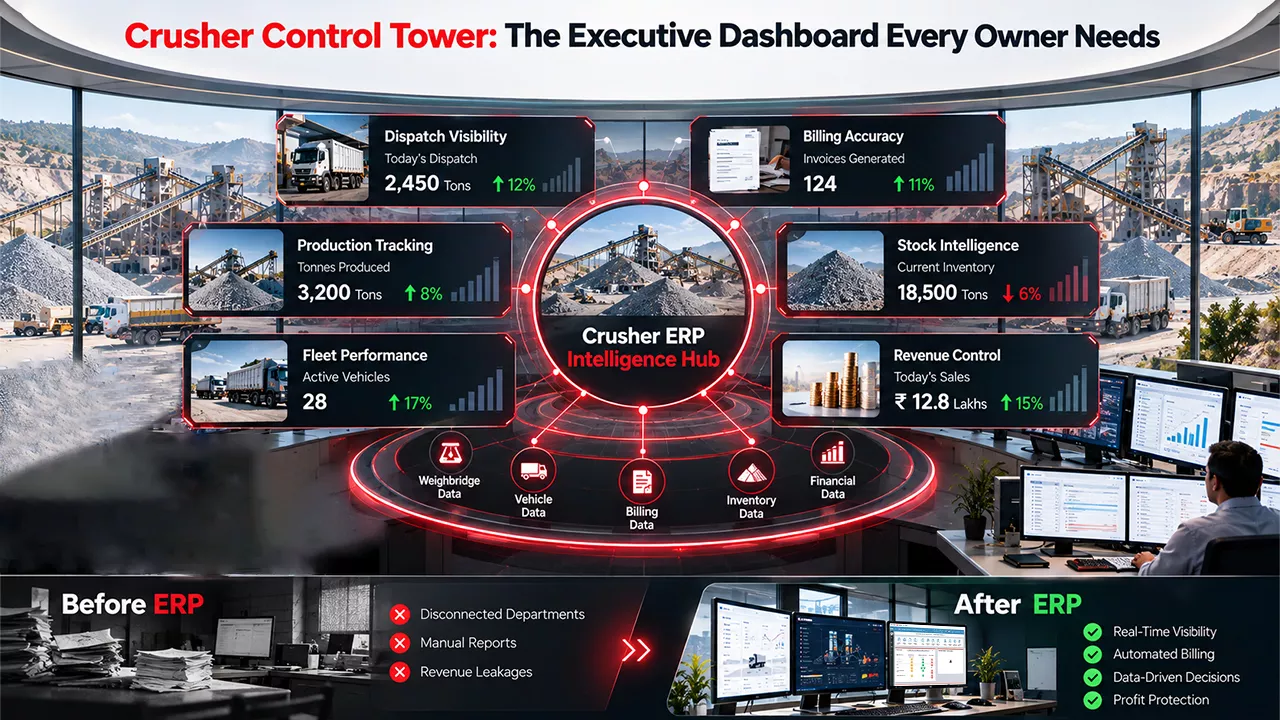
Management Dashboards
Enable real-time visibility for owners and management teams.
Want to see how these modules work together? View Complete Solution
Ready to Stop Revenue Leakage in Your Crusher Operations?
Conclusion
Stone crusher businesses operate on tight margins where every tonne, every dispatch, and every invoice directly affects profitability.
The challenge is no longer weighing the material correctly.
The challenge is ensuring that weighment, dispatch, inventory, billing, fleet operations, and finance all operate from the same source of truth.
That is why modern stone crusher weighbridge software has evolved far beyond basic weight capture. Today’s leading systems integrate weighbridges with ERP workflows, creating complete visibility from vehicle entry to customer payment.
For contractors, builders, EPC companies, infrastructure developers, and aggregate producers, the strategic opportunity is clear:
Stop managing transactions in isolation.
Start managing the entire dispatch-to-cash cycle through an integrated ERP platform.
Because when every load is automatically weighed, dispatched, billed, and accounted for, mismatches disappear, revenue leakage declines, and operational control improves dramatically.