Table of Contents:
Introduction
A project manager receives a call from the finance team.
“Can you share the latest project cost report in the next 15 minutes?”
The report exists.
Somewhere.
One version is with the site engineer. Another is in the planning department. Procurement has updated material costs in a different spreadsheet. Finance maintains its own workbook. Meanwhile, management is looking at yesterday’s data while the site team is working with today’s numbers.
This scenario plays out daily across construction companies in India.
The issue is not that Excel is a bad tool.
In fact, Excel remains one of the most widely used tools in construction. It powers estimates, budgets, quantity calculations, vendor comparisons, and project reports.
The real challenge begins when businesses grow.
What worked for one project and fifteen employees often becomes a bottleneck when managing multiple projects, hundreds of vendors, distributed teams, and crores worth of project costs.
This raises an important question:
Is Excel still enough for modern construction management?
The answer is both yes and no.
Let’s explore where Excel continues to add value and where it starts creating hidden business risks.
Before discussing limitations, it’s important to acknowledge why Excel became so popular.
Excel Solves Immediate Problems
For contractors and project teams, Excel offers:
- Low implementation cost
- Familiar user interface
- Flexible formatting
- Quick calculations
- Custom reporting capabilities
- Easy estimate preparation
Industry Example
A contractor managing two residential projects can effectively use Excel for:
- BOQ preparation
- Contractor billing calculations
- Material tracking
- Budget monitoring
- Labour costing
At this stage, Excel provides sufficient visibility.
Quick Insight
Excel is not the problem. Using Excel beyond its intended scale is the problem.
Where Excel for Construction Management Works Well
1. Estimation and BOQ Preparation
Excel remains highly effective during pre-construction planning.
Quantity surveyors and estimators use it for:
- Quantity take-offs
- Rate analysis
- Cost estimation
- Tender calculations
- Bid comparisons
Why It Works
Excel’s flexibility allows users to create customized costing models specific to project requirements.
Expected Outcome
- Faster estimate preparation
- Flexible scenario planning
- Easy modification during tender stages
2. Early-Stage Construction Budget Management
For small projects, Excel helps teams:
- Define project budgets
- Allocate cost categories
- Forecast expenditure
- Compare planned versus actual costs
Best Practice
Always lock critical formulas and maintain a master budget file.
3. Simple Project Reporting
Many project managers continue to use Excel for:
- Weekly reporting
- DPR summaries
- Progress updates
- Resource allocation sheets
For limited stakeholders and limited projects, the approach can be effective.
The Hidden Moment When Excel Starts Failing
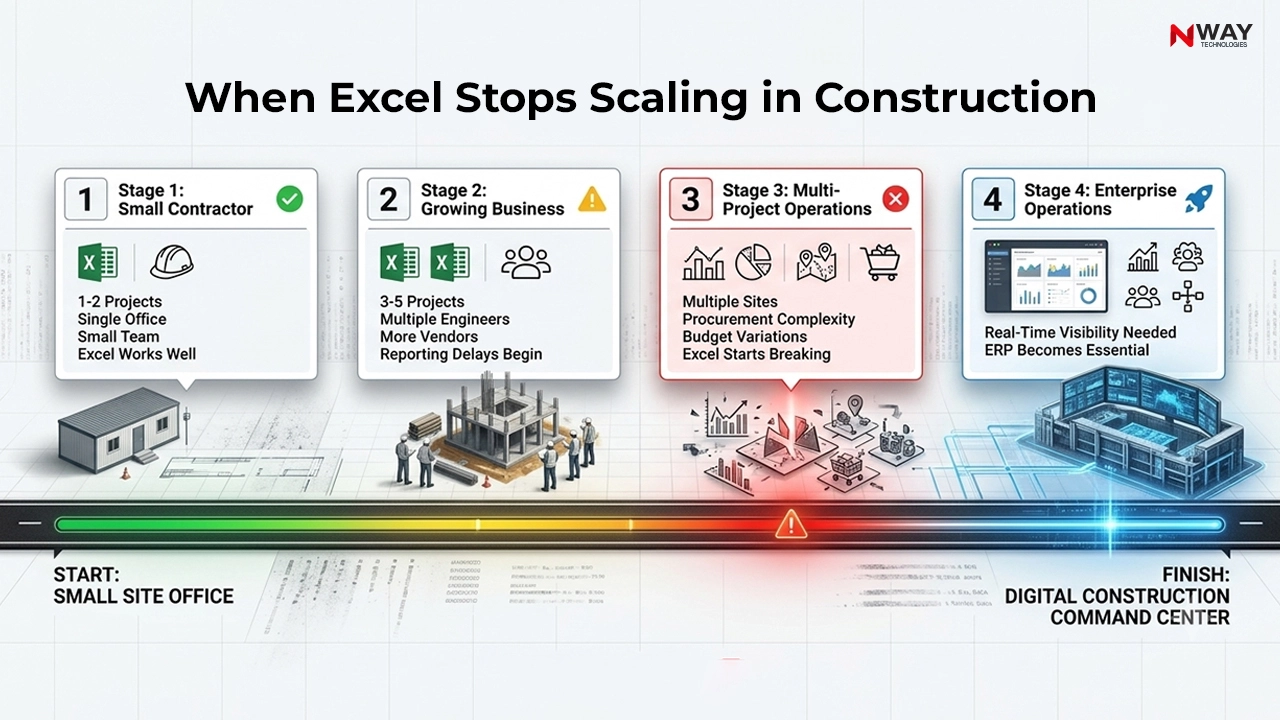
Most organizations never formally decide that Excel is no longer sufficient.
Instead, operational complexity quietly increases until problems become visible.
The warning signs usually appear as:
- Frequent data reconciliation
- Repeated reporting delays
- Multiple versions of the same file
- Growing dependence on manual updates
- Increasing management frustration
Common Mistake
Many construction companies believe Excel problems are employee problems.
In reality, most Excel-related issues are process and visibility problems.
Where Excel Fails in Construction Management
1. No Single Source of Truth
The biggest weakness of Excel is fragmentation.
Different teams maintain different files:
- Procurement workbook
- Project workbook
- Finance workbook
- Inventory workbook
- Billing workbook
As a result:
- Data becomes inconsistent
- Reports take longer to create
- Decisions are delayed
Hidden Risk
Management meetings become discussions about whose numbers are correct instead of what actions should be taken.
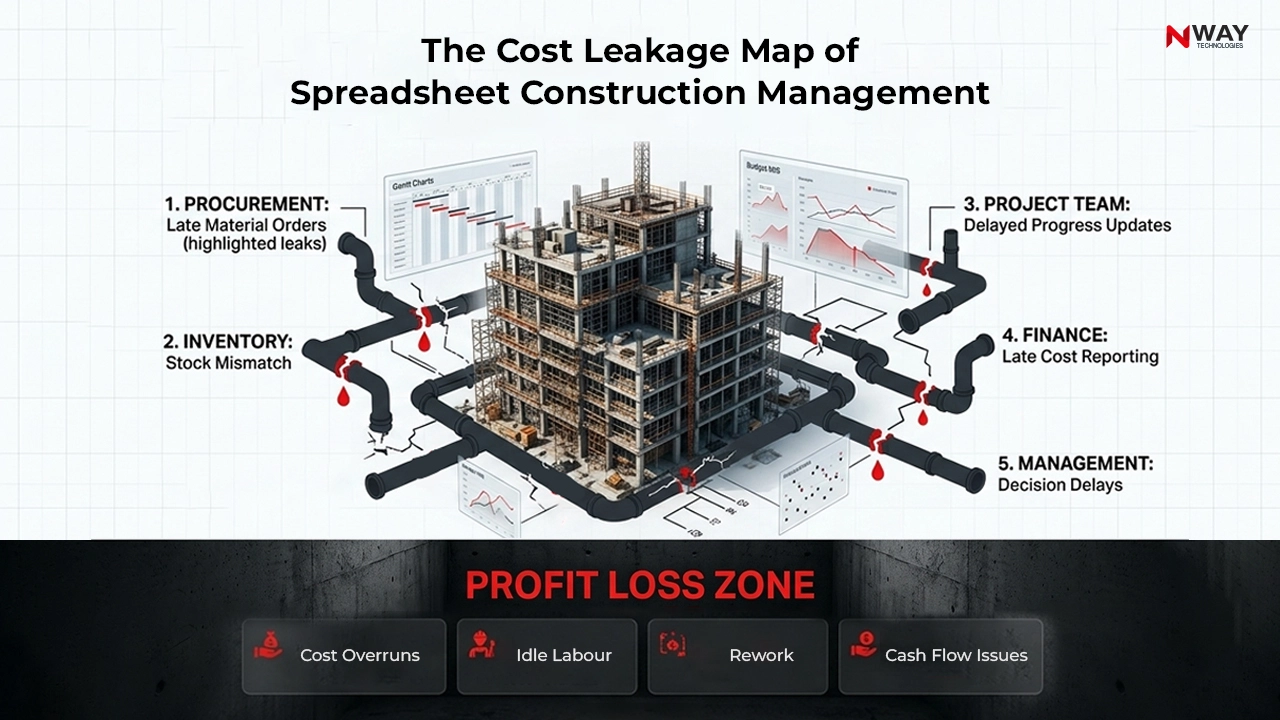
2. Construction Cost Tracking Becomes Reactive
Cost control determines project profitability.
However, Excel often provides information after costs have already occurred.
Typical Situation
By the time finance identifies a cost overrun:
- Material consumption has happened
- Vendor payments are processed
- Labour costs are incurred
The opportunity to prevent losses has already passed.
Why It Matters
Effective Construction Cost Tracking should identify risks before margins disappear.
Expert Tip
The objective is not reporting cost overruns.
The objective is preventing them.
3. Multi-Site Project Tracking Breaks Down
Managing one project through spreadsheets is possible.
Managing ten projects simultaneously is a different challenge.
Challenges
- Hundreds of files
- Multiple site updates
- Delayed information sharing
- Manual consolidation
The more projects a company adds, the more difficult project visibility becomes.
Business Impact
Project managers spend more time gathering information than managing projects.
Excel vs Construction ERP: A Strategic Comparison
| Capability |
Excel |
Construction ERP Software |
| Project Cost Tracking |
Manual |
Real-time |
| Multi-Site Visibility |
Limited |
Centralized |
| Procurement Workflow |
Manual |
Automated |
| Resource Monitoring |
Spreadsheet-based |
Live dashboards |
| Approval Management |
Emails & calls |
Structured workflows |
| Version Control |
High risk |
Single database |
| Audit Trail |
Limited |
Complete traceability |
| Executive Reporting |
Time-consuming |
Instant |
| Scalability |
Low |
High |
| Data Accuracy |
User dependent |
System controlled |
4. Procurement Control Becomes Difficult
Procurement is one of the highest-value activities in construction.
Yet many companies still manage it through:
- Email approvals
- Excel trackers
- Phone calls
Common Challenges
- Duplicate purchases
- Delayed approvals
- Material shortages
- Vendor disputes
Industry Scenario
A delayed purchase order may appear small, but it can impact:
- Site productivity
- Labour utilization
- Project schedules
- Cash flow
The resulting ripple effect can cost significantly more than the delayed material itself. [See: Construction Purchase Management Software]
Did You Know?
A single missing project update can affect procurement planning, billing forecasts, resource allocation, and profitability calculations simultaneously.
5. Collaboration Becomes Chaos
Construction is inherently collaborative.
Stakeholders include:
- Site engineers
- Project managers
- Procurement teams
- Finance teams
- Senior management
- Vendors
- Contractors
Excel was never designed to serve as a centralized operational platform for all these stakeholders.
Common Symptoms
- Multiple versions of reports
- Missing updates
- Conflicting numbers
- Long reporting cycles
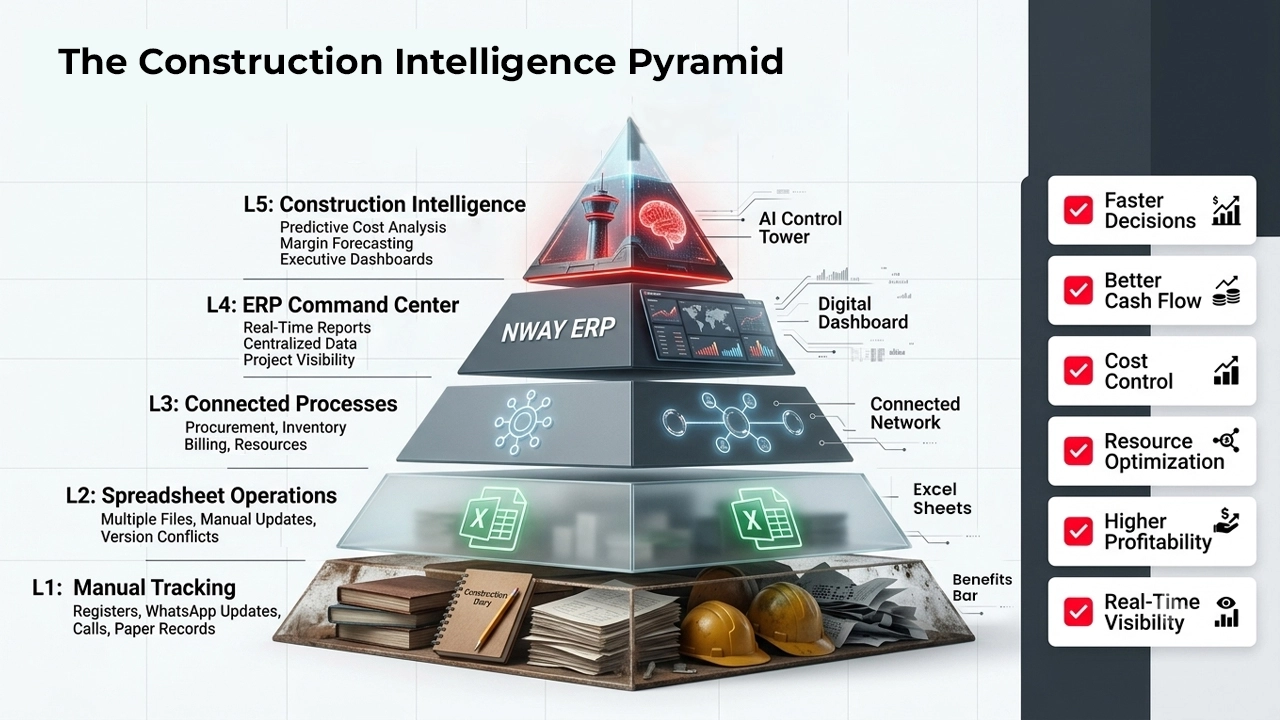
Construction Transformation Maturity Model
| Stage |
Operational Style |
Primary Tool |
| Stage 1 |
Manual Tracking |
Registers & Paper |
| Stage 2 |
Spreadsheet Management |
Excel |
| Stage 3 |
Departmental Software |
Isolated Tools |
| Stage 4 |
Integrated Operations |
Construction ERP Software |
| Stage 5 |
Data-Driven Construction |
ERP + Analytics + AI |
Most growing contractors operate between Stage 2 and Stage 3.
The challenge is moving toward integrated visibility.
When Should a Construction Company Move Beyond Excel?
The transition should not be based on company size alone.
It should be based on operational complexity.
Consider Construction Management Software When:
You manage:
- Multiple projects
- Multiple locations
- Multiple departments
You experience:
- Frequent reporting delays
- Budget overruns
- Procurement confusion
- Data inconsistencies
Leadership requires:
- Real-time visibility
- Faster decisions
- Better profitability control
- Growth scalability
How Construction ERP Software Complements Excel
Contrary to popular belief, moving to ERP does not mean eliminating Excel.
The smartest organizations use both.
Excel For
- Analysis
- Estimation
- Ad-hoc calculations
- Forecast modelling
Construction ERP For
- Project execution
- Procurement
- Billing
- Inventory
- Resource management
- Financial control
- Real-time reporting
This combination provides both flexibility and control.
Conclusion
Excel remains one of the most valuable tools in construction.
For estimating, budgeting, and individual analysis, it continues to deliver significant value.
However, construction businesses do not fail because Excel is inadequate. They struggle because operational complexity eventually exceeds what spreadsheets were designed to manage.
As projects become larger, teams become more distributed, and margins become harder to protect, the need for real-time visibility becomes critical.
The future belongs to construction companies that combine the flexibility of Excel with the control of integrated Construction ERP Software and construction project management Software.
The goal is not to replace spreadsheets.
The goal is to replace uncertainty.
Organizations that achieve this transition gain stronger cost control, better project visibility, faster decision-making, and improved profitability.
Also Read: Revolutionizing Construction Management with ERP Software
Discover the hidden costs of spreadsheet-driven construction management and the operational advantages of Construction ERP Software.
FAQs
Is Excel good for construction project management?
Yes, Excel works well for small projects, basic budgeting, estimating, and simple project tracking.
What are the limitations of Excel in construction management?
Excel lacks real-time visibility, workflow automation, centralized data management, and multi-user collaboration.
When should a construction company move from Excel to ERP?
Companies should consider ERP when managing multiple projects, departments, or project locations.
Can Excel track construction project costs?
Yes, but cost tracking in Excel is manual and can become difficult as project complexity increases.
How does Construction ERP Software improve project tracking?
Construction ERP Software Provides real-time project updates, centralized reporting, and automated workflows.
How does NWAY ERP help construction companies beyond Excel?
NWAY ERP centralizes project, cost, procurement, inventory, and financial management into one integrated platform.