Retention Money & Mobilization Advance: How Contractors Track and Recover Them

Table of Contents:

Introduction

A contractor may spend months negotiating project margins, optimizing procurement costs, and accelerating execution schedules, only to discover that a substantial portion of earned revenue remains trapped in retention accounts long after the project is complete.

This is one of the most overlooked financial challenges in the construction industry.

While discussions around project profitability often focus on cost overruns and productivity, retained payments and unrecovered advances can quietly erode working capital and create avoidable dependence on external financing. For contractors managing multiple projects simultaneously, even small delays in recovery can accumulate into significant cash flow constraints.

The companies that consistently outperform their peers are not necessarily those winning the largest projects. They are often the ones that maintain stronger financial discipline, better contract visibility, and tighter control over recoverable funds.

That’s where systematic retention and mobilization of advance management becomes a competitive advantage rather than merely a contractual requirement.

Understanding Retention Money and Mobilization Advance

What is Retention Money in Construction?

Retention of money in construction refers to a percentage of payment withheld by the client from each running bill as security against incomplete work, defects, or contractual non-compliance.

Typically:

  • 5% to 10% of invoice value is retained
  • Collected progressively throughout project execution
  • Released partially at project completion
  • Balance released after the defect liability period

The purpose is to safeguard the client’s interests and ensure contractors fulfill all contractual commitments.

Why It Matters

For contractors, retention money is not a cost.

It is earned revenue that remains temporarily inaccessible.

If not managed effectively, retained amounts can significantly affect:

  • Working capital
  • Cash flow planning
  • Equipment financing
  • Vendor payments
  • Expansion opportunities

What is Mobilization Advance in Construction?

Mobilization advance in construction is an upfront payment provided by a client to help a contractor mobilize resources before project execution begins.

The advance may be used for:

  • Equipment mobilization
  • Site establishment
  • Labor deployment
  • Material procurement
  • Temporary infrastructure setup

In most contracts, the mobilization advance is gradually recovered through deductions from subsequent running bills.

Quick Insight

A contractor may receive a substantial mobilization advance at project commencement while simultaneously accumulating retention money during execution.

Both need separate tracking mechanisms because:

  • Mobilization advance is deducted by the client.
  • Retention money is payable by the client.

Confusing the two often leads to accounting errors and recovery disputes.
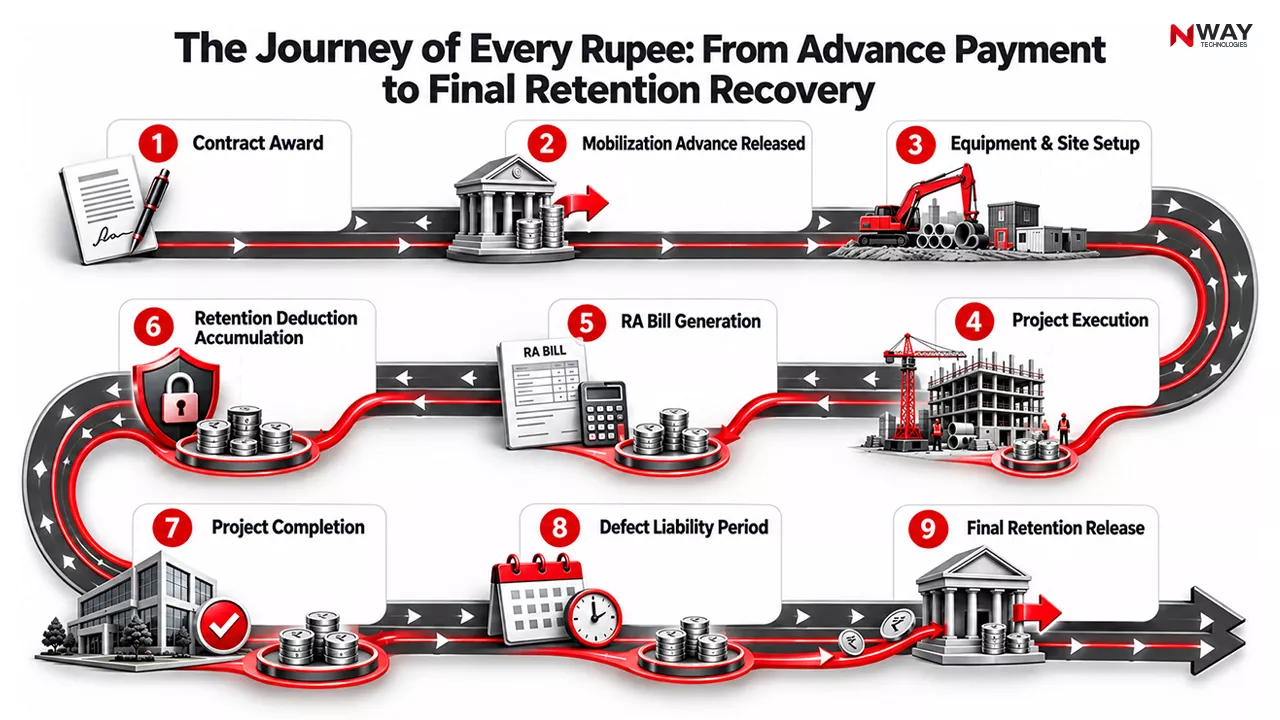
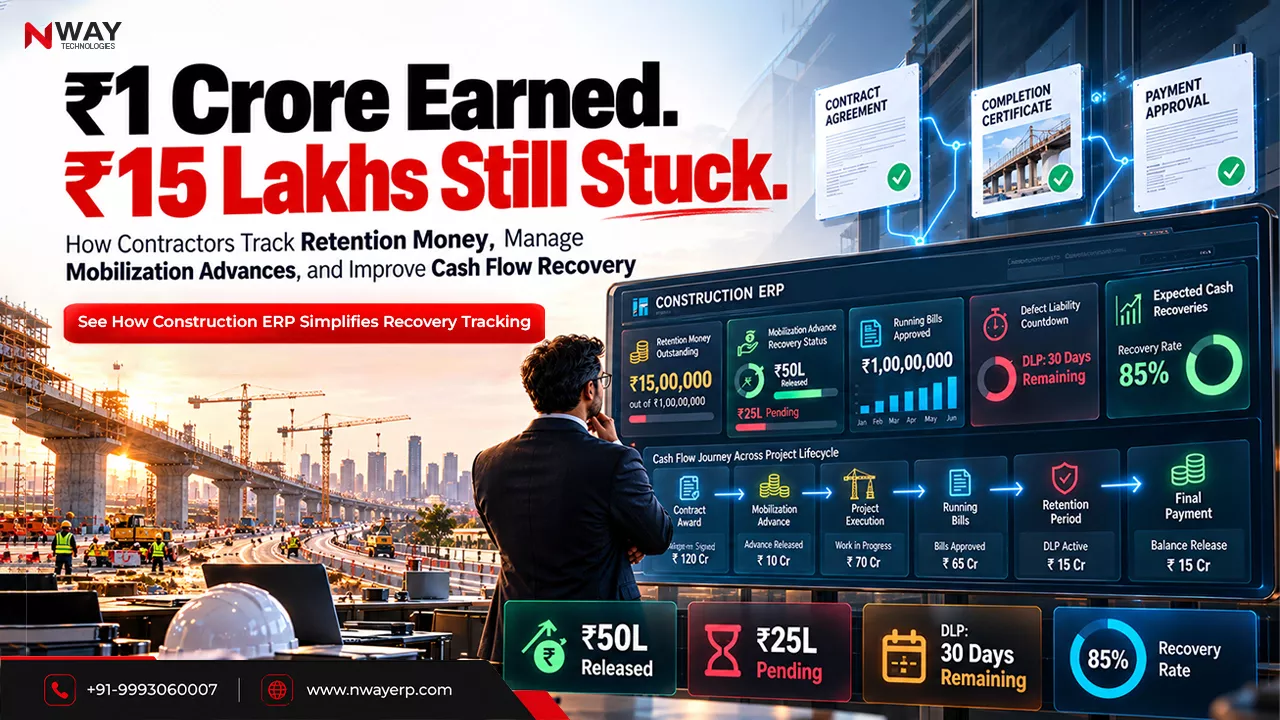
The Journey of Every Rupee: From Advance Payment to Final Retention Recovery

Why Contractors Struggle to Recover Retention Money

The Visibility Problem

Many contractors understand how much retention has been deducted but lack visibility into:

  • Contract-wise balances
  • Release conditions
  • Defect liability timelines
  • Certification status
  • Outstanding documentation

As project portfolios grow, manual monitoring becomes increasingly difficult.

Common Challenges

1. Multiple Active Projects

A contractor handling 20 projects may have:

  • Different retention percentages
  • Different release schedules
  • Different retention clause in construction contracts
  • Different recovery conditions

Without a centralized system, tracking becomes fragmented.

2. Documentation Gaps

Retention release often depends on:

  • Completion certificates
  • Quality approvals
  • As-built drawings
  • Defect closure reports
  • Final account settlements

Missing even one document can delay payment.

3. Defect Liability Period Confusion

Many organizations do not actively monitor:

  • Start date of DLP
  • End date of DLP
  • Pending defects
  • Release eligibility dates

Consequently, recoverable funds remain unclaimed.

4. Lack of Ownership

Finance teams assume project teams are tracking recoveries.

Project teams assume finance departments are following up.

The result is predictable: nobody owns the process.

Common Mistake

Many contractors focus heavily on winning new projects while neglecting outstanding retention recoveries from completed projects.

This creates artificial cash shortages even when substantial funds are legally recoverable.
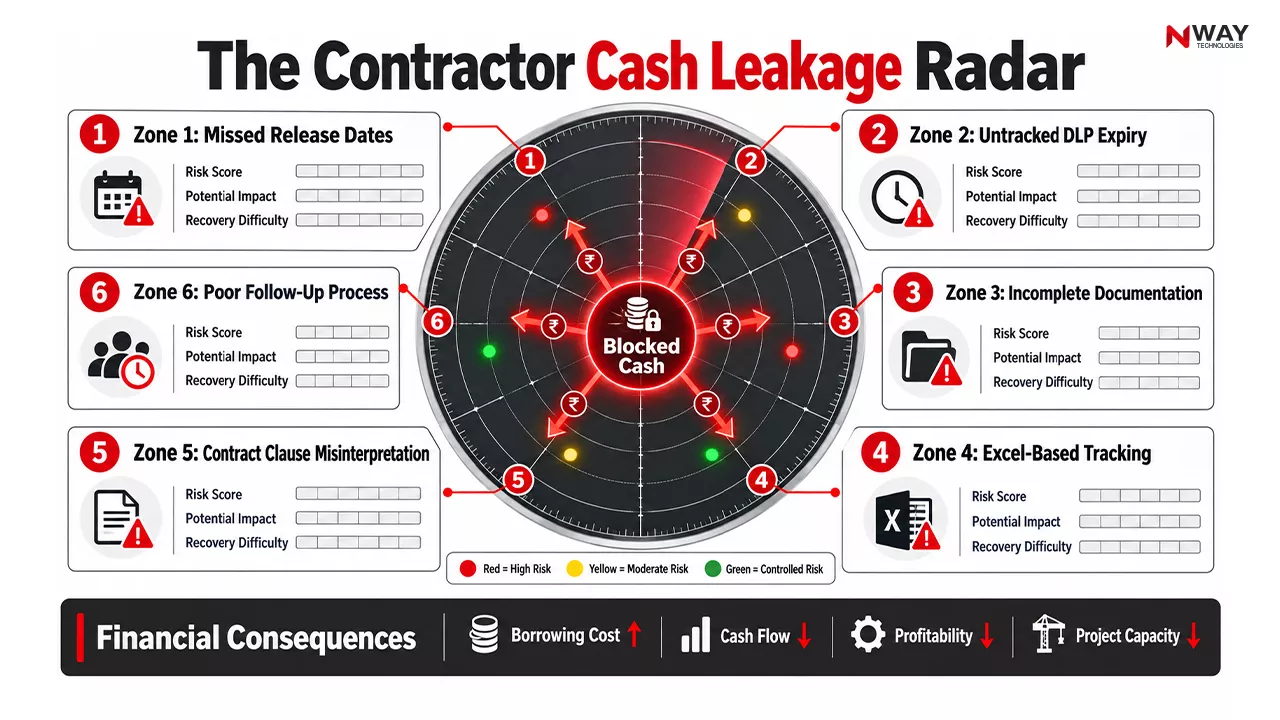
The Contractor Cash Leakage Radar

The Financial Impact of Poor Tracking

Hidden Cost of Retention Delays

Consider a contractor executing projects worth ₹100 crore annually.

Assume:

  • Retention rate = 5%
  • Total retention accumulated = ₹5 crore

If recovery is delayed by 12 months:

  • Additional borrowing may be required
  • Interest costs increase
  • Cash conversion cycle extends
  • Profitability declines

The issue is not revenue generation.

The issue is revenue realization.

Risk Assessment Matrix

Risk Probability Business Impact
Missed retention release date High High
Incorrect advance recovery calculation Medium High
Contract interpretation disputes Medium High
Missing supporting documents High Medium
Cash flow shortage High High
Audit observation Medium Medium

How Contractors Should Track Retention Money

Step 1: Create a Contract-Based Recovery Register

Every project should have a dedicated tracking framework containing:

  • Contract value
  • Retention percentage
  • Total retained amount
  • Amount released
  • Pending balance
  • DLP end date
  • Expected release date

This creates accountability and visibility.

Step 2: Monitor Contract Milestones

Recovery eligibility often depends on:

  • Mechanical completion
  • Project completion
  • Final handover
  • Defect closure

Tracking milestones is as important as tracking money.

Step 3: Link Documentation with Recovery

Maintain digital records of:

  • Contract agreements
  • Client approvals
  • Completion certificates
  • Quality clearances
  • Release requests

When documentation is centralized, recovery cycles accelerate.

Best Practice Checklist

  • Maintain project-wise retention ledger
  • Review recoveries monthly
  • Track DLP expiry dates
  • Automate reminder alerts
  • Store all supporting documents digitally
  • Assign responsibility for follow-up
  • Escalate overdue recoveries
  • Reconcile client deductions regularly

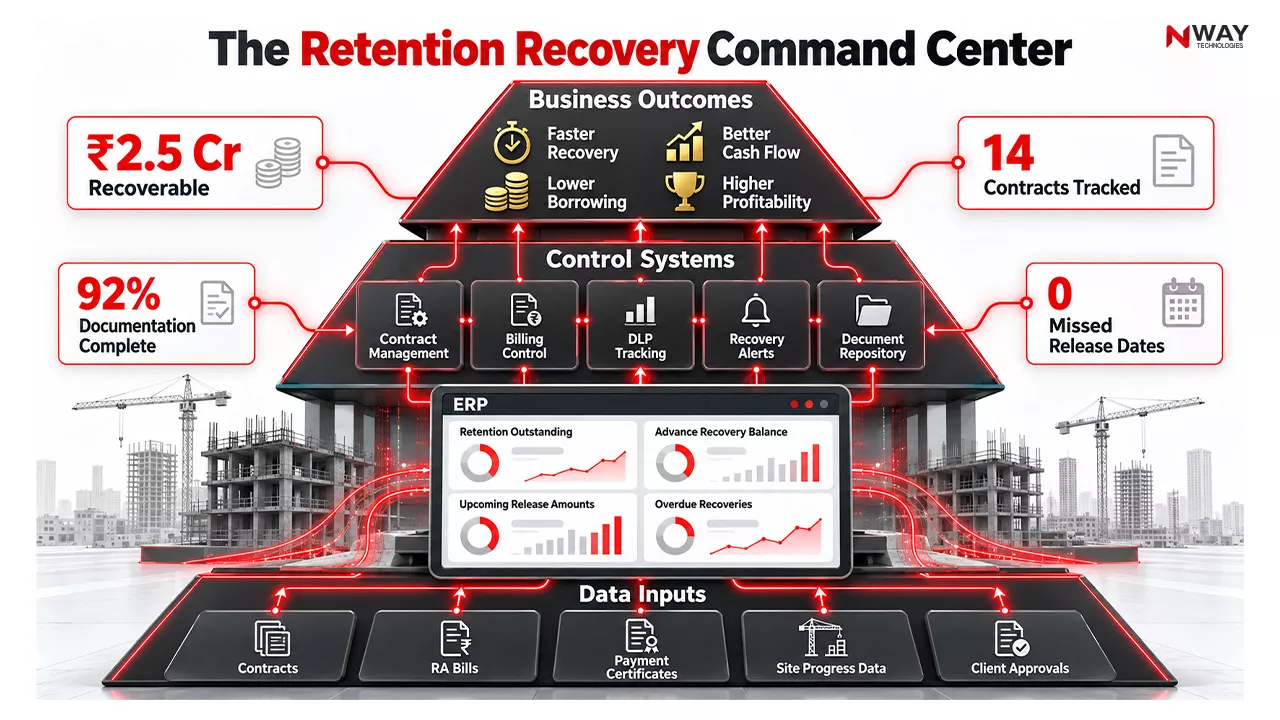
The Retention Recovery Command Center

Managing Mobilization Advance Effectively

A Recommended Framework

Before Project Start

Verify:

  • Advance amount
  • Recovery mechanism
  • Interest conditions
  • Bank guarantee requirements

During Project Execution

Track:

  • Total advance received
  • Recovery percentage
  • Amount recovered
  • Balance outstanding

During RA Billing

Ensure:

  • Deductions match contract conditions
  • Recovery calculations are accurate
  • Billing reflects current advance balance

Expert Tip

Never depend solely on client calculations.

Contractors should maintain independent recovery records to validate deductions and prevent revenue leakage.

ERP vs Manual Tracking: A Contractor’s Reality

Activity Manual Process ERP-Driven Process
Retention tracking Excel files Automated ledger
Advance recovery Manual calculations System-generated adjustments
DLP monitoring Calendar reminders Automated alerts
Documentation management Email folders Central repository
Management reporting Time-consuming Real-time dashboards
Recovery forecasting Limited visibility Predictive insights
Financial control Reactive Proactive

How Construction ERP Software Improves Recovery Management

Modern construction ERP software transforms retention and advance management from a reactive process into a controlled business workflow.

Centralized Contract Management

A robust ERP system stores:

  • Contract details
  • Payment terms
  • Retention percentages
  • Release conditions
  • Advance recovery schedules

All stakeholders access the same information.

Automated Retention Tracking

The system can automatically:

  • Calculate deductions
  • Track balances
  • Generate recovery reports
  • Monitor release eligibility

This reduces dependency on spreadsheets.

Advance Recovery Management

ERP systems help contractors:

  • Track advance utilization
  • Reconcile deductions
  • Monitor recovery progress
  • Avoid billing discrepancies

Dashboard-Based Visibility

Decision-makers receive visibility into:

  • Total retention outstanding
  • Project-wise recoveries
  • Advance balances
  • Aging analysis
  • Expected cash inflows

Did You Know?

Many construction companies discover significant recoverable amounts only after consolidating project data inside ERP systems. Visibility often becomes the biggest financial gain. Explore : Construction MIS Software

Industry Scenario: Before and After Digital Tracking

Before

A contractor manages 30 projects through spreadsheets.

Problems include:

  • Different file formats
  • Duplicate records
  • Missed deadlines
  • Delayed follow-ups
  • Cash flow stress

After ERP Implementation

The contractor gains:

  • Centralized project visibility
  • Automated alerts
  • Faster reconciliations
  • Better cash flow forecasting
  • Stronger management control

Expected Outcomes

  • Faster retention recovery
  • Fewer disputes
  • Improved working capital
  • Higher finance team productivity
  • Better project profitability visibility

Building a Retention Recovery Strategy

A Four-Pillar Framework

Pillar 1: Contract Intelligence

Understand every retention clause in construction contract documents before execution begins.

Pillar 2: Financial Visibility

Create real-time visibility for finance, project, and leadership teams.

Pillar 3: Digital Documentation

Ensure all approvals and certificates are digitally accessible.

Pillar 4: Recovery Governance

Conduct monthly reviews covering:

  • Upcoming releases
  • Pending claims
  • Contractual risks
  • Escalation actions

Conclusion

Retention money in construction and mobilization advances are far more than contractual accounting entries. They directly influence liquidity, project funding capacity, borrowing requirements, and overall business profitability. Contractors that rely on fragmented spreadsheets and manual follow-up processes often experience delayed recoveries, avoidable disputes, and unnecessary cash flow pressure.

The industry is steadily moving toward data-driven contract administration where recovery milestones, documentation requirements, and financial obligations are tracked with the same rigor as project execution. By combining disciplined contract management practices with modern Construction ERP software solutions such as NWAY ERP, contractors can improve visibility, accelerate recoveries, strengthen working capital, and convert earned revenue into realized cash more efficiently.

In an increasingly competitive construction market, recovery management is no longer just a finance function. It is a strategic capability that directly impacts growth, profitability, and business resilience.
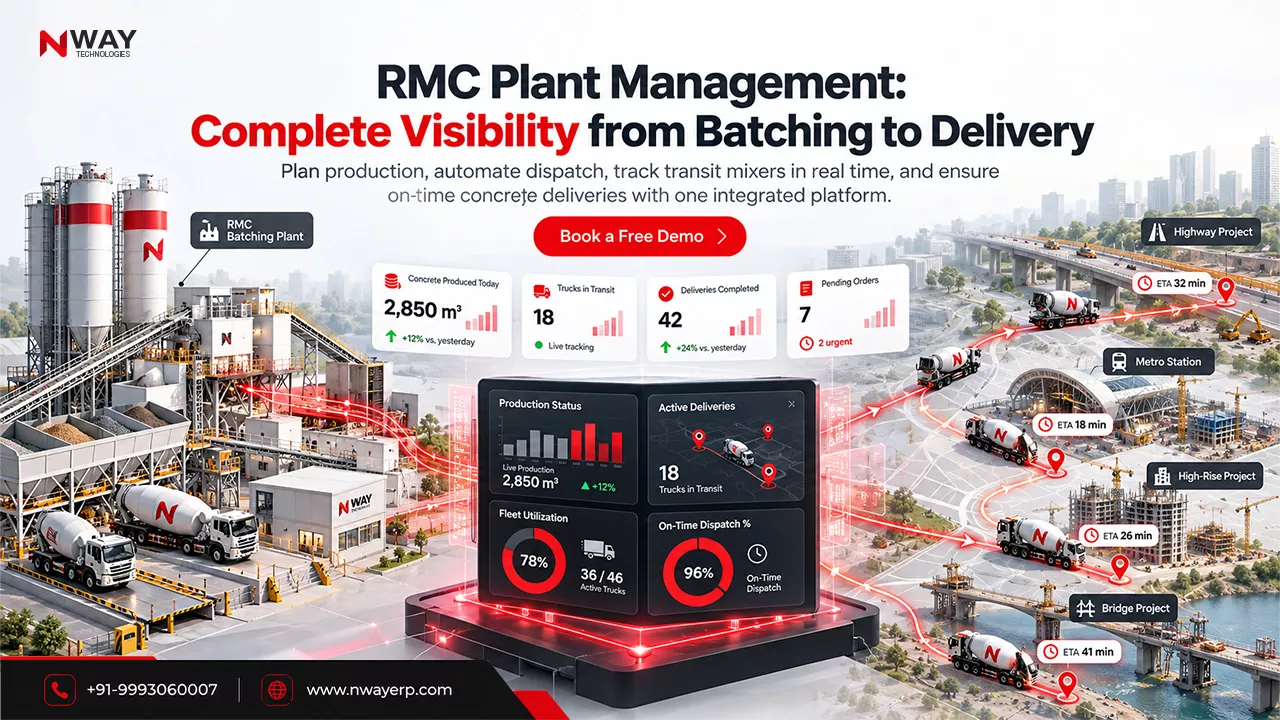
FAQs

How is retention money calculated in construction?

Retention money is calculated as a fixed percentage, typically 5% to 10%, deducted from each contractor invoice as specified in the construction contract.

Is retention money refundable?

Yes. Retention money is generally refundable after project completion and fulfillment of defect liability obligations, subject to contract terms.

What is the purpose of retention money in construction?

Retention money protects the client against defective work, incomplete scope, or contractual non-compliance until project obligations are fully met.

When is retention money released?

Retention money is typically released in stages, with a portion paid at project completion and the remaining balance after the defect liability period.

What happens if retention money is not paid?

Contractors may pursue recovery through contractual claims, negotiations, arbitration, or legal remedies depending on the contract provisions.

RMC Plant Management: Batching, Dispatch & Delivery Tracking in One System

RMC Plant Management: Batching, Dispatch & Delivery Tracking in One System

Table of Contents:

Introduction

It’s 8:30 AM.

An infrastructure contractor is pouring concrete for a critical bridge pier. The site team expects six transit mixers before noon. The RMC plant has already produced the concrete. Dispatch believes the trucks have left. The customer assumes everything is on track.

But reality looks different.

Two transit mixers are stuck in traffic. One vehicle was reassigned to another project. The plant has already started preparing the next batch. The site is waiting, labor is idle, and the concrete pouring schedule is at risk.

This scenario plays out every day across India’s construction, infrastructure, metro, highway, industrial, and real-estate projects.

The challenge isn’t simply producing ready-mix concrete.

The challenge is coordinating the entire journey from:

Batching → Dispatch → Fleet Movement → Site Delivery → Customer Confirmation

When these processes operate independently, businesses face:

  • Delayed deliveries
  • Idle fleets
  • Concrete wastage
  • Plant bottlenecks
  • Customer disputes
  • Reduced profitability

This is why leading RMC businesses are investing in ready mix concrete ERP software that connects the entire operation into one intelligent control system.

Instead of managing production, dispatch, and transportation separately, they create a single digital ecosystem where every stakeholder sees the same data in real time.

Why Traditional RMC Operations Struggle to Scale

As order volumes increase, operational complexity grows exponentially.

A typical RMC company must simultaneously manage:

  • Multiple construction sites
  • Multiple batching plants
  • Transit mixer availability
  • Pump allocation
  • Production schedules
  • Quality records
  • Customer delivery commitments
  • Fuel and vehicle utilization

Manual processes become unsustainable at this level.

Common Challenges

Production Teams Lack Delivery Visibility –

Operators may continue producing concrete without knowing whether enough vehicles are available for dispatch.

Dispatch Teams Depend on Phone Calls

Many dispatch coordinators still rely on:

  • Calls
  • Spreadsheet updates
  • WhatsApp groups
  • Manual registers

Information becomes outdated within minutes.

Fleet Teams Operate Independently

Vehicle status often remains unclear:

  • Is the truck loading?
  • Has it left the plant?
  • Is it delayed?
  • Has unloading started?

Without visibility, planning becomes guesswork.

Management Receives Information Too Late

By the time reports reach management:

  • Service failures have occurred
  • Profitability has been impacted
  • Customers are already dissatisfied

Quick Insight

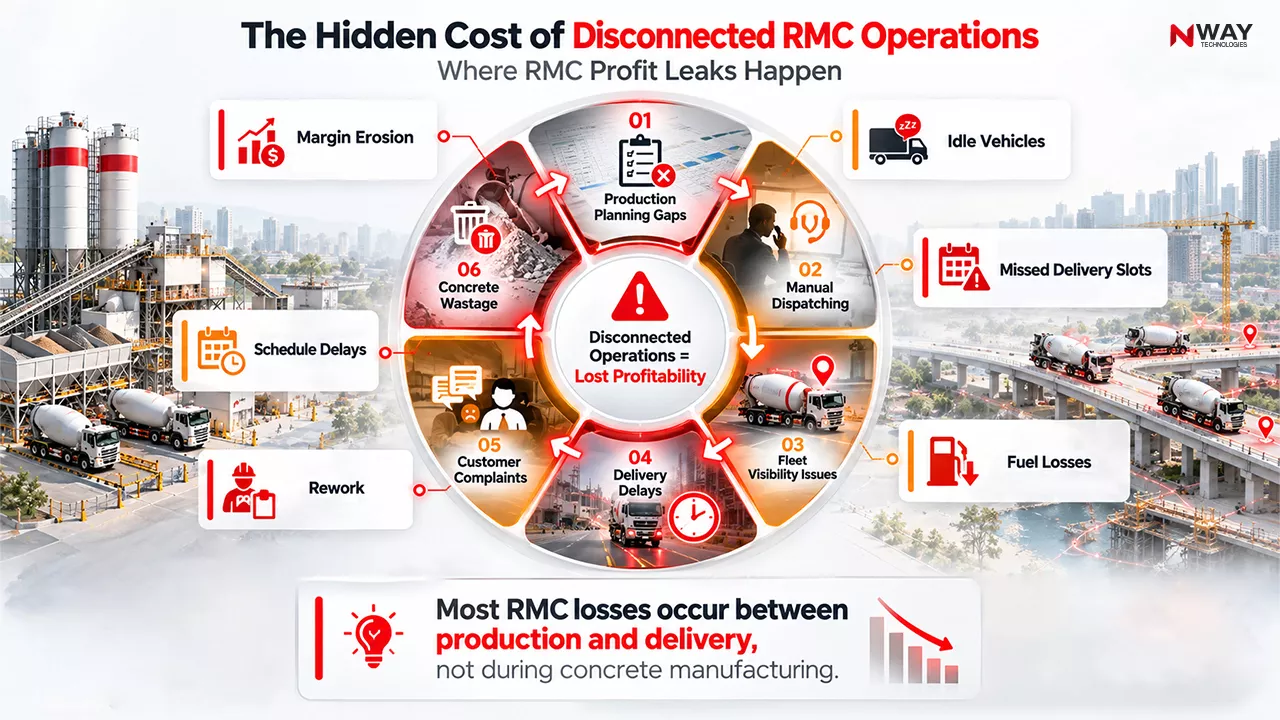
Most RMC delivery problems originate from communication gaps rather than production limitations.

The plant may have enough capacity, but disconnected processes prevent efficient execution.

The Hidden Cost of Disconnected RMC Operations

What Is RMC Plant Management Software?

RMC plant management software is an integrated platform that manages every operational activity involved in ready-mix concrete production and delivery.

Instead of using separate systems for production, dispatch, transportation, and reporting, all activities are connected to a single digital platform.

Core Functional Areas

Production Planning

  • Order scheduling
  • Batch planning
  • Plant capacity optimization
  • Raw material availability checks

Plant Operations

  • Batch execution
  • Mix design management
  • Production monitoring
  • Quality control records

Dispatch Management

  • Vehicle allocation
  • Trip scheduling
  • Dispatch prioritization
  • Load sequencing

Fleet Management

Using RMC fleet management software, organizations can:

  • Track transit mixers in real time
  • Monitor vehicle utilization
  • Improve turnaround time
  • Reduce idle hours

Delivery Tracking

  • GPS monitoring
  • ETA visibility
  • Delivery confirmation
  • Site status updates

Management Analytics

  • Production dashboards
  • Fleet performance dashboards
  • Dispatch KPIs
  • Customer fulfillment reports

The Ideal Digital Workflow for Modern RMC Plants

Step 1: Customer Order Creation

The order enters the system with:

  • Grade requirements
  • Quantity
  • Site location
  • Delivery schedule
  • Customer specifications

The platform immediately validates capacity availability.

Step 2: Production Planning

An advanced RMC plant and production module automatically evaluates:

  • Plant capacity
  • Existing workload
  • Material stock
  • Vehicle availability

This eliminates last-minute scheduling conflicts.

Step 3: Automated Batching

Production teams receive:

  • Batch sequences
  • Quantity requirements
  • Mix specifications

All production data becomes digitally recorded.

Step 4: Dispatch Scheduling

The software allocates:

  • Available transit mixers
  • Delivery sequence
  • Route assignments
  • Loading schedules

Dispatch becomes proactive rather than reactive.

Step 5: Live Fleet Tracking

Vehicles can be monitored throughout their journey.

Operations teams know:

  • Current location
  • Route progress
  • Expected arrival time
  • Delays and exceptions

Step 6: Site Delivery Confirmation

Project sites can  confirm:

  • Receipt
  • Quantity delivered
  • Delivery time
  • Completion status

Information instantly updates across the system.

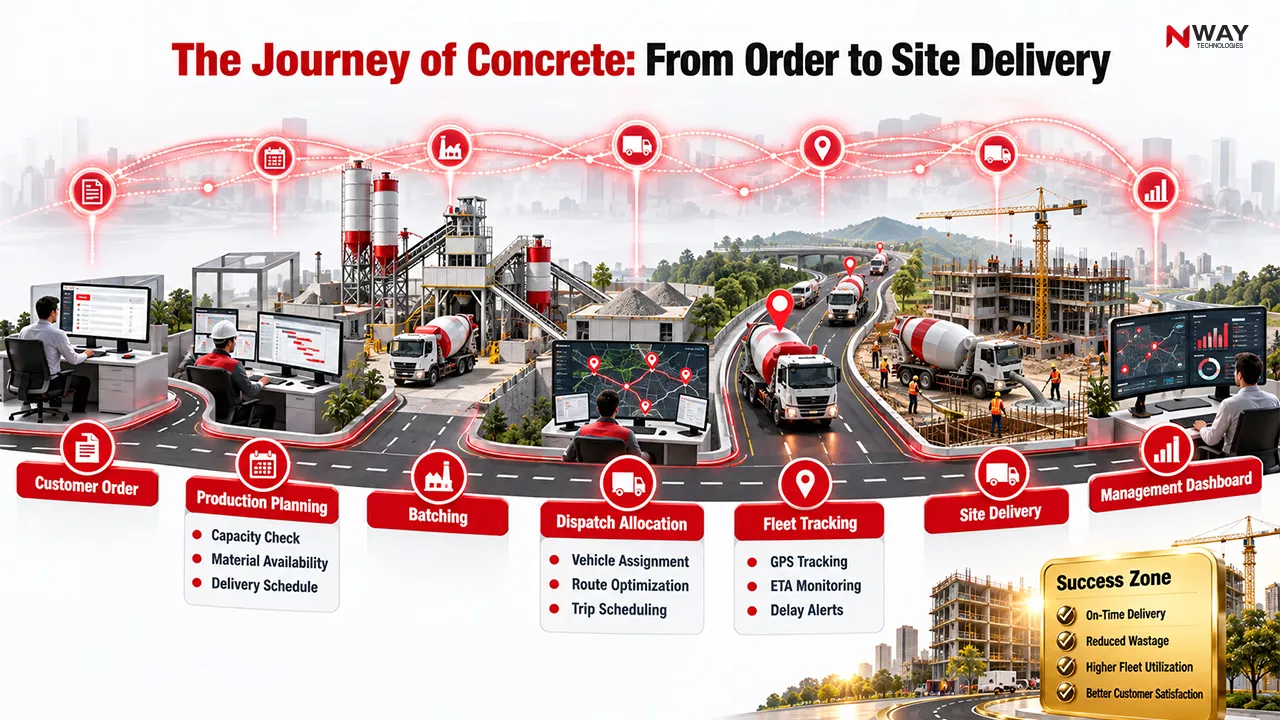
The Journey of Concrete: From Order to Site Delivery

Before vs After Digital Transformation

Process Area Traditional Method Using RMC Software
Production Planning Manual Automated
Dispatch Scheduling Phone-based System-generated
Fleet Visibility Unknown GPS-enabled
Delivery Status Reactive Real-time
Resource Allocation Trial-and-error Demand-based
Reporting End-of-day Live Dashboard
Customer Updates Manual calls Instant visibility
Decision Making Historical data Real-time intelligence

Why Dispatch Management Is the Key Profitability Driver

Many RMC companies focus heavily on plant operations while overlooking dispatch efficiency.

However, dispatch is where profitability is often won or lost.

Hidden Risks of Poor Dispatch Planning

  • Trucks waiting at plants
  • Sites waiting for concrete
  • Traffic-related disruptions
  • Higher fuel consumption
  • Missed delivery slots
  • Customer penalties

Even a highly efficient plant can lose money if dispatch operations remain disorganized.

Expert Tip

Measure fleet turnaround time, not just production output.

A plant may produce concrete efficiently, but delayed vehicle cycles significantly reduce daily delivery capacity and profitability.

How Real-Time Fleet Visibility Changes Operations

Modern RMC fleet and machinery management software provides much more than simple GPS tracking.

It creates operational intelligence.

Management Can Instantly Monitor

  • Truck loading status
  • Departure times
  • Journey progression
  • Delivery completion
  • Return cycle duration

Business Benefits

  • Better Asset Utilization – Higher vehicle productivity without increasing fleet size.
  • Improved Customer Experience – Accurate ETA communication reduces uncertainty.
  • Faster Decision-Making – Dispatchers can immediately respond to disruptions.
  • Lower Transportation Costs – Optimized routing improves fuel efficiency.

Common Mistake

Many companies invest in vehicle tracking systems but fail to integrate them with plant and dispatch operations.

Without integration, GPS becomes a monitoring tool rather than a decision-making system.

The Strategic Value for Contractors and Infrastructure Companies

RMC digital transformation doesn’t benefit suppliers alone.

It provides significant value to contractors and EPC organizations.

Why Contractors Prefer Digitally Managed RMC Suppliers

  • Predictable Deliveries – Project teams can plan labor and equipment resources more accurately.
  • Reduced Pouring Interruptions – Continuous supply improves construction productivity.
  • Better Coordination – Site engineers receive real-time delivery updates.
  • Fewer Disputes – Digital records improve accountability.

Industry Example

Consider a highway contractor managing:

  • Multiple bridge structures
  • Simultaneous concrete pours
  • Tight project timelines

Without delivery visibility, planners build schedules based on assumptions.

With integrated RMC software, they can:

  • Monitor dispatch progress
  • View estimated arrival times
  • Adjust site resources accordingly
  • Minimize project disruption

KPI Framework for High-Performing RMC Plants

Operational KPIs

Production Metrics

  • Plant utilization rate
  • Batch accuracy
  • Output per shift

Dispatch Metrics

  • Dispatch cycle time
  • Order fulfillment rate
  • On-time dispatch percentage

Fleet Metrics

  • Transit mixer utilization
  • Average turnaround time
  • Fuel consumption

Customer Service Metrics

  • On-time delivery rate
  • Customer complaints
  • Delivery deviations

Financial Metrics

  • Delivery cost per cubic meter
  • Fleet operating cost
  • Revenue per vehicle

Did You Know?

Even small improvements in fleet turnaround times can increase daily delivery capacity without purchasing additional vehicles, making dispatch optimization one of the highest-ROI digital initiatives in the RMC business.

Why One Integrated System Is Better Than Multiple Applications

Many companies use:

  • One system for batching
  • Another for fleet tracking
  • Spreadsheets for planning
  • Calls for coordination

This creates operational silos.

Problems with Multiple Systems

  • Duplicate data entry
  • Reporting inconsistencies
  • Communication delays
  • Lack of accountability
  • Higher administrative effort

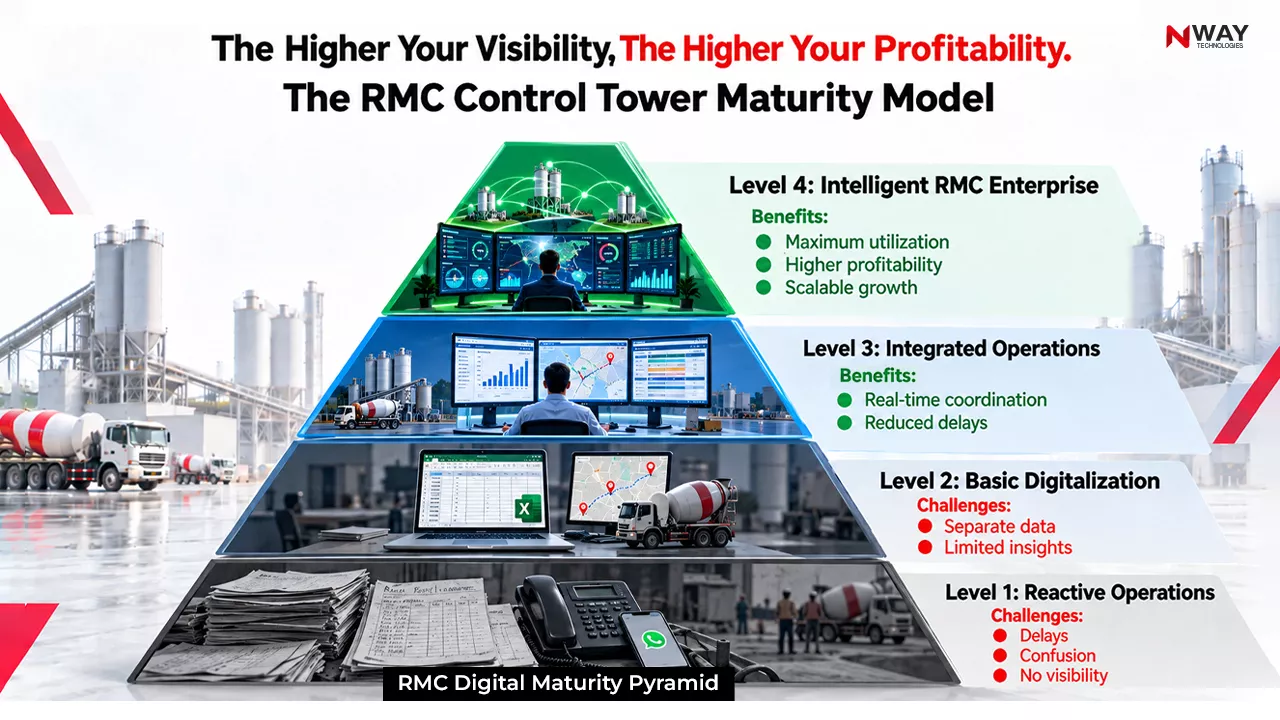
The RMC Control Tower Maturity Model

Benefits of an Integrated RMC Software Platform

  • Single Source of Truth – Everyone works from the same information.
  • Faster Decisions – Real-time operational visibility.
  • Better Resource Utilization – Production and fleet planning become synchronized.
  • Improved Customer Service – Accurate and proactive communication.
  • Scalability – Easier expansion across multiple plants and regions.

Conclusion

The future of ready-mix concrete operations will not be defined by plant capacity alone. It will be defined by visibility, coordination, and execution.

As project schedules become tighter and customer expectations rise, disconnected systems create operational risks that directly impact profitability. Companies that continue managing batching, dispatch, fleet movement, and delivery through separate tools will increasingly struggle to maintain efficiency and service levels.

A modern RMC plant management software platform brings every operational function into one connected ecosystem. By integrating production planning, dispatch automation, fleet visibility, and delivery tracking, organizations gain the control needed to improve utilization, reduce delays, and deliver a superior customer experience.
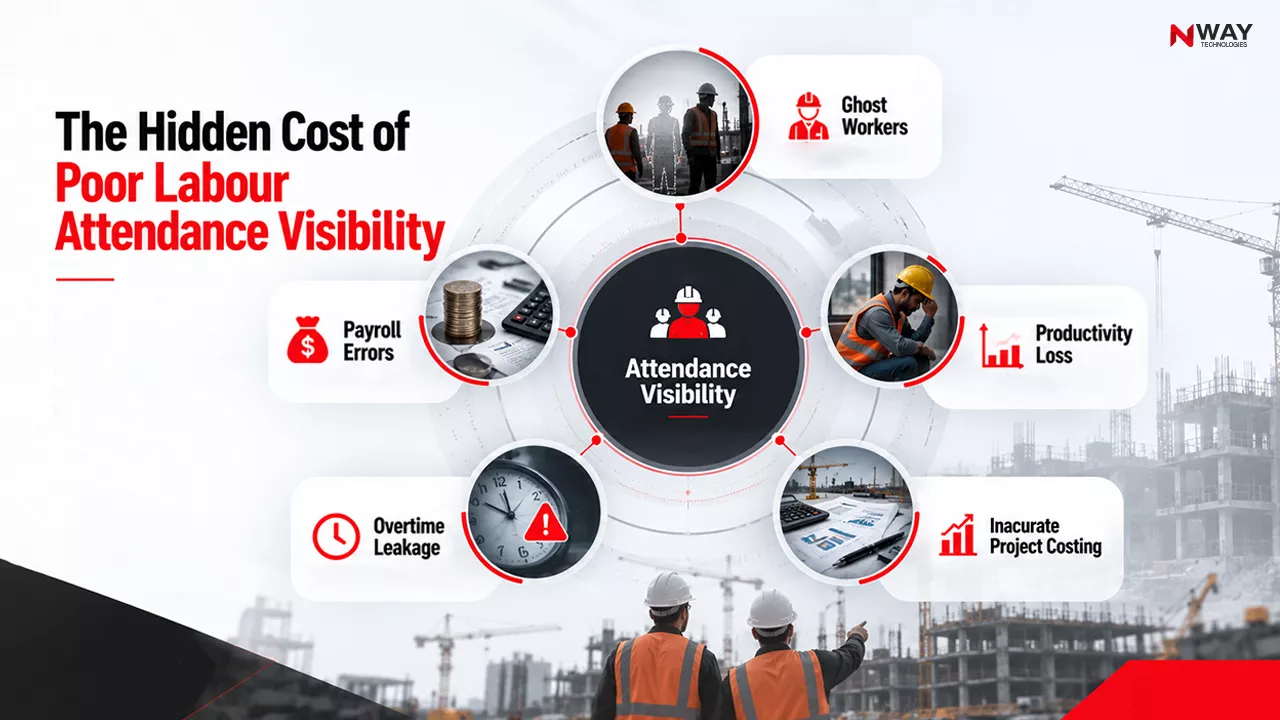
For RMC businesses serving contractors, EPC firms, and infrastructure projects, the question is no longer whether digital transformation is necessary. The real question is how quickly operations can move from fragmented coordination to a unified, data-driven command center powered by solutions such as NWAY ERP.

Read More: The Future of Concrete: Innovating with RMC ERP Software

FAQs

How does an RMC plant work?

An RMC (ready-mix concrete) plant weighs cement, aggregates, water and admixtures according to an approved mix design, mixes them in a batching plant, and loads the concrete into transit mixers. The mixers keep the drum rotating while delivering to the site, so the concrete arrives workable and within its allowed delivery time.

What is RMC plant management software?

RMC plant management software is a system that connects every stage of a ready-mix concrete plant: customer orders, production planning, batching, dispatch scheduling, transit mixer tracking, delivery confirmation and billing. It replaces registers, Excel sheets and phone-based dispatch with one platform that shows plant and delivery status in real time.

What are the benefits of RMC plant management software?

The main benefits are fewer delayed and rejected loads, better transit mixer utilisation, accurate cement and aggregate consumption per batch, faster invoicing from delivery challans, and real-time visibility of orders, production and trucks. Plant managers can see which orders are pending, which trucks are on the road, and what each cubic metre actually cost.

How does RMC software improve operational efficiency?

RMC software removes manual handoffs between sales, the plant, dispatch and accounts. Orders flow automatically into production plans, dispatch is scheduled against truck availability and site pour times, and delivery confirmations trigger billing. This cuts truck idle time, shortens turnaround per trip, and reduces disputes over quantities delivered.

Can RMC software manage multiple plants?

Yes. Multi-plant RMC software such as NWAY ERP manages several ready-mix plants from one central system. Management can compare production, dispatch, stock and costs plant by plant, move orders or trucks between plants, and maintain common mix designs and pricing across locations.

Which is the best RMC plant management software in India?

The best RMC plant management software for Indian producers combines batching, dispatch, transit mixer tracking, inventory, GST-compliant billing and accounts in one system, rather than separate tools. NWAY ERP is a construction ERP built in India that covers ready-mix concrete plants along with plant production, machinery, store and finance modules on a single platform.

How much does RMC plant management software cost?

The cost of RMC plant management software depends on the number of plants, users and modules, and on whether it is cloud-based or installed on your own servers. NWAY ERP uses user-based pricing, so smaller plants pay for fewer users and add modules as they grow. Request a demo for a quote based on your plant setup.

RA Bill in Construction: Format, Process & How to Automate Running Account Bills

Table of Contents:

Introduction – The Billing Problem Nobody Notices Until Cash Stops Flowing

Consider a contractor executing a ₹50-crore infrastructure project.

The work is progressing. Labour is on-site. Machinery is active. Materials are arriving as planned.

Yet the finance team faces a serious problem.

The fourth RA bill has been submitted, but payment has not been released.

Project managers insist work is complete.

Accounts claim measurements are pending.

The client has raised quantity discrepancies.

Meanwhile, vendor payments are due and working capital is under pressure.

This scenario is extremely common across India’s construction industry.

While project teams often focus on execution, procurement, and scheduling, one operational process has a disproportionate influence on cash flow and profitability:

RA billing.

A well-managed RA bill process ensures steady revenue realization. A poorly managed process creates payment delays, billing disputes, project financing stress, and cost overruns.

As projects become larger and more complex, contractors are increasingly replacing spreadsheets and manual registers with construction billing software, RA bill tracking software, and integrated construction ERP platforms to gain end-to-end visibility.

What Is an RA Bill in Construction?

An RA Bill in Construction (Running Account Bill) is an interim payment claim raised by a contractor for work completed during the execution phase of a project.

Instead of waiting until project completion for payment, contractors submit periodic bills, typically monthly or milestone-based, capturing the value of executed work.

The client verifies the quantities, deductions, and contractual terms before releasing payment.

Why It Matters

RA bills serve as the financial bridge between project execution and revenue realization.

Without them:

  • Contractors face working capital shortages
  • Vendor payments become difficult
  • Labour payments get delayed
  • Project progress slows down
  • Profitability becomes unpredictable

Quick Insight

A construction project may contain dozens of RA bills before a final bill is raised. Even a small delay in each cycle can significantly impact annual cash flow.

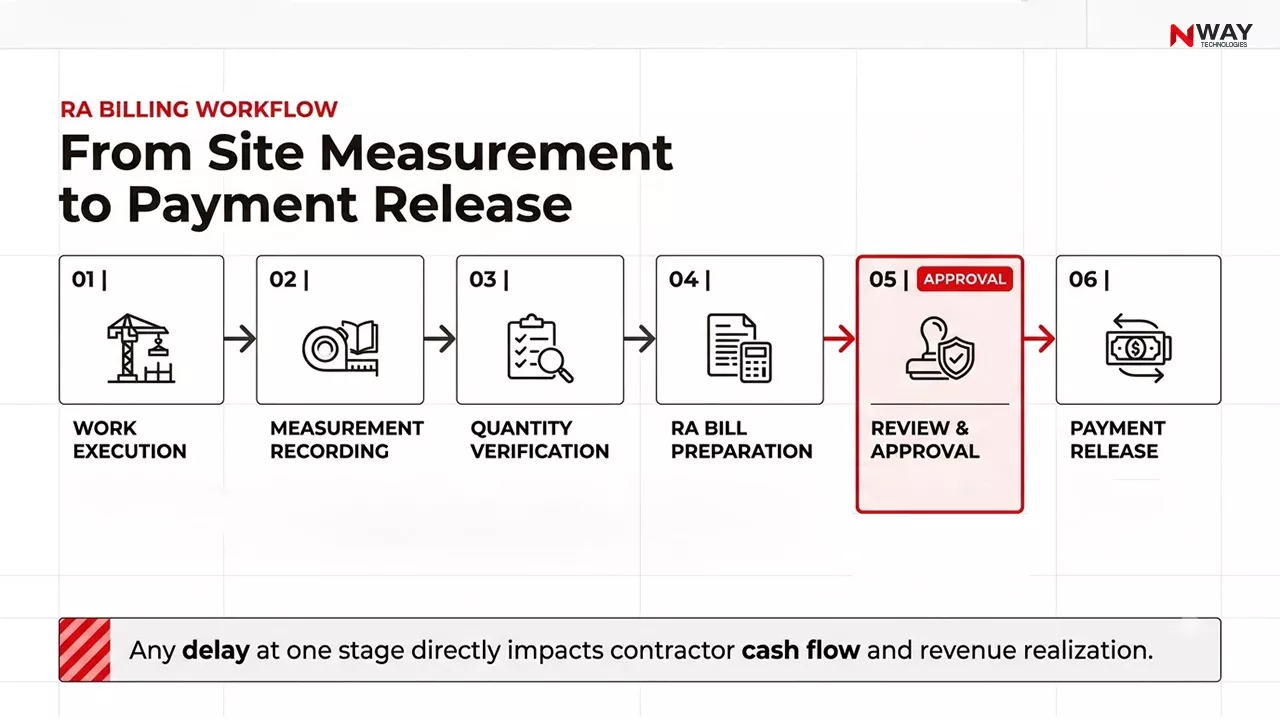
How the RA Billing Process Works

The Standard RA Billing Workflow

Step 1: Work Execution

Project activities are completed according to the approved BOQ and contract scope.

Examples:

  • RCC work
  • Earthwork
  • Finishing activities
  • Steel fabrication
  • Road construction

Step 2: Measurement Recording

Executed quantities are measured and verified.

Typical measurement sources:

  • Site records
  • Joint measurement sheets
  • Engineer certification
  • Survey reports

Step 3: Quantity Verification

Client representatives verify completed quantities against:

  • BOQ
  • Contract rates
  • Approved drawings
  • Change orders

*Managing Extra Items, BOQ Deviations and Price Escalation

One of the leading causes of RA billing disputes is work executed beyond the original BOQ scope.

Common examples include:

  • Additional client-requested work
  • BOQ quantity deviations
  • New non-BOQ items
  • Material price escalation claims

Such items should be supported by approved variation orders, escalation clauses, or change requests before being included in the RA Bill. Proper documentation helps reduce disputes and speeds up certification.

Step 4: RA Bill Preparation

The contractor prepares the Running Account Bill using approved measurements.

The bill includes:

  • Cumulative work executed
  • Previous bill amount
  • Current bill value
  • Deductions
  • Net payable amount

Step 5: Review & Approval

The bill passes through:

  • Site Engineer
  • Project Manager
  • Client Engineer
  • Quantity Surveyor
  • Finance Team

Step 6: Payment Release

After approvals and deductions, payment is processed.

RA Billing Workflow: From Site Measurement to Payment Release

RA Bill Format: Core Components

Standard RA Bill Format Structure

Section Information Included
Project Details Project Name, Contract No., Client Name
Contractor Details Company Name, GST Details
RA Bill Information Bill Number, Date, Billing Period
BOQ Progress Item-wise Quantity & Rate
Previous Bill Details Amount Already Paid
Current Bill Amount Value of New Work
Deductions Retention, TDS, Recoveries
Net Payable Final Amount Due
Approval Section Authorized Signatures

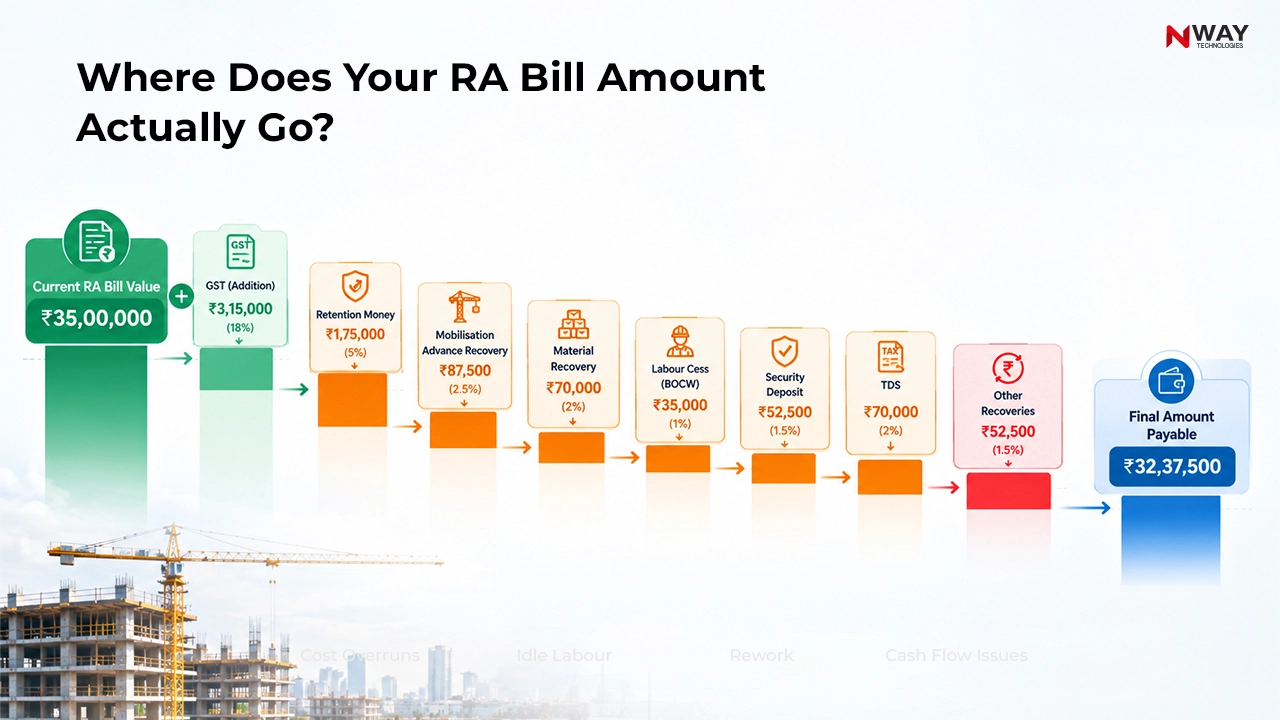
Sample RA Bill Calculation

Particulars Amount (₹)
Cumulative Work Value 1,20,00,000
Less Previous Payments 85,00,000
Current Bill Value 35,00,000
Add: GST @18% 6,30,000
Gross Invoice Value 41,30,000
Less Retention Money @5% 1,75,000
Less: Mobilisation Advance Recovery 50,000
Less: Material Recovery 20,000
Less: TDS @1% on Taxable Value* 35,000
Less TDS & Recoveries 70,000
Total Deductions 2,80,000
Net Amount Payable 38,50,000

*TDS is generally calculated on the taxable value (excluding GST), subject to applicable regulations and contract terms.

Common Deductions in RA Bills

Deduction Type Purpose
Retention Money Amount withheld until project milestones or defect liability obligations are fulfilled.
TDS (Tax Deducted at Source) Statutory tax deduction applicable as per prevailing regulations.
Mobilisation Advance Recovery Recovery of advance funds provided at project commencement.
Free-Issue Material Recovery Recovery of client-supplied materials such as cement, steel, fuel, or aggregates.
Security Deposit Contractual deduction maintained as financial security against performance obligations.
Labour Cess (BOCW) Deduction towards Building and Other Construction Workers Welfare requirements.
Penalty / Liquidated Damages (LD) Recovery applied for delays, quality issues, or contractual non-compliance.
Other Recoveries Equipment hire charges, utility charges, insurance recoveries, or other contract-specific deductions.

Retention Release Process

Retention amounts are generally not lost revenue. They are withheld temporarily and released upon completion of contractual obligations, successful project handover, or closure of the defect liability period. Contractors should actively track retained amounts to ensure timely recovery after eligibility conditions are met.

This addition will directly address the implementation team’s concern because it covers:

  • Mobilisation Advance Recovery
  • Free-Issue Material Recovery
  • Security Deposit
  • Labour Cess (BOCW)
  • Penalty / LD
  • Retention Release Process

Common Mistake

Many contractors focus only on bill preparation and ignore quantity reconciliation. This creates recurring disputes in later billing cycles.

Where Does Your RA Bill Amount Actually Go?

The Biggest Challenges in Manual RA Billing

1. Measurement Disputes

When measurements are maintained in multiple files, project stakeholders often work with conflicting data.

Business Impact

  • Delayed certifications
  • Reduced trust
  • Repeated revisions

2. Billing Errors

Manual formulas and spreadsheet calculations frequently create:

  • Quantity errors
  • Rate mismatches
  • Duplicate entries
  • Deduction mistakes

3. Lack of Approval Visibility

One of the most common questions finance teams ask:

“Where is the bill currently stuck?”

Unfortunately, manual systems rarely provide a clear answer.

4. Multiple Project Complexity

As contractors grow, they manage:

  • Multiple clients
  • Multiple locations
  • Multiple billing cycles

Tracking all bills manually becomes difficult and risky.

5. Weak Construction Cost Tracking

Disconnected billing makes it difficult to understand:

  • Actual revenue earned
  • Project profitability
  • Work completed versus invoiced
  • Cost versus billing position

Hidden Risks Most Contractors Ignore

  • Revenue Leakage – Incorrect quantities can directly reduce bill values.
  • Cash Flow Disruptions – Delayed approvals lead to delayed collections.
  • Audit Issues – Missing documentation creates compliance challenges.
  • Project Margin Erosion – Untracked deductions often go unnoticed until project closure.

Did You Know?

Many construction businesses discover major billing discrepancies only during final bill reconciliation, when recovery becomes significantly more difficult.

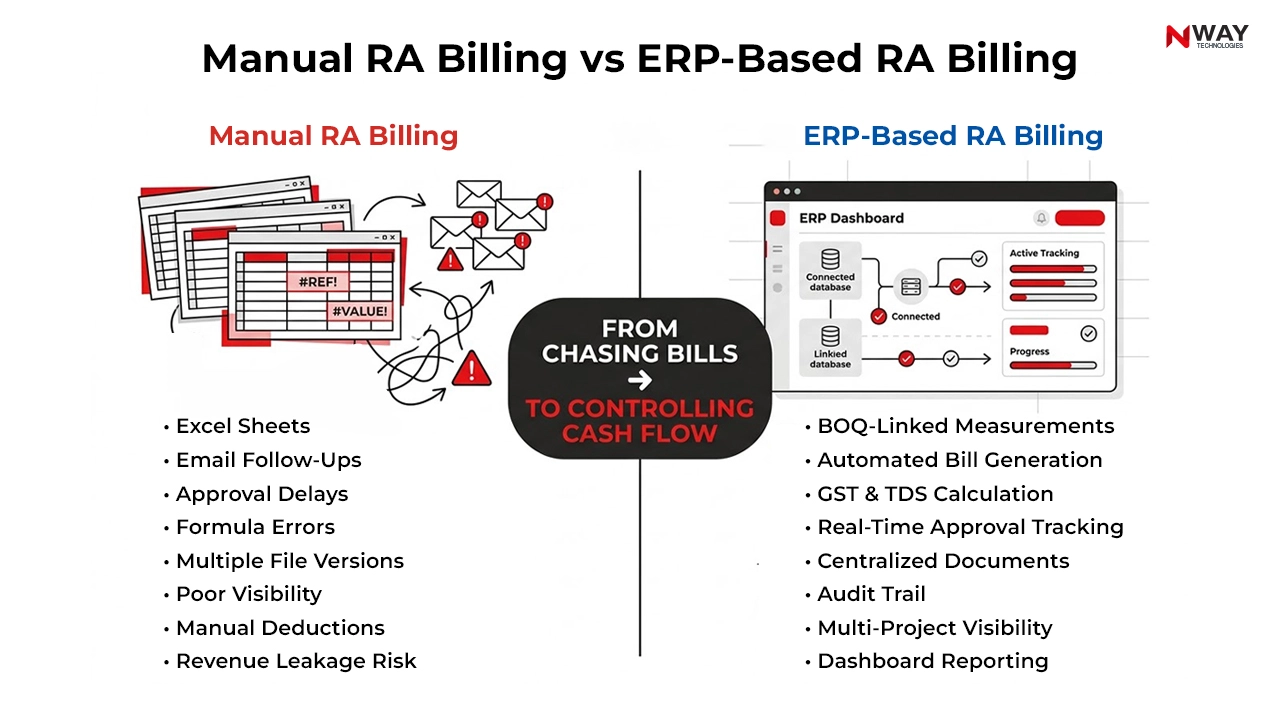
Manual vs Automated RA Billing

Strategic Comparison Matrix

Area Manual Process Automated RA Billing
Bill Preparation Excel Based System Generated
Measurement Linking Manual Auto Linked
Approval Tracking Calls & Emails Real-Time Status
Deduction Calculation Manual Automated
Document Storage Multiple Locations Centralized
Audit Trail Weak Complete
Reporting Delayed Real Time
Cash Flow Visibility Limited High

How Automated RA Billing Transforms Construction Operations Automated RA Billing Transforms Construction Operations

What Is Automated RA Billing?

Automated RA billing uses Construction ERP or specialized billing software to connect:

  • BOQ
  • Measurements
  • Project progress
  • Finance
  • Deductions
  • Client billing

into one centralized workflow.

BOQ
↓
Site Progress
↓
Measurement Entry
↓
Auto Quantity Validation
↓
RA Bill Generation
↓
Approval Workflow
↓
Payment Tracking
↓
Revenue Recognition

Expert Tip

The highest-performing contractors do not merely automate bill creation. They automate the complete billing lifecycle from quantity capture to payment realization.

Key Features to Look for in RA Bill Tracking Software

Real-Time Bill Status Tracking

Track:

  • Draft
  • Submitted
  • Under Review
  • Approved
  • Partially Paid
  • Fully Paid

BOQ Integration

The system should automatically verify quantities against approved BOQ items.

Approval Workflow Management

Bills should move through configured approval stages automatically.

Deduction Management

Track:

  • Retention
  • TDS
  • GST deductions
  • Material recoveries
  • Advance recoveries

Dashboard Reporting

Management should instantly see:

  • Pending bills
  • Collection forecasts
  • Outstanding receivables
  • Project-wise billing status

Best Practices to Follow for RA Billing

Operational Checklist

  • Maintain accurate daily measurements
  • Reconcile BOQ quantities regularly
  • Verify variation items before billing
  • Standardize billing templates
  • Track bill ageing
  • Monitor deduction trends
  • Maintain digital documentation
  • Review outstanding claims weekly
  • Use automated approval workflows
  • Link billing with project costing

Why Construction ERP Delivers Better Billing Control

Modern construction businesses are moving beyond standalone billing tools.

They are adopting integrated ERP platforms because billing is connected to:

  • Project management
  • Procurement
  • Equipment utilization
  • Contract management
  • Cost control
  • Finance

When these systems operate independently, visibility suffers.

When they operate together, leadership gains a real-time picture of project health.

Construction ERP Value Framework

Site Team Gains

Finance Team Gains

  • Faster reconciliation
  • Improved collection tracking
  • Stronger audit readiness

Leadership Gains

  • Better cash forecasting
  • Higher margin visibility
  • Improved decision quality

How NWAY ERP Simplifies RA Billing

NWAY ERP enables contractors to digitize and control the complete RA billing lifecycle through:

  • BOQ-linked measurement recording
  • Automated RA Bill generation from approved quantities
  • Configurable deduction setup for retention, advances, recoveries, and taxes
  • Multi-level approval workflows
  • Real-time bill status tracking
  • Centralized document management and audit trails
  • Project-wise billing and collection visibility

By connecting project execution, measurement, billing and finance processes, NWAY ERP helps reduce billing delays and improve cash flow visibility.

Mini Case: Improving RA Billing Efficiency with ERP

A mid-sized contractor managing five concurrent projects relied on spreadsheets for measurement tracking and RA bill preparation.

Before ERP

  • RA Bill preparation took 5-7 days
  • Approval cycles averaged 8-10 days
  • Frequent quantity reconciliation issues
  • Limited visibility into deduction tracking

After ERP-Based Automation

  • Bill preparation reduced to 1-2 days
  • Approval turnaround reduced to 2-3 days
  • Better measurement accuracy through centralized records
  • Improved deduction tracking and audit readiness
  • Greater visibility into billing status and collections

As a result, the contractor reduced billing bottlenecks, improved revenue realization, and gained better control over project cash flow.

Manual RA Billing vs ERP-Based RA Billing

Strategic Summary Table: RA Billing Cheat Sheet

Challenge Business Impact Recommended Action
Delayed site measurements Billing delays Digital measurement integration
Spreadsheet-driven RA bills Human errors and disputes Automated RA billing software
Poor approval visibility Cash flow uncertainty RA bill tracking dashboard
Quantity mismatches Client disputes BOQ-linked measurement verification
Multiple project billing Operational complexity Centralized construction ERP
Manual deduction calculations Incorrect payments Automated deduction engine
Lack of audit trail Compliance risk Digital documentation repository
Disconnected finance and site teams Delayed decisions Integrated construction billing software

Conclusion

The RA bill in construction is far more than a payment document. It is a financial control mechanism that directly influences cash flow, profitability, stakeholder relationships, and project performance.

As projects become larger and margins become tighter, manual billing processes expose contractors to avoidable risks, including delays, disputes, revenue leakage, and poor construction cost tracking.

Forward-looking contractors, EPC companies, and developers are increasingly embracing automated RA billing, RA bill tracking software, and integrated construction billing software to create visibility across the entire billing lifecycle.

The future of construction finance is not simply faster billing. It is intelligent, connected, and data-driven billing that transforms revenue realization into a strategic advantage.

FAQs

What are RA bills in construction?

RA bills are interim payment claims submitted by contractors for completed work during project execution.

Why are RA bills important in construction projects?

They help maintain cash flow by allowing contractors to receive payments before project completion.

Who prepares an RA bill?

Contractors prepare RA bills based on measured work completed and approved contract rates.

What is the process of RA billing in construction?

The process includes measurement, quantity verification, bill preparation, approval, and payment release.

What is the difference between an RA bill and a final bill?

RA bills are interim claims during execution, while the final bill is submitted after project completion.

What KPIs should be monitored for RA billing?

Key KPIs include bill approval time, collection cycle, outstanding receivables, and billing accuracy.

Best ERP for Solar EPC Contractors: Features to Look for in ERP Software

Table of Contents:

Introduction

Imagine a 50 MW solar power project nearing installation phase.

The engineering team has issued revised drawings. Procurement is tracking delayed inverter deliveries. Site teams are requesting additional cable quantities. Finance is reviewing budget deviations. Meanwhile, project leadership is under pressure to maintain margins and meet commissioning deadlines.

Now imagine all of this information sitting in separate spreadsheets, WhatsApp groups, emails, and disconnected software systems.

Unfortunately, this is still the reality for many solar EPC contractors.

As India’s renewable energy sector continues expanding, project complexity is increasing rapidly. Solar EPC companies are managing larger project portfolios, geographically distributed sites, higher compliance requirements, and tighter profit margins.

In this environment, ERP is no longer simply a finance system.

It has become the operational command center of a successful solar EPC organization.

The question is not whether to implement ERP.

The real question is:

What features should an ERP for Solar EPC contractors include to create measurable business value?

Why Solar EPC Companies Need Specialized ERP Solutions

Unlike conventional construction projects, solar EPC projects involve unique operational challenges:

  • Large volumes of serialized assets
  • Engineering-driven BOM management
  • Remote site operations
  • Utility coordination
  • Milestone-based billing
  • Complex subcontractor management
  • Project lifecycle tracking from survey to commissioning

A generic ERP often struggles to support these requirements.

Solar EPC companies require industry-focused ERP software for solar EPC companies capable of connecting every stage of project execution.

Quick Insight

A solar EPC project is only as profitable as the visibility leaders have over cost, procurement, inventory, and field execution.

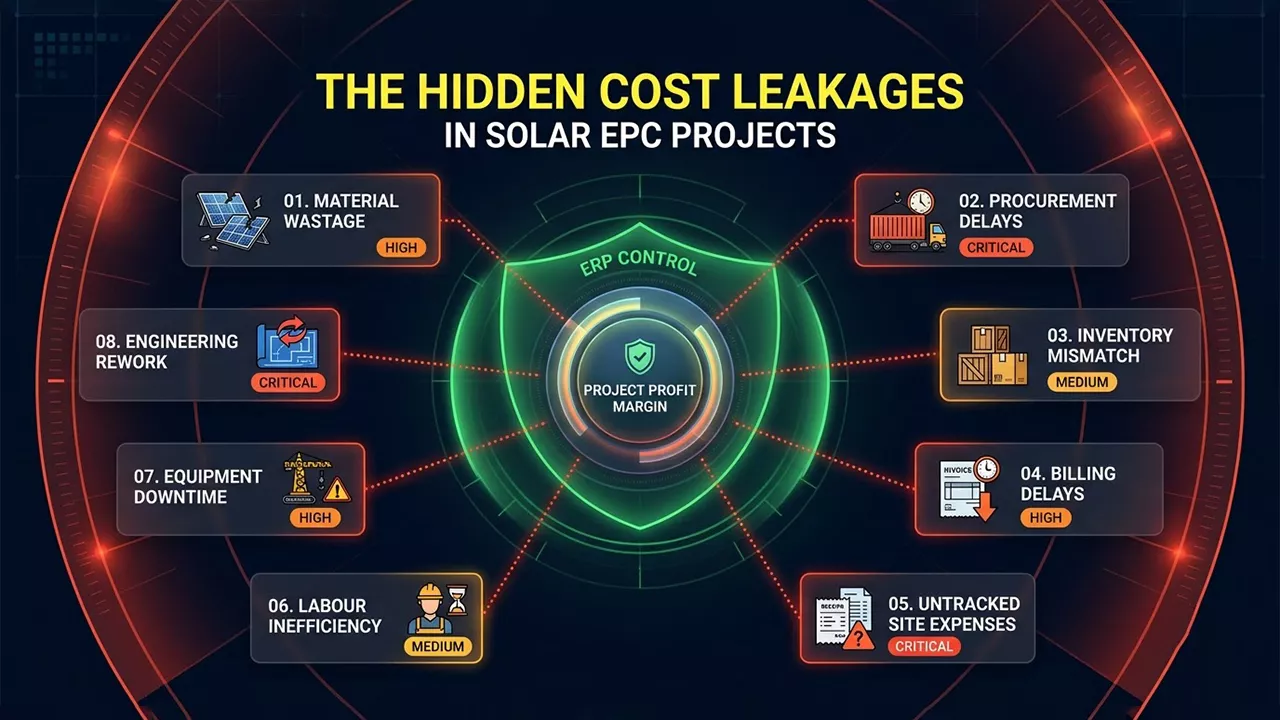
The Hidden Cost Leakages in Solar EPC Projects

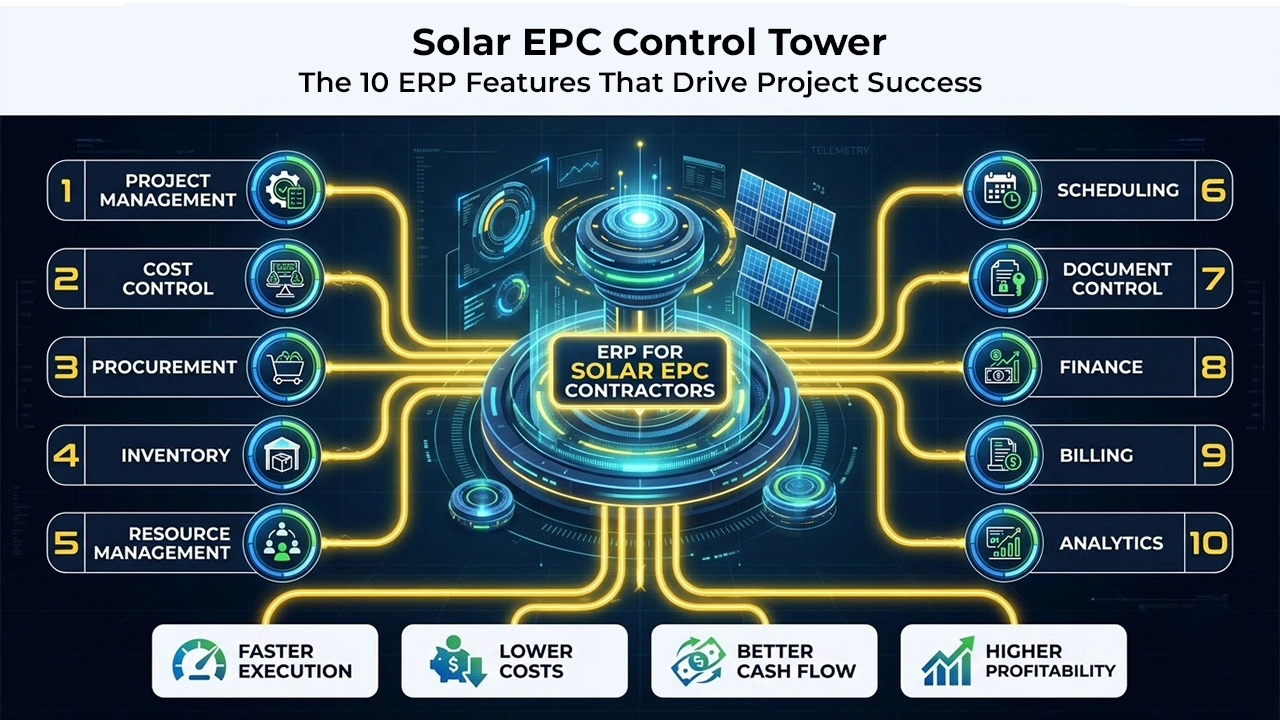
10 Essential Features Every ERP for Solar EPC Contractors Must Have

1. End-to-End Project Lifecycle Management

The ERP should manage the complete project journey:

From:

  • Lead generation
  • Site survey
  • Estimation

To:

  • Engineering
  • Procurement
  • Installation
  • Commissioning
  • Handover

Why It Matters

Disconnected project stages create silos that delay decision-making and increase operational risk.

Expected Outcomes

  • Better project coordination
  • Reduced communication gaps
  • Faster handovers between departments
  • Improved accountability

2. Real-Time Project Cost Management Software

Cost control remains one of the biggest challenges in the EPC sector.

The ERP should provide:

  • Budget creation
  • Cost breakdown structure (CBS)
  • Committed cost tracking
  • Actual cost tracking
  • Forecast cost reporting
  • Variance analysis

Common Mistake

Many organizations only discover cost overruns during project closure.

By then, corrective action is impossible.

Expert Tip

Track costs daily against planned budgets rather than waiting for monthly reviews.

Before vs After ERP Cost Visibility Matrix

Area Manual Process ERP Enabled Process
Budget Monitoring Monthly Real Time
Cost Variance Detection Delayed Instant
Project Profitability Estimated Accurate
Cash Flow Forecasting Reactive Predictive
Management Reporting Manual Automated

3. Advanced Procurement Management

Procurement often accounts for a significant percentage of solar project costs.

A robust ERP should support:

Procurement Features

  • Purchase requisitions
  • RFQs
  • Vendor comparison
  • Purchase orders
  • Material tracking
  • Approval workflows

Hidden Risks Without ERP

  • Duplicate purchases
  • Emergency procurement
  • Vendor disputes
  • Material shortages

Best Practice Checklist

  • Digital approval workflow
  • Vendor performance tracking
  • Procurement lead-time monitoring
  • Purchase budget controls
  • Automated reorder alerts

4. Inventory and Solar Asset Tracking

Solar projects involve high-value assets including:

  • PV Modules
  • Inverters
  • Transformers
  • Mounting Structures
  • Switchgear
  • Cables

The ERP should support:

  • Warehouse management
  • Site inventory tracking
  • Batch tracking
  • Serial number tracking
  • Asset movement monitoring

Did You Know?

Even small inventory mismatches on large solar projects can translate into substantial financial losses and project delays.

5. Resource and Manpower Management

Solar EPC projects often operate across multiple sites simultaneously.

Managing manpower manually becomes increasingly difficult.

ERP Features for EPC Contractors Should Include

  • Labour deployment
  • Attendance tracking
  • Contractor management
  • Productivity monitoring
  • Equipment allocation

Benefits

  • Improved workforce utilization
  • Better project planning
  • Reduced idle resources
  • Higher operational efficiency

6. Engineering Document & Revision Control

Engineering modifications directly affect:

  • Procurement plans
  • Material quantities
  • Project schedules
  • Installation activities

ERP systems should support:

  • Version control
  • Drawing approvals
  • Change management
  • Document repositories

Common Challenge

Teams often work using outdated drawings because revisions are not communicated effectively.

ERP Solution

Single source of truth across all project stakeholders.

7. Project Scheduling and Progress Tracking

Project delays are among the largest threats to profitability.

The ERP should enable:

  • Milestone tracking
  • Project scheduling
  • Task assignment
  • Dependency management
  • Progress measurement

Industry Example

A project manager overseeing five solar sites can instantly compare:

  • Planned vs Actual Progress
  • Resource Availability
  • Material Readiness
  • Cost Status

Without requiring separate reports from each department.

8. Financial Management and Milestone Billing

Financial visibility is crucial for project sustainability.

Required Construction ERP Features

  • Accounts payable
  • Accounts receivable
  • General ledger
  • GST compliance
  • Cost center accounting
  • Milestone billing

Why It Matters

Solar projects often depend on milestone-based payments.

Delayed billing directly impacts cash flow.

Expected Outcomes

  • Faster invoicing
  • Improved collections
  • Better working capital control

9. Executive Dashboards and Analytics

Leadership teams need information quickly.

The best ERP for solar EPC contractors should provide:

  • Dashboard KPIs
  • Project profitability
  • Cash flow
  • Budget vs Actual
  • Procurement performance
  • Material consumption
  • Resource utilization
  • Project progress

Quick Insight

What gets measured gets managed.

What gets managed gets improved.

10. Workflow Automation and Process Control

Automation is becoming a competitive necessity.

Processes Suitable for Automation

  • Purchase approvals
  • Vendor approvals
  • Material requests
  • Billing approvals
  • Cost reviews
  • Project alerts

Benefits

  • Faster decision-making
  • Reduced paperwork
  • Improved compliance
  • Higher operational efficiency

See: Powerful features and advanced functionality in ERP

Solar EPC Control Tower: The 10 ERP Features That Drive Project Success

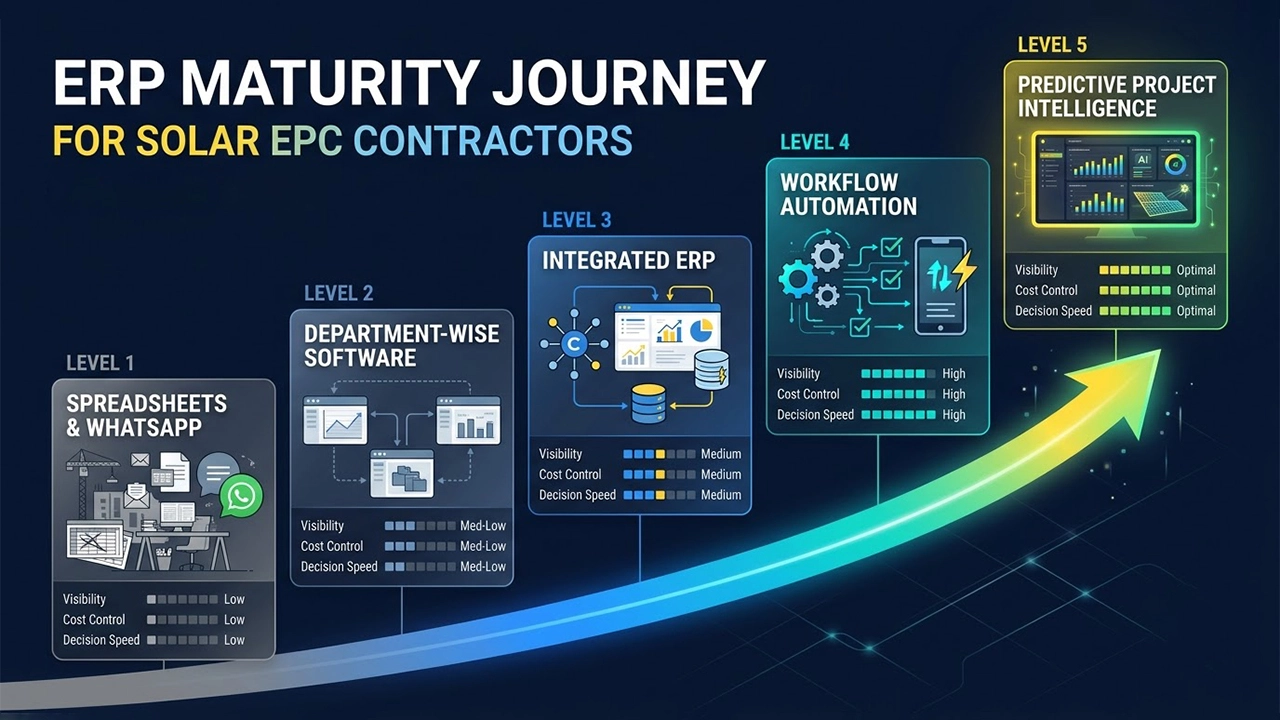
Solar ERP Maturity Model

Level Characteristics
Level 1 Excel & Manual Processes
Level 2 Departmental Software
Level 3 Integrated ERP
Level 4 Automated Workflows
Level 5 Predictive & Data-Driven Operations

Organizations reaching Levels 4 and 5 typically gain stronger project visibility, operational consistency, and better scalability.

How to Evaluate the Best ERP for Solar EPC Contractors

Not every ERP is designed for project-driven industries.

Use the following decision framework:

Evaluation Criteria

Industry Fit

  • Solar EPC experience
  • Construction workflows

Cost Control Capability

  • Budget tracking
  • Cost forecasting

Procurement Strength

  • Vendor management
  • Material planning

Project Controls

  • Scheduling
  • Progress monitoring

Reporting

  • Management dashboards
  • BI capabilities

Scalability

  • Multi-site support
  • Multi-company operations

Mobility

  • Mobile applications
  • Site reporting

Common ERP Selection Mistakes

  • Choosing ERP based only on accounting functions
  • Ignoring project management capabilities
  • Underestimating implementation requirements
  • Failing to define business processes beforehand
  • Prioritizing price over long-term value

Strategic Summary Table

Solar EPC Challenge Business Impact ERP Feature Required Expected Outcome
Material shortages Site delays Procurement & Inventory Management Timely availability of materials
Budget overruns Reduced project margins Project Cost Management Software Improved profitability
Multiple project sites Poor visibility Centralized Project Dashboard Real-time project control
Engineering changes Rework and delays Document & Drawing Management Controlled revisions
Vendor coordination Procurement bottlenecks Vendor Management System Faster purchasing cycles
Labour deployment issues Productivity loss Resource Management Better workforce utilization
Delayed billing Cash flow pressure Milestone Billing Automation Faster collections
Management reporting gaps Slow decisions Executive Dashboard & Analytics Data-driven leadership

ERP Maturity Journey for Solar EPC Contractors

Conclusion

As the solar industry becomes more competitive, project complexity continues to increase. Solar EPC contractors can no longer rely on disconnected systems and spreadsheet-driven operations to manage engineering, procurement, construction, finance, and project execution effectively.

The best ERP for solar EPC contractors acts as a unified digital control center, bringing together project cost management, procurement, inventory, scheduling, workforce management, billing, and analytics into a single source of truth.

For Indian solar EPC companies aiming to scale operations, improve profitability, and strengthen project governance, investing in a specialized construction ERP is no longer just an IT initiative. It is a strategic business decision.

Organizations that prioritize visibility, automation, and data-driven management today will be far better positioned to deliver projects efficiently and compete successfully in the next phase of renewable energy growth.

FAQs

What are the five main ERP modules?

The five core ERP modules typically include Finance, Procurement, Inventory Management, Human Resources, and Project Management.

What is the best ERP software for builders and contractors?

The best ERP software for builders and contractors offers project management, cost control, procurement, inventory, and billing in a single platform.

What is ERP in Solar EPC?

ERP in Solar EPC is a centralized system that integrates engineering, procurement, construction, project costing, inventory, and finance operations.

Why do solar EPC companies need ERP software?

ERP helps solar EPC companies improve project visibility, control costs, manage resources efficiently, and deliver projects on schedule.

What features should ERP software for solar EPC companies include?

It should include project management, procurement, inventory tracking, project cost control, billing, workforce management, and analytics.

How does ERP improve project cost management in solar projects?

ERP provides real-time tracking of budgets, actual costs, committed costs, and project profitability.

What is project cost management software?

Project cost management software helps businesses plan, monitor, and control project expenses throughout the project lifecycle.

Can ERP help manage multiple solar project sites?

Yes, ERP centralizes data from multiple sites, providing real-time visibility across all projects.

Excel for Construction: Where It Works and Fails

Table of Contents:

Introduction

A project manager receives a call from the finance team.

“Can you share the latest project cost report in the next 15 minutes?”

The report exists.

Somewhere.

One version is with the site engineer. Another is in the planning department. Procurement has updated material costs in a different spreadsheet. Finance maintains its own workbook. Meanwhile, management is looking at yesterday’s data while the site team is working with today’s numbers.

This scenario plays out daily across construction companies in India.

The issue is not that Excel is a bad tool.

In fact, Excel remains one of the most widely used tools in construction. It powers estimates, budgets, quantity calculations, vendor comparisons, and project reports.

The real challenge begins when businesses grow.

What worked for one project and fifteen employees often becomes a bottleneck when managing multiple projects, hundreds of vendors, distributed teams, and crores worth of project costs.

This raises an important question:

Is Excel still enough for modern construction management?

The answer is both yes and no.

Let’s explore where Excel continues to add value and where it starts creating hidden business risks.

Why Excel Became the Default Tool in Construction

Before discussing limitations, it’s important to acknowledge why Excel became so popular.

Excel Solves Immediate Problems

For contractors and project teams, Excel offers:

  • Low implementation cost
  • Familiar user interface
  • Flexible formatting
  • Quick calculations
  • Custom reporting capabilities
  • Easy estimate preparation

Industry Example

A contractor managing two residential projects can effectively use Excel for:

  • BOQ preparation
  • Contractor billing calculations
  • Material tracking
  • Budget monitoring
  • Labour costing

At this stage, Excel provides sufficient visibility.

Quick Insight

Excel is not the problem. Using Excel beyond its intended scale is the problem.

Where Excel for Construction Management Works Well

1. Estimation and BOQ Preparation

Excel remains highly effective during pre-construction planning.

Quantity surveyors and estimators use it for:

  • Quantity take-offs
  • Rate analysis
  • Cost estimation
  • Tender calculations
  • Bid comparisons

Why It Works

Excel’s flexibility allows users to create customized costing models specific to project requirements.

Expected Outcome

  • Faster estimate preparation
  • Flexible scenario planning
  • Easy modification during tender stages

2. Early-Stage Construction Budget Management

For small projects, Excel helps teams:

  • Define project budgets
  • Allocate cost categories
  • Forecast expenditure
  • Compare planned versus actual costs

Best Practice

Always lock critical formulas and maintain a master budget file.

3. Simple Project Reporting

Many project managers continue to use Excel for:

  • Weekly reporting
  • DPR summaries
  • Progress updates
  • Resource allocation sheets

For limited stakeholders and limited projects, the approach can be effective.

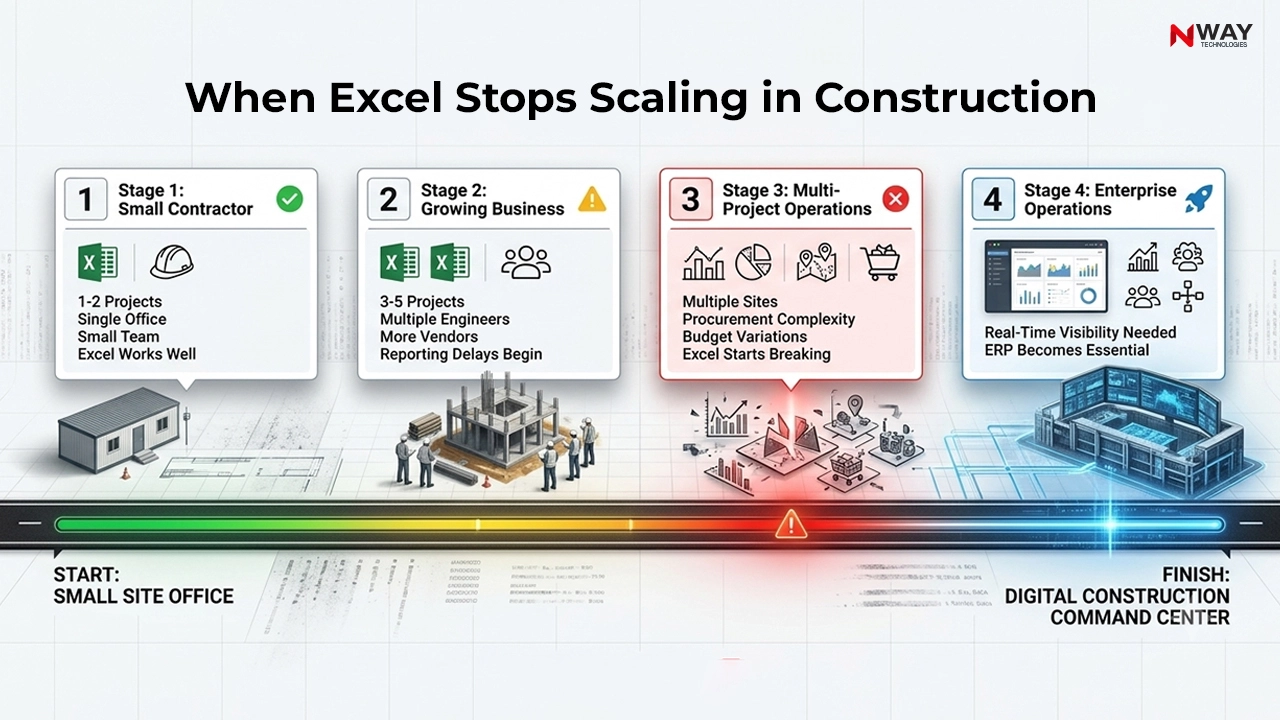
When Excel Stops Scaling in Construction

The Hidden Moment When Excel Starts Failing

Most organizations never formally decide that Excel is no longer sufficient.

Instead, operational complexity quietly increases until problems become visible.

The warning signs usually appear as:

  • Frequent data reconciliation
  • Repeated reporting delays
  • Multiple versions of the same file
  • Growing dependence on manual updates
  • Increasing management frustration

Common Mistake

Many construction companies believe Excel problems are employee problems.

In reality, most Excel-related issues are process and visibility problems.

Where Excel Fails in Construction Management

1. No Single Source of Truth

The biggest weakness of Excel is fragmentation.

Different teams maintain different files:

  • Procurement workbook
  • Project workbook
  • Finance workbook
  • Inventory workbook
  • Billing workbook

As a result:

  • Data becomes inconsistent
  • Reports take longer to create
  • Decisions are delayed

Hidden Risk

Management meetings become discussions about whose numbers are correct instead of what actions should be taken.

2. Construction Cost Tracking Becomes Reactive

Cost control determines project profitability.

However, Excel often provides information after costs have already occurred.

Typical Situation

By the time finance identifies a cost overrun:

  • Material consumption has happened
  • Vendor payments are processed
  • Labour costs are incurred

The opportunity to prevent losses has already passed.

Why It Matters

Effective construction cost tracking should identify risks before margins disappear.

Expert Tip

The objective is not reporting cost overruns.

The objective is preventing them.

3. Multi-Site Project Tracking Breaks Down

Managing one project through spreadsheets is possible.

Managing ten projects simultaneously is a different challenge.

Challenges

  • Hundreds of files
  • Multiple site updates
  • Delayed information sharing
  • Manual consolidation

The more projects a company adds, the more difficult project visibility becomes.

Business Impact

Project managers spend more time gathering information than managing projects.

Excel vs Construction ERP: A Strategic Comparison

Capability Excel Construction ERP Software
Project Cost Tracking Manual Real-time
Multi-Site Visibility Limited Centralized
Procurement Workflow Manual Automated
Resource Monitoring Spreadsheet-based Live dashboards
Approval Management Emails & calls Structured workflows
Version Control High risk Single database
Audit Trail Limited Complete traceability
Executive Reporting Time-consuming Instant
Scalability Low High
Data Accuracy User dependent System controlled

4. Procurement Control Becomes Difficult

Procurement is one of the highest-value activities in construction.

Yet many companies still manage it through:

  • Email approvals
  • Excel trackers
  • Phone calls

Common Challenges

  • Duplicate purchases
  • Delayed approvals
  • Material shortages
  • Vendor disputes

Industry Scenario

A delayed purchase order may appear small, but it can impact:

  • Site productivity
  • Labour utilization
  • Project schedules
  • Cash flow

The resulting ripple effect can cost significantly more than the delayed material itself. [See: Construction Purchase Management Software]

Did You Know?

A single missing project update can affect procurement planning, billing forecasts, resource allocation, and profitability calculations simultaneously.

5. Collaboration Becomes Chaos

Construction is inherently collaborative.

Stakeholders include:

  • Site engineers
  • Project managers
  • Procurement teams
  • Finance teams
  • Senior management
  • Vendors
  • Contractors

Excel was never designed to serve as a centralized operational platform for all these stakeholders.

Common Symptoms

  • Multiple versions of reports
  • Missing updates
  • Conflicting numbers
  • Long reporting cycles

Construction Transformation Maturity Model

Stage Operational Style Primary Tool
Stage 1 Manual Tracking Registers & Paper
Stage 2 Spreadsheet Management Excel
Stage 3 Departmental Software Isolated Tools
Stage 4 Integrated Operations Construction ERP Software
Stage 5 Data-Driven Construction ERP + Analytics + AI

Most growing contractors operate between Stage 2 and Stage 3.

The challenge is moving toward integrated visibility.

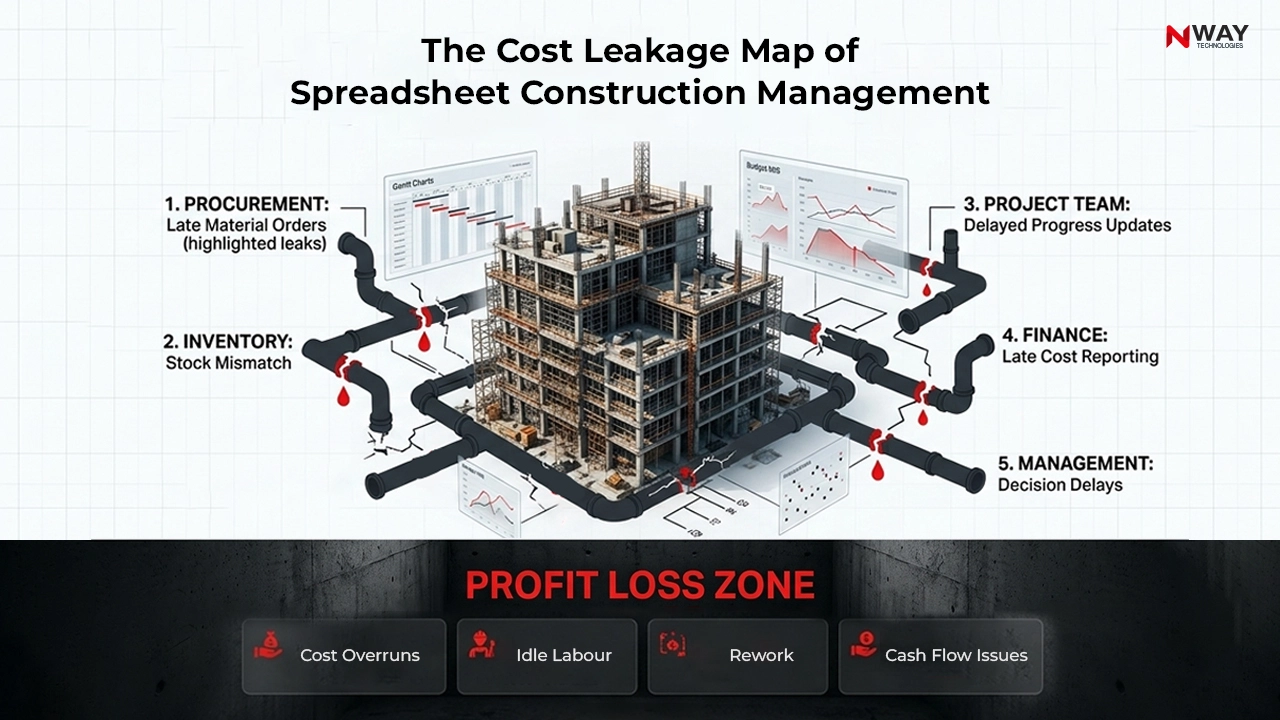
The Cost Leakage Map of Spreadsheet Construction Management

When Should a Construction Company Move Beyond Excel?

The transition should not be based on company size alone.

It should be based on operational complexity.

Consider Construction Management Software When:

You manage:

  • Multiple projects
  • Multiple locations
  • Multiple departments

You experience:

  • Frequent reporting delays
  • Budget overruns
  • Procurement confusion
  • Data inconsistencies

Leadership requires:

  • Real-time visibility
  • Faster decisions
  • Better profitability control
  • Growth scalability

How Construction ERP Software Complements Excel

Contrary to popular belief, moving to ERP does not mean eliminating Excel.

The smartest organizations use both.

Excel For

  • Analysis
  • Estimation
  • Ad-hoc calculations
  • Forecast modelling

Construction ERP For

  • Project execution
  • Procurement
  • Billing
  • Inventory
  • Resource management
  • Financial control
  • Real-time reporting

This combination provides both flexibility and control.

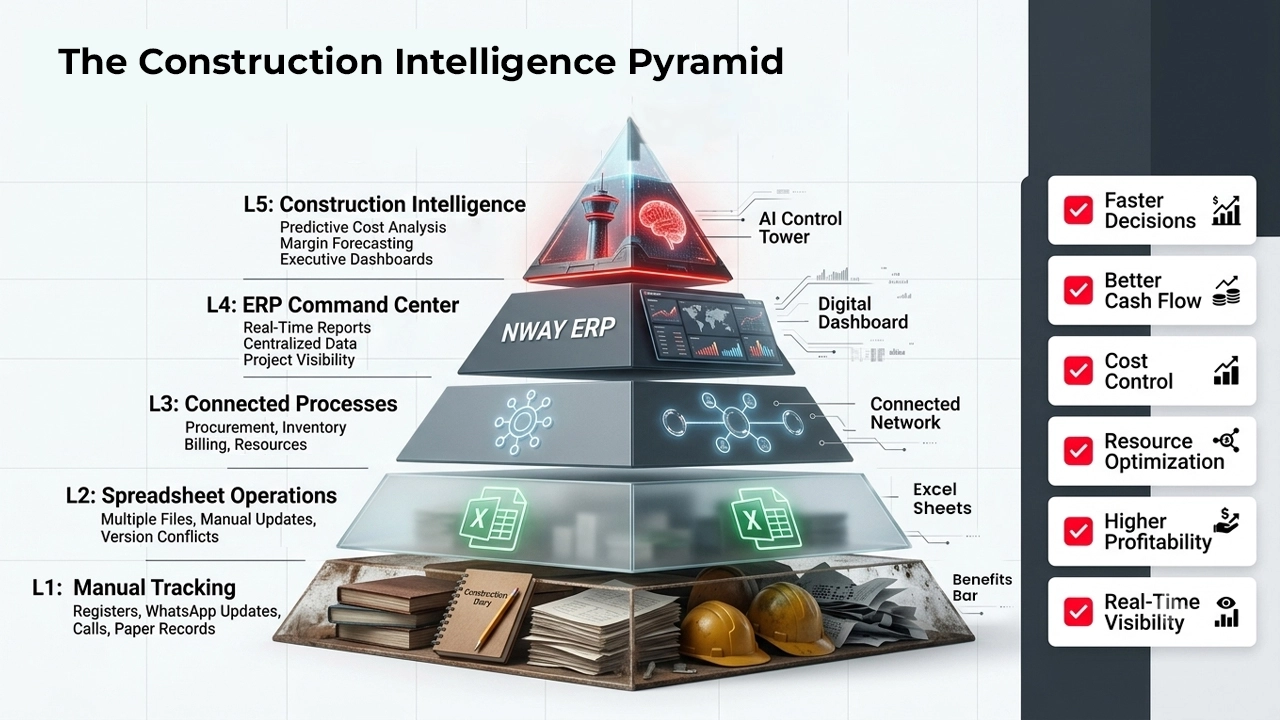
The Construction Intelligence Pyramid

Conclusion

Excel remains one of the most valuable tools in construction.

For estimating, budgeting, and individual analysis, it continues to deliver significant value.

However, construction businesses do not fail because Excel is inadequate. They struggle because operational complexity eventually exceeds what spreadsheets were designed to manage.

As projects become larger, teams become more distributed, and margins become harder to protect, the need for real-time visibility becomes critical.

The future belongs to construction companies that combine the flexibility of Excel with the control of integrated construction ERP software and construction project management Software.

The goal is not to replace spreadsheets.

The goal is to replace uncertainty.

Organizations that achieve this transition gain stronger cost control, better project visibility, faster decision-making, and improved profitability.

Also Read: Revolutionizing Construction Management with ERP Software

FAQs

Is Excel good for construction project management?

Yes, Excel works well for small projects, basic budgeting, estimating, and simple project tracking.

What are the limitations of Excel in construction management?

Excel lacks real-time visibility, workflow automation, centralized data management, and multi-user collaboration.

When should a construction company move from Excel to ERP?

Companies should consider ERP when managing multiple projects, departments, or project locations.

Can Excel track construction project costs?

Yes, but cost tracking in Excel is manual and can become difficult as project complexity increases.

How does Construction ERP Software improve project tracking?

Construction ERP Software Provides real-time project updates, centralized reporting, and automated workflows.

How does NWAY ERP help construction companies beyond Excel?

NWAY ERP centralizes project, cost, procurement, inventory, and financial management into one integrated platform.

How to Calculate Budget vs Actual Cost in Construction

Budget vs actual cost tracking in construction project

Budget vs actual cost in construction compares the planned cost of work with what was really spent on it. Calculate it as Cost Variance = Budgeted Cost − Actual Cost. A negative result means an overrun. For projects still in progress, compare the budgeted cost of work completed (earned value) with actual cost.

Example: Budget ₹55 lakh, actual ₹57.7 lakh → variance −₹2.7 lakh (−4.9%), an overrun.

Table of Contents:

Imagine a contractor winning a ₹50 crore infrastructure project with an estimated margin of 12%.

On paper, the project looks healthy.

Three months later:

  • Material prices increase unexpectedly.
  • Additional machinery is deployed.
  • Labour productivity declines due to site challenges.
  • Procurement delays force emergency purchases at higher rates.

Individually, these expenses appear manageable.

Collectively, they reduce project profitability significantly.

The biggest problem is that many organizations discover these variances only during monthly reviews or project closure audits.

By that point, corrective actions are limited.

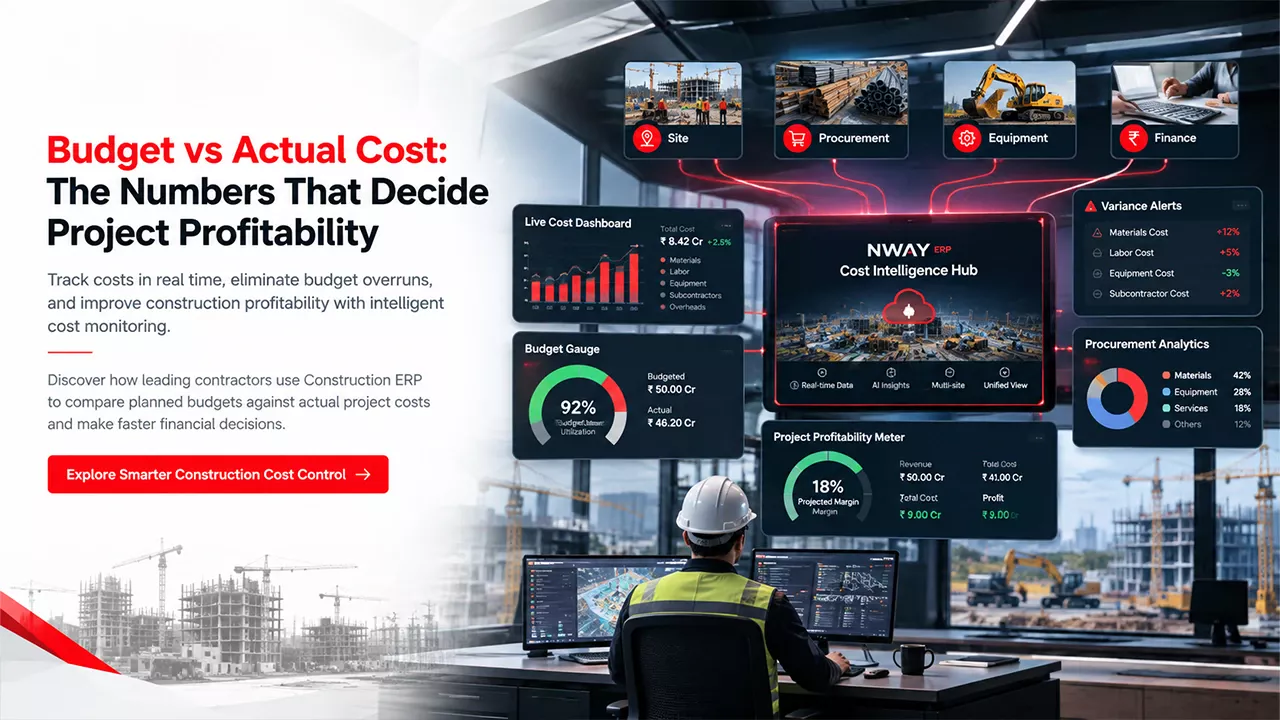
This is why modern construction budgeting practices focus on continuous comparison of budget vs. actual cost throughout the project lifecycle. (See – Real-time comparison needs a connected construction finance and accounting module, not month-end spreadsheets.)

What Does Budget vs Actual Cost Mean?

Budget Cost refers to the planned cost established before project execution based on design specifications, quantity take-offs, labour plans, resource allocation, procurement strategies, and risk assumptions.

‘Actual cost’ refers to the real expenditure incurred during project execution.

The comparison enables organisations to measure project financial health in real time.

Core Formula

Cost Variance = Budget Cost − Actual Cost

Or

Cost Variance (%) = ((Budget Cost − Actual Cost) ÷ Budget Cost) × 100

Budget vs Actual Cost Example (₹55 Lakh Project)

Cost Category Budget (₹) Actual (₹) Variance (₹)
Materials 25,00,000 27,00,000 -2,00,000
Labour 12,00,000 11,50,000 +50,000
Equipment 8,00,000 9,00,000 -1,00,000
Subcontractors 10,00,000 10,20,000 -20,000
Total 55,00,000 57,70,000 -2,70,000

In this example, the project has exceeded the budget by ₹2.7 lakh, triggering a need for immediate cost investigation.

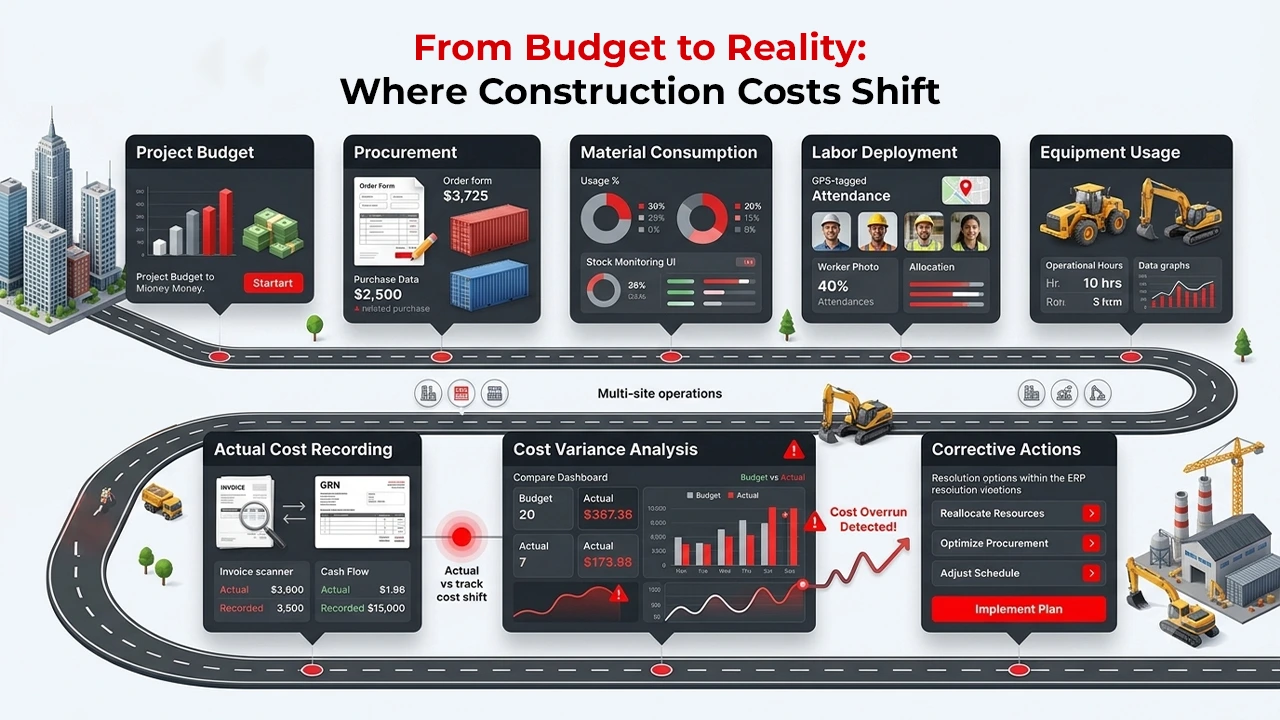
From Budget to Reality: Where Construction Costs Shift

Why Budget vs Actual Cost Matters in Construction

1. Protects Project Profitability

A project can be delivered on time and still lose money.

Budget monitoring highlights:

  • Margin erosion
  • Excessive resource consumption
  • Hidden operational inefficiencies
  • Unexpected procurement costs

Quick Insight

A 5% cost overrun on a large infrastructure project can eliminate a significant portion of the contractor’s expected profit.

2. Improves Cash Flow Planning

Construction businesses operate within tight working capital cycles.

Budget tracking helps organizations:

  • Forecast cash requirements
  • Plan vendor payments
  • Avoid liquidity shortages
  • Manage project financing effectively

3. Enhances Decision-Making

Project leaders can make better decisions when they know:

  • Where money is being spent
  • Which activities are generating overruns
  • Which vendors or resources create financial risks

5 Construction Cost Components to Track

Effective construction project budget monitoring requires visibility into every major cost category.

Material Costs

Includes:

  • Cement
  • Steel
  • Sand
  • Aggregates
  • Finishing materials
  • Consumables

Hidden Risk

Material wastage between store issues and site consumption often goes unreported.

Labour Costs

Includes:

  • Skilled labour
  • Semi-skilled labour
  • Unskilled workforce
  • Contract labour

Common Challenge

Manual attendance records frequently create payroll inaccuracies and cost leakages.

Equipment and Machinery Costs

Includes:

  • Rental equipment
  • Owned machinery
  • Maintenance costs
  • Fuel consumption
  • Operator expenses

Expert Tip

Equipment idle time is one of the most overlooked contributors to project cost overruns.

Subcontractor Costs

Includes:

  • Civil works
  • Electrical works
  • Plumbing
  • Specialized services

Proper verification of work progress and billing is critical for accurate cost reporting.

Indirect Costs (Site Overheads)

Includes:

  • Site office expenses
  • Utilities
  • Security
  • Temporary facilities
  • Administrative costs

These costs often accumulate slowly and become substantial over long project durations.

Step-by-Step Process for Calculating Budget vs Actual Cost

Step 1: Establish a Detailed Project Budget

Before construction begins, create a baseline budget covering:

  • Labour
  • Materials
  • Equipment
  • Overheads
  • Subcontractors
  • Contingencies

Best Practice Checklist

  • Define cost codes
  • Assign budgets to activities
  • Allocate contingency reserves
  • Include risk assumptions
  • Create approval workflows

Step 2: Capture Actual Costs Daily

Actual cost collection should occur continuously.

Sources include:

  • Purchase orders
  • Vendor invoices
  • Payroll records
  • Material issues
  • Equipment logs
  • Site expense reports

Common Mistake

Waiting until month-end to update actual costs creates reporting delays and missed intervention opportunities.

Step 3: Categorize Costs Properly

Every expense should be mapped to:

  • Activity
  • Project
  • Resource
  • Cost code
  • Work package

This ensures accurate variance analysis.

Step 4: Perform Variance Analysis (CV, CPI, and EAC)

  • EV = % complete × total budget
  • CV = EV − AC
  • CPI = EV ÷ AC
  • EAC = Budget ÷ CPI
  • Use a mid-project example: 60% complete on ₹55L gives EV ₹33L. With AC ₹35L, CPI is 0.94 and EAC is about ₹58.3L.

Identify:

  • Over-budget activities
  • High-risk cost categories
  • Scope-related expenses
  • Productivity issues

Variance Analysis Framework

Variance Type Possible Cause
Material Variance Wastage, Theft, Price Increase
Labour Variance Low Productivity, Overtime
Equipment Variance Breakdown, Idle Time
Procurement Variance Emergency Purchases
Subcontract Variance Change Orders

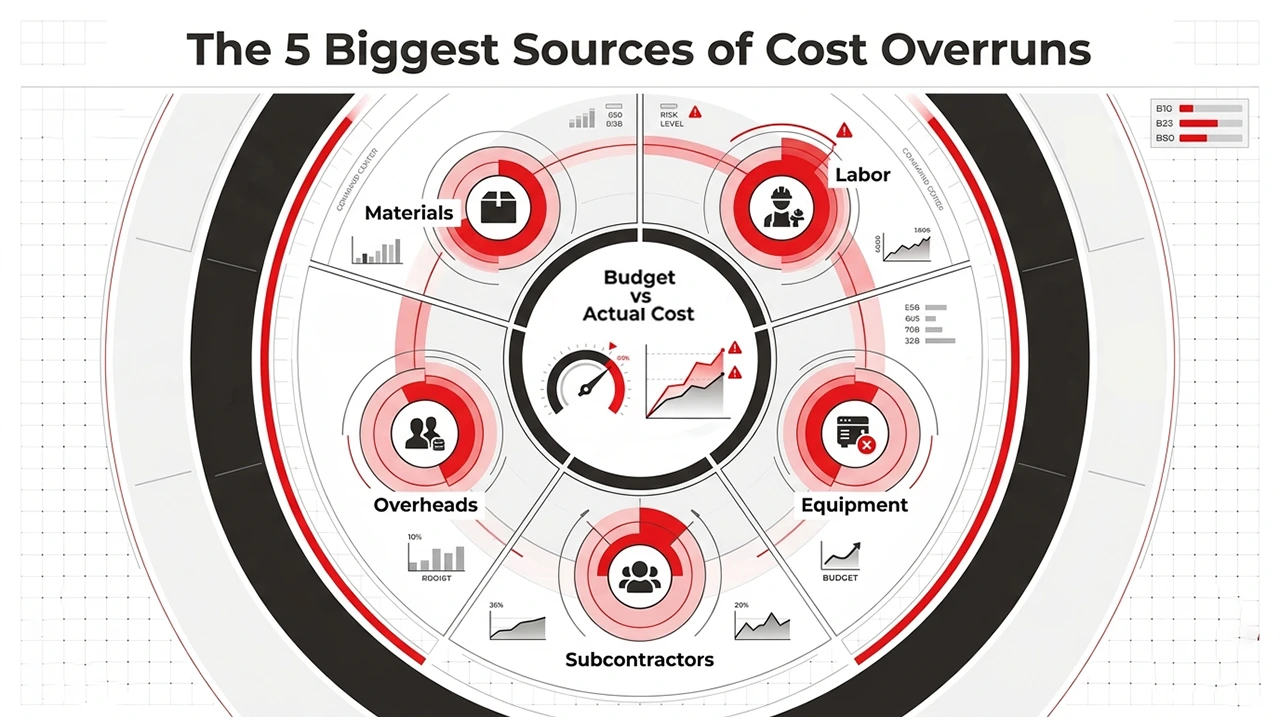
The 5 Biggest Sources of Cost Overruns

Step 5: Take Corrective Action

Once deviations are identified:

  • Renegotiate procurement contracts
  • Improve resource deployment
  • Reduce wastage
  • Optimize manpower allocation
  • Improve site controls

The objective is not reporting cost overruns.

The objective is preventing them.

Manual Monitoring vs ERP-Based Cost Management

Parameter Manual Tracking Construction ERP
Data Collection Delayed Real Time
Cost Visibility Limited Complete
Variance Analysis Monthly Continuous
Accuracy Moderate High
Forecasting Difficult Automated
Multi-Project Monitoring Complex Centralized
Management Reporting Manual Dashboard Driven

Did You Know?

Many contractors still manage multi-crore projects through spreadsheets despite handling thousands of cost transactions every month.

How Construction ERP Improves Budget vs Actual Tracking

For growing construction companies, spreadsheets eventually become a financial blind spot.

Modern construction cost control software integrates:

  • Procurement
  • Inventory
  • Finance
  • Payroll
  • Equipment Management
  • Site Operations

into one centralised platform.

What Changes When You Implement Construction ERP?

Before

  • Multiple spreadsheets
  • Delayed reporting
  • Duplicate data entry
  • Inconsistent cost tracking

After

  • Single source of truth
  • Real-time dashboards
  • Automated cost allocation
  • Instant variance analysis
  • Executive-level visibility

Industry Example

A contractor managing multiple highway projects uses ERP to compare budgeted procurement costs with actual purchase orders daily.

Instead of discovering overruns at month-end, project managers receive alerts immediately, allowing procurement teams to negotiate alternatives before costs escalate further. See: Construction ERP Software

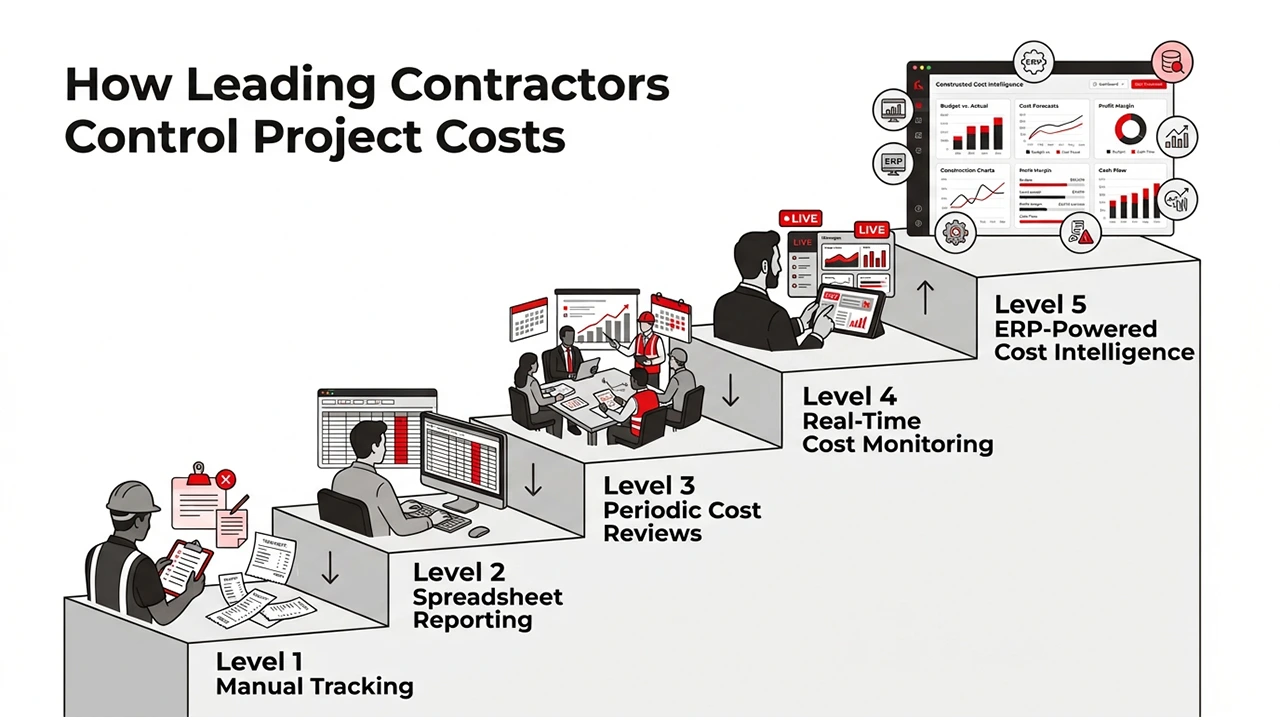
How Leading Contractors Control Project Costs

Cost Impact Framework: Where Budget Variances Usually Start

Level 5: Strategic Losses

  • Incorrect bidding
  • Poor Construction Cost Estimation

Level 4: Planning Losses

  • Unoptimized schedules
  • Resource conflicts

Level 3: Procurement Losses

  • Price fluctuations
  • Emergency purchases

Level 2: Execution Losses

  • Rework
  • Material wastage
  • Productivity issues

Level 1: Operational Losses

  • Attendance discrepancies
  • Fuel misuse
  • Unapproved expenses

Expert Insight

Most project cost overruns begin at Levels 1 and 2, but management often notices them only when they reach Level 5.

Future of Construction Cost Management

The industry is moving beyond retrospective accounting.

Forward-looking organizations are investing in:

  • Predictive cost analytics
  • AI-assisted forecasting
  • Real-time project dashboards
  • Mobile field reporting
  • ERP-driven cost intelligence

Future competitiveness will belong to companies that can identify financial risks before they impact project profitability.

Also read: BOQ vs Budget vs Estimate: What’s the Difference?

Conclusion

Accurate construction cost estimation is only the starting point of a successful project. The real challenge lies in continuously comparing budgeted costs against actual expenditures and taking corrective action before small deviations become major financial problems.

For contractors, project managers, CFOs, and construction business owners, Budget vs Actual Cost analysis has evolved from a financial reporting activity into a strategic capability. Organizations that embrace data-driven construction project cost management, real-time visibility, and ERP-powered decision-making gain tighter construction cost control, stronger margins, improved forecasting, and greater project success rates.

In an industry where every percentage point of profit matters, the ability to measure, monitor, and manage costs in real time is rapidly becoming a competitive advantage rather than an operational convenience.
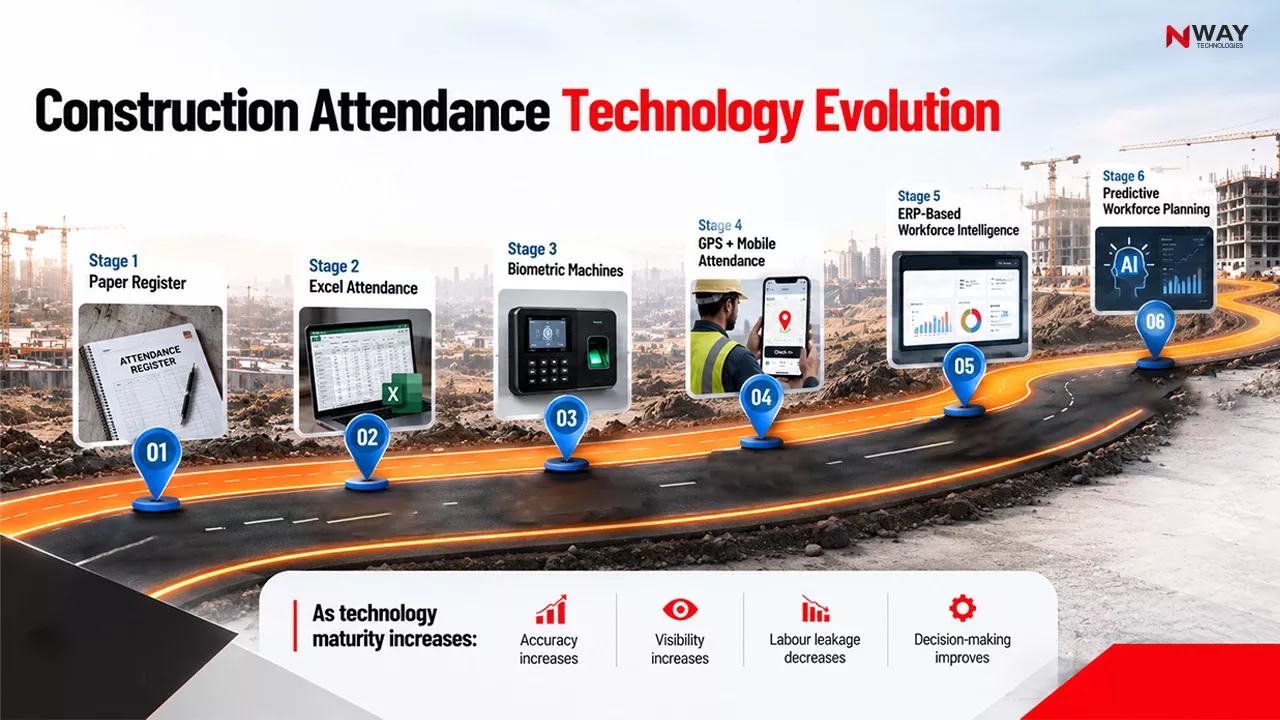
FAQs

How do you calculate budget vs actual cost in construction?

Subtract the actual cost from the budgeted cost: Cost Variance = Budget Cost − Actual Cost. To express it as a percentage, divide the variance by the budget and multiply by 100. For example, a ₹55 lakh budget with ₹57.7 lakh spent gives a variance of −₹2.7 lakh, or −4.9%.

What does a negative cost variance mean in construction?

A negative cost variance means the project has spent more than budgeted, which is a cost overrun. A positive variance means work cost less than planned. Track variance by cost category, such as materials, labour, equipment and subcontractors, to find exactly where the overrun started.

How do you compare budget vs actual cost on a project that is still in progress?

Compare actual cost with the earned value, which is the budgeted cost of the work completed so far, not the full project budget. Earned Value = % complete × total budget. If a ₹55 lakh project is 60% complete, its earned value is ₹33 lakh. If ₹35 lakh has been spent, the cost variance is −₹2 lakh.

What are CPI and EAC in construction cost control?

CPI (Cost Performance Index) = Earned Value ÷ Actual Cost. A CPI below 1 means the project is over budget. EAC (Estimate at Completion) = Total Budget ÷ CPI and forecasts the final project cost. With a CPI of 0.94 on a ₹55 lakh budget, the EAC is about ₹58.3 lakh.

What causes budget overruns in construction projects?

The most common causes are material price increases and wastage, low labour productivity and overtime, equipment idle time and breakdowns, emergency purchases caused by procurement delays, subcontractor change orders, and rework. Most overruns start as small site-level losses that go unnoticed until month-end reviews.

How often should construction costs be compared against the budget?

Capture actual costs daily and review variances at least weekly. Month-end comparison is too late, because by then overruns have already compounded and corrective options such as renegotiating purchases or redeploying resources are limited.

How does construction ERP help track budget vs actual cost?

A construction ERP connects procurement, inventory, payroll, equipment and finance. Each purchase order, material issue and attendance record is posted against the project budget in real time. Managers then see variances on a dashboard and get alerts as overruns happen, instead of reconciling spreadsheets at month-end.
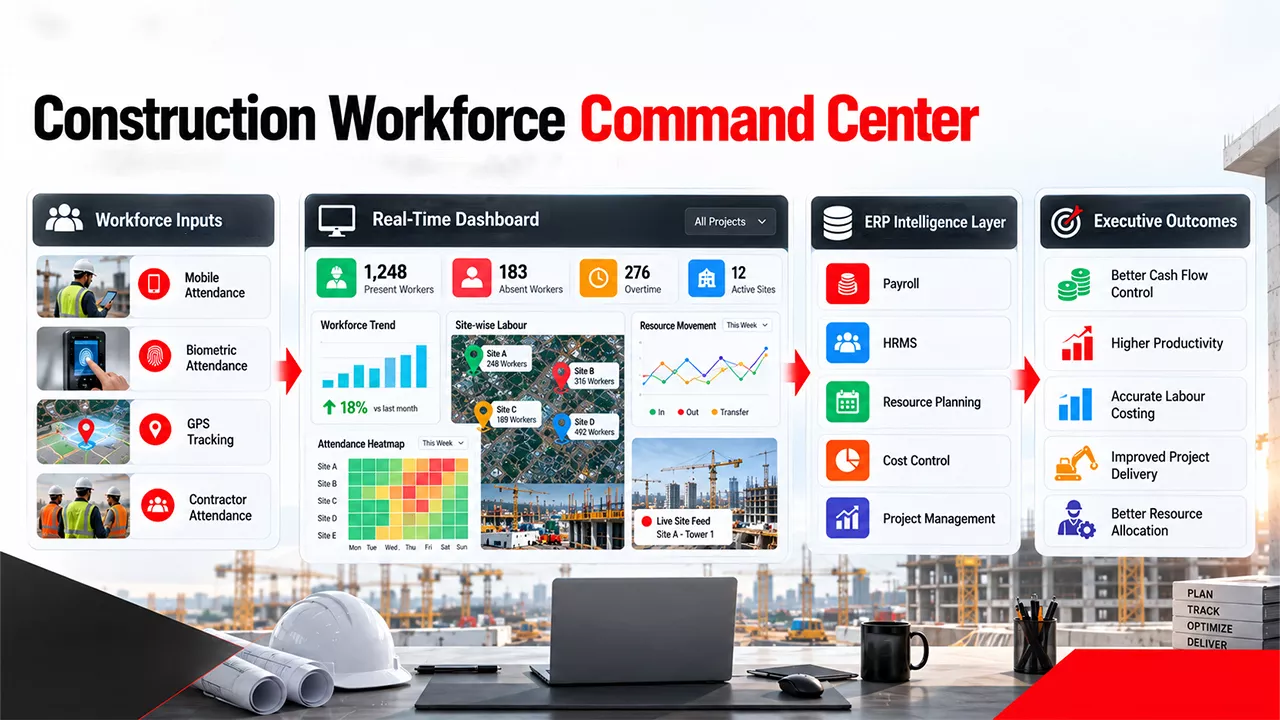
Why Budget Leakages Happen in Construction Projects

Table of Contents:

Introduction

A contractor wins a ₹200 crore infrastructure project with healthy projected margins. Six months later, cash flow is tightening, procurement teams are requesting additional budgets, labor productivity is declining, and finance reports indicate rising costs.

Management immediately investigates.

The surprising discovery?

There was no single major problem.

Instead, profitability escaped through dozens of seemingly minor issues:

  • Excess material consumption
  • Unapproved purchases
  • Rework from drawing revisions
  • Delayed subcontractor reconciliations
  • Idle manpower
  • Equipment downtime
  • Late detection of cost variances

These are budget leakages.

Across India, UAE, Saudi Arabia, and the wider GCC region, tighter margins and increasingly complex projects are making Construction Cost Management a boardroom priority rather than just a project control function.

The critical question is no longer:

“Why did the project go over budget?”

It is:

“Where did the money start leaking?”

Where Construction Profits Disappear

The Hidden Nature of Construction Budget Leakages

Unlike a structural failure or schedule delay, budget leakages rarely create immediate alarms.

They accumulate quietly.

A few extra tons of steel. A few days of idle equipment. A few unapproved purchases. A few hours of rework.

Individually they appear insignificant.

Collectively they can wipe out project profitability.

Why It Matters

Even a project that appears on schedule can still suffer from serious financial leakage.

Common consequences include:

  • Reduced project margins
  • Increased working capital requirements
  • Client disputes
  • Procurement inefficiencies
  • Delayed cash collection
  • Lower competitiveness in future bids

Quick Insight

Profit does not usually disappear in one transaction. It leaks through hundreds of untracked decisions.

The 7 Biggest Causes of Budget Leakages in Construction Projects

1. Poor Construction Budget Planning

Most budget leakages begin during project planning.

When cost estimates rely on outdated rates, incomplete quantity assessments, or optimistic assumptions, the project starts with a financial disadvantage.

Common Challenges

  • Incomplete BOQ verification
  • Unrealistic productivity assumptions
  • Ignored escalation risks
  • Insufficient contingencies
  • Underestimated resource requirements

Industry Example

A contractor budgets concrete work assuming historical labor productivity. Actual site conditions reduce output by 20%.

Even though execution is technically successful, labor costs exceed forecasts throughout the project. See: – Solution ( Finance & Accounts )

Common Mistake

Treating the estimate as a fixed reality instead of a forecast.

2. Material Leakage and Wastage

Materials often represent 40% to 60% of total project costs.

Even small variances create significant financial impact.

Hidden Risks

  • Excess issue quantities
  • Overstocking
  • Theft and pilferage
  • Damage during storage
  • Poor consumption monitoring

Best Practice Checklist

  • Track issue vs consumption
  • Compare consumption against BOQ
  • Monitor site-wise material usage
  • Automate stock transfers
  • Conduct regular reconciliations

Expert Tip

If material variance is reviewed monthly, the problem has already become expensive.

3. Procurement Inefficiencies

Procurement decisions directly influence project profitability.

However, many organizations still depend on email chains, calls, and spreadsheets.

Typical Leakage Areas

  • Emergency purchases
  • Duplicate orders
  • Price inconsistencies
  • Delayed approvals
  • Unverified vendor rates

Cost Impact Framework

Procurement Issue Cost Impact
Late purchase orders Idle labor and equipment
Emergency buying Higher material costs
Poor vendor comparison Reduced margins
Untracked commitments Budget overruns
Missing approvals Compliance risk

Did You Know?

Many project budgets appear healthy until procurement commitments are included. Actual financial exposure is often much higher than visible expenses.

4. Labor and Resource Underutilization

Labor is one of the largest controllable project costs.

Unfortunately, it’s also one of the most difficult to monitor accurately.

Signs of Resource Leakage

  • Idle workforce
  • Duplicate responsibilities
  • Poor crew allocation
  • Low productivity
  • Delayed decision-making

Before vs After Resource Visibility

Without Visibility With Real-Time Tracking
Manual attendance Automated workforce tracking
Productivity assumptions Actual productivity metrics
Delayed reporting Real-time dashboards
Resource imbalance Optimized allocation

Why It Matters

An idle engineer, supervisor, or machine may not attract attention today.

Over a 12-month project, that hidden cost becomes substantial.

5. Rework and Quality Failures

Rework is one of the most destructive forms of budget leakage because contractors pay twice for the same work.

Sources of Rework

  • Drawing version confusion
  • Poor supervision
  • Design changes
  • Inadequate quality control
  • Communication failures

Hidden Costs Beyond Rework

  • Additional labor
  • Material replacement
  • Equipment costs
  • Delayed billing
  • Schedule disruption

Quick Insight

Every rework activity creates a double loss:

  • Direct repair cost
  • Lost opportunity to perform productive work

6. Delayed Project Cost Tracking

Many organizations discover problems at month-end.

Unfortunately, budget leakages don’t wait for monthly reports.

The Traditional Problem

Project teams often manage:

  • Procurement in one system
  • Inventory in another
  • Finance elsewhere
  • Site reports through WhatsApp and spreadsheets

This creates a lag between reality and reporting.

Construction Cost Control Maturity Model

Level Cost Visibility
Level 1 Excel-based tracking
Level 2 Weekly reporting
Level 3 Department dashboards
Level 4 Integrated project visibility
Level 5 Real-time cost intelligence

Expert Recommendation

The objective of Construction Project Cost Management is not historical reporting.

The objective is early intervention.

7. Lack of System Integration

Many construction companies have data.

What they lack is connected data.

Common Scenario

Finance says: “Project is on budget.”

Project team says: “We need additional funds.”

Procurement says: “Several commitments are not yet recorded.”

All three statements may be correct because each department sees only part of the picture.

8 Hidden Threats to Your Project Budget

How Construction ERP Software Reduces Budget Leakages

Modern construction ERP software creates a single source of truth across projects.

Instead of relying on disconnected systems, ERP platforms connect:

  • Budgeting
  • Procurement
  • Inventory
  • Equipment
  • Labor
  • Billing
  • Finance
  • Project Controls

ERP vs Manual Cost Control

Process Manual Environment ERP Environment
Budget Tracking Monthly review Real-time monitoring
Procurement Visibility Email-based Workflow-driven
Material Reconciliation Manual Automated
Site Reporting Spreadsheets Mobile reporting
Billing Tracking Delayed visibility Real-time status
Cost Variance Detection Reactive Proactive

Expected Outcomes

Organizations implementing integrated Construction Management Software often achieve:

  • Early variance detection
  • Better cash flow visibility
  • Reduced material leakage
  • Improved procurement control
  • Faster project reporting
  • More predictable profitability

Where Did the Money Go?

Construction Budget Leakage Cheat Sheet

Budget Leakage Source Business Impact Warning Sign Recommended Action
Material Wastage Increased direct cost Consumption exceeds BOQ Daily material reconciliation
Procurement Delays Schedule impact & idle labor Emergency purchases Procurement workflow automation
Rework Margin erosion Frequent quality defects Quality checkpoints
Idle Labor Higher overhead costs Workforce waiting for work Resource planning & allocation
Equipment Downtime Productivity loss Unplanned breakdowns Preventive maintenance
Scope Changes Budget overruns Multiple change requests Change order control process
Billing Delays Cash flow stress Work completed but unbilled Real-time billing visibility
Data Silos Poor decisions Different reports show different numbers Centralized ERP platform

Conclusion

The biggest threat to project profitability is not always a major delay, material shortage, or contractual dispute.

More often, it is the accumulation of hidden budget leakages that remain invisible until margins have already been damaged.

Effective Construction Cost Management requires organizations to move beyond periodic reporting and toward continuous cost visibility. As construction projects become larger and more complex across India, UAE, Saudi Arabia, and global markets, companies that can detect financial deviations early will outperform those relying on spreadsheets and hindsight.

The future of construction cost control belongs to organizations that connect project execution, procurement, inventory, labor, equipment, billing, and finance into a single decision-making framework. When leaders can see cost leakage as it happens, they gain the ability to protect margins before those losses become irreversible.

FAQs

What does budget leakage mean?

Budget leakage is the gradual loss of project profitability through hidden inefficiencies such as wastage, rework, idle resources, and uncontrolled spending.

Why do large projects go over budget?

Large projects typically go over budget due to inaccurate estimates, scope changes, productivity issues, and delayed cost visibility.

How can contractors reduce budget leakages?

Contractors can reduce budget leakages through real-time cost tracking, stronger controls, and proactive project monitoring.

What is the difference between budget leakage and budget overruns?

Budget leakages are the hidden causes of financial loss, while budget overruns are the visible result of those losses.

What are the warning signs of budget leakage?

Frequent rework, emergency purchases, rising material consumption, idle labor, and unexplained cost variances are common warning signs.

Can small cost leakages impact project margins?

Yes, even small leakages can accumulate over time and significantly erode project profitability.

What KPIs should contractors track to prevent budget overruns?

Contractors should track budget variance, material consumption, labor productivity, procurement commitments, and project profitability.

Why Most Construction Projects Start with Plans but End in Chaos

Most construction projects don’t fail because teams lack experience.
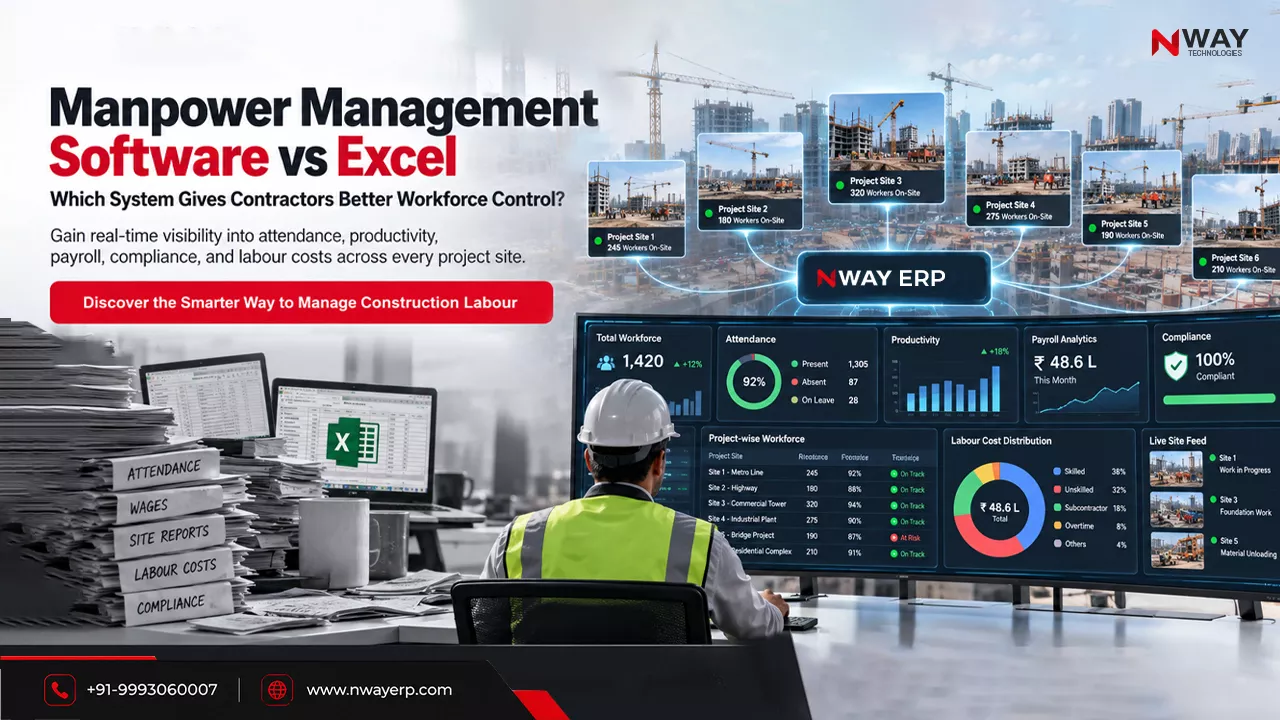
The BOQ is approved. The schedule is finalized. Procurement plans are prepared. Resources are assigned.

Yet six months later, the same project is dealing with delayed approvals, material shortages, budget overruns, and missed milestones.

The uncomfortable reality is that project chaos rarely begins on-site. It begins much earlier in the gap between planning and execution.
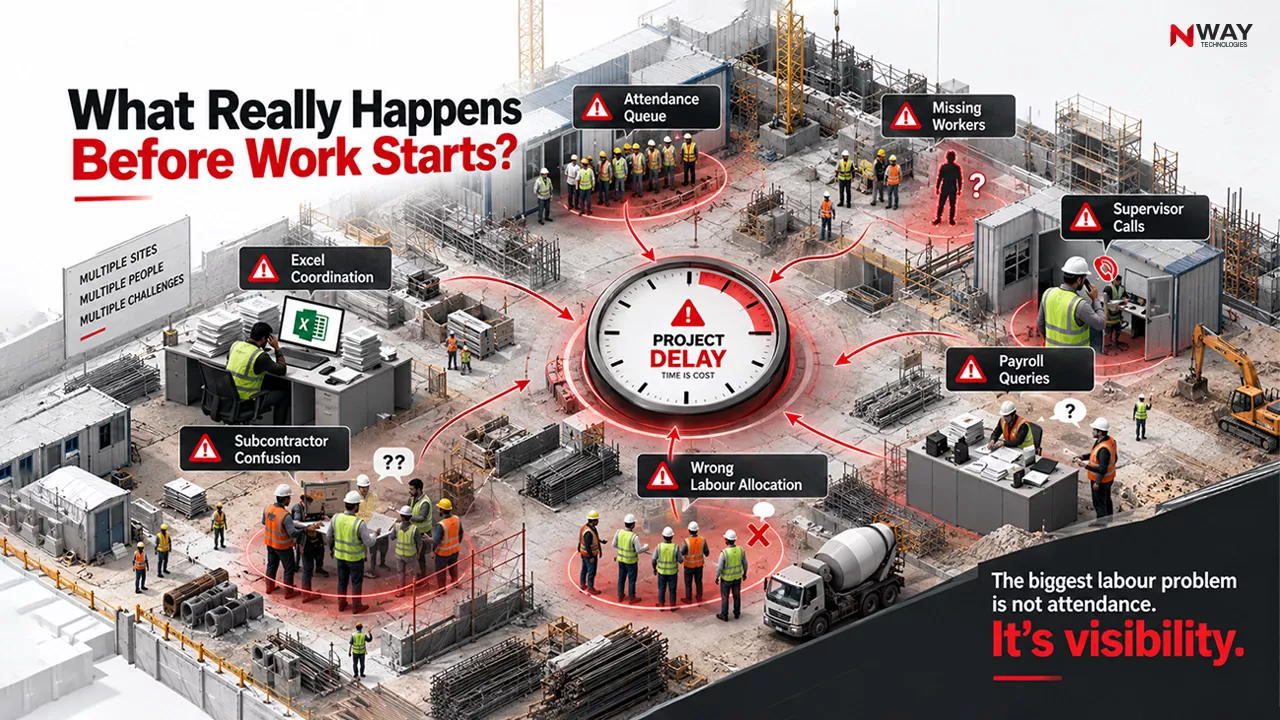
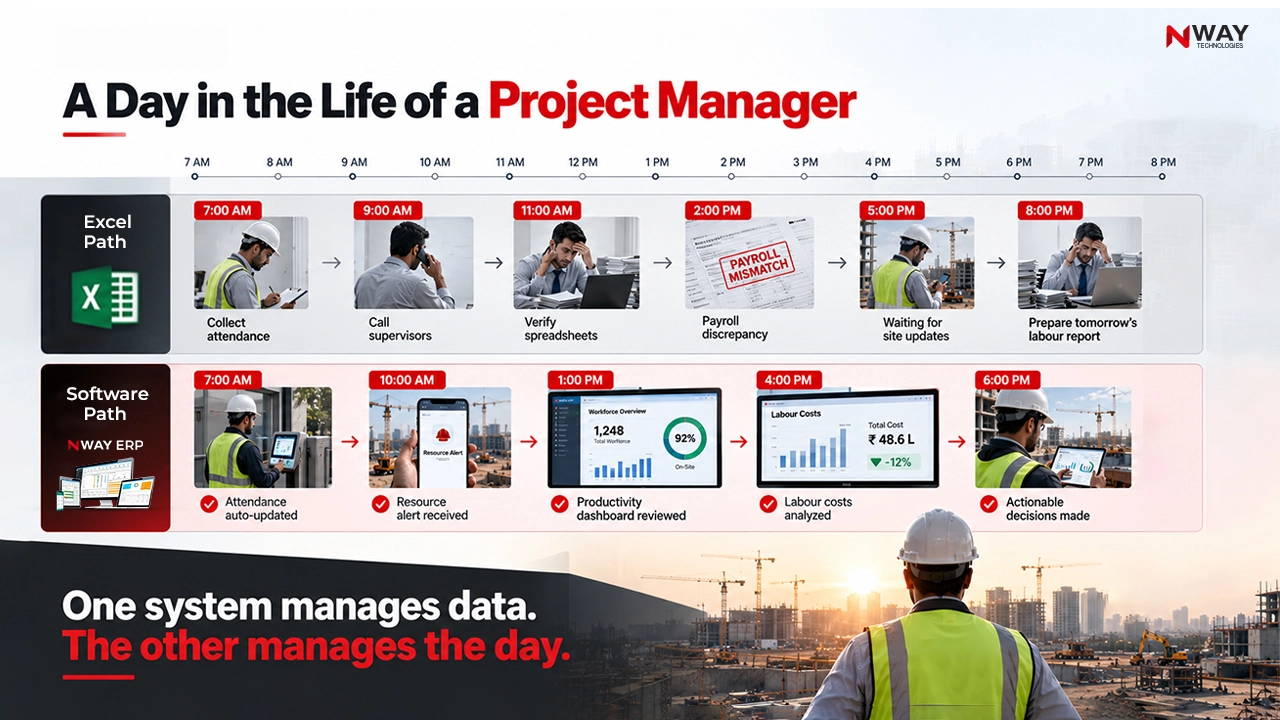
Research from McKinsey found that large construction projects frequently suffer major cost and schedule overruns, while productivity growth in construction has remained significantly below many other industries for decades. Meanwhile, productivity challenges continue to be driven by communication gaps, fragmented planning, and weak information flow rather than purely technical execution issues.

The problem is not the plan itself.

The problem is that most organisations cannot maintain visibility once execution begins.

Table of Contents:

Executive Summary

Many construction businesses assume project delays are caused by labour shortages, vendor issues, or changing project conditions.

While these factors contribute, the bigger issue is often fragmented with project management.

When planning, procurement, finance, inventory, and site operations operate in silos, decisions become reactive instead of proactive.

Modern Construction Project Management is no longer about creating better schedules. It is about creating continuous visibility throughout the project lifecycle.

The Journey from Planning to Chaos

The Real Problem Isn’t What You Think

Most companies focus on execution problems.

But projects rarely spiral into chaos because workers stop working.

They spiral because information stops flowing.

Consider a typical project environment:

  • BOQ maintained in spreadsheets
  • Procurement tracked separately
  • Site updates shared through calls or WhatsApp
  • Finance reviews monthly reports
  • Management receives delayed information

Everyone is working hard.

Yet everyone is working from different versions of reality.

Insight

The biggest challenge in construction today is not project complexity.

It is decision latency.

By the time leadership identifies a problem, the impact has already reached costs, timelines, or margins.

Why Traditional Methods Fail

1. Excel Creates an Illusion of Control

Spreadsheets work for individual tasks but struggle with dynamic projects.

When BOQ revisions, procurement changes, material consumption, and budget adjustments happen simultaneously, manual updates quickly become outdated.

The result:

  • Data inconsistencies
  • Delayed decisions
  • Procurement mistakes
  • Cost tracking gaps

2. Manual Approvals Slow Projects

Many project delays are not caused by suppliers.

They are caused by waiting.

Material requests, vendor approvals, billing approvals, and purchase requests often pass through multiple stakeholders before action is taken.

Small delays accumulate into major schedule overruns.

3. Fragmented Systems Create Blind Spots

A common challenge in construction businesses is that finance, procurement, inventory, and project teams operate through disconnected tools.

Without a single source of truth, management cannot see project reality in real time.

Poor information flow and communication breakdowns across construction projects can lead to significant operational inefficiencies, delays, rework, and increased costs.

 Hidden Causes of Construction Project Delays

Four Challenges That Turn Plans into Chaos

Procurement Disconnect

A project schedule assumes materials will arrive in four weeks.

Procurement discovers an eight-week lead time.

The information reaches project leadership too late.

What follows is predictable:

  • Idle labour
  • Delayed activities
  • Higher costs

Cost Overruns Detected Too Late

Many organizations still compare budgets against actuals once a month.

The issue?

Cost overruns happen in real time.

By the time monthly reviews identify a problem, corrective action becomes much harder.

Resource Allocation Problems

Equipment, labour, and subcontractors are often shared across multiple projects.

Without centralised visibility, double allocation and underutilization become common.

What appears to be a resource shortage is often a visibility problem.

Poor Communication

Construction projects involve numerous stakeholders:

  • Site engineers
  • Procurement teams
  • Contractors
  • Consultants
  • Finance teams

When communication isn’t documented and centralized, disputes and rework become inevitable.

What Successful Construction Companies Do Differently

Leading contractors are shifting away from reactive project management.

Instead, they focus on four principles:

  • Single Source of Truth – All project information from BOQ and procurement to billing and cost tracking must be connected.
  • Real-Time Visibility – Leaders need live access to: Budget vs Actual, Material consumption, Vendor performance, Project progress
  • Connected Workflows – Planning, procurement, inventory, execution, and billing should function as one continuous process.
  • Predictive Project Controls – The best-performing companies no longer ask: “What went wrong?” They ask: “What is likely to go wrong next?”

Where Construction ERP Fits In

Technology alone does not solve project management challenges.

However, integrated systems provide the visibility modern projects require.

A modern Construction ERP Software platform helps organisations connect:

  • Construction Project Planning
  • Procurement
  • Material Reconciliation
  • Construction Accounting
  • Site Management
  • Equipment Utilization
  • Multi-Site Visibility

The real value is not automation.

The real value is better decision-making.

When project information flows across departments, teams can identify risks before they become delayed.

Traditional vs Modern Construction Management

What’s Changing in 2026 and Beyond

Construction management is entering a new phase.

Deloitte’s engineering and construction outlook points to growing adoption of AI, connected construction, digital workflows, and data-driven operations.

Three trends are shaping the future:

  • AI-Powered Risk Identification – Systems can increasingly identify schedule risks, procurement bottlenecks, and cost variances before they affect project outcomes.
  • Predictive Analytics – Organisations are moving beyond dashboards toward forecasting future issues based on historical and live project data.
  • Centralised Operations – Improving data capabilities remains a significant opportunity for construction businesses, enabling better visibility, coordination, and decision-making across projects and operations.

The companies that gain visibility first will create competitive advantages in profitability and project delivery.

Conclusion

Construction projects rarely descend into chaos overnight.

The process is gradual.

A delayed approval here. A procurement gap there. A budget variance nobody notices. A critical update trapped inside a spreadsheet.

Eventually, small disconnects become major project risks.

The firms that consistently deliver projects on time and within budget are not necessarily those with the most detailed plans.

They are the ones with the clearest visibility throughout execution.

In today’s environment, Construction Project Management is no longer about managing activities alone.

It is about managing information.

Key Takeaways

  • Most Construction Project Delays originate before site execution begins.
  • The biggest challenge is often fragmented information, not poor planning.
  • Excel and manual processes struggle to support complex, multi-site projects.
  • Real-time visibility is becoming essential for effective Project Management in Construction.
  • Integrated systems and data-driven workflows help organizations move from reactive management to proactive decision-making.

FAQs

Why do construction projects go over budget?

Common causes include inaccurate BOQs, delayed procurement, weak cost tracking, scope changes, and lack of real-time visibility.

What causes the majority of construction project delays?

Procurement bottlenecks, approval delays, resource conflicts, poor communication, and fragmented planning processes are among the most common contributors.

How important is Construction Project Planning?

Effective Construction Project Planning establishes realistic schedules, procurement strategies, resource allocation, risk management frameworks, and budget controls.

How does Construction Project Management Software help?

It improves visibility, coordination, reporting accuracy, cost tracking, and operational control across the project lifecycle.

Why is ERP important for the Construction Industry?

ERP for Construction Industry environments helps unify finance, procurement, inventory, project controls, site management, and construction accounting into a single operational framework.

BOQ vs Budget vs Estimate: What’s the Difference?

Table of Contents:

Introduction

Imagine a contractor wins a ₹100 crore infrastructure project. The bid was competitive, the quantities were checked, and management felt confident about projected margins.

Six months later, the project is facing procurement disputes, budget overruns, and cash flow pressure.

When management investigates, the problem is not a major design change or unforeseen site condition. It is something much simpler:

The project team treated the BOQ, estimate, and budget as if they were the same thing.

This confusion is surprisingly common across contractors, builders, EPC firms, and infrastructure companies. Teams often discuss “project cost” as one number when in reality multiple financial documents guide a project from tendering to execution.

As projects become larger, margins become tighter, and stakeholder scrutiny increases across India, the UAE, Saudi Arabia, and the wider GCC region, understanding the difference between a construction BOQ, a construction cost estimate, and a construction project budget is no longer optional.

It is a prerequisite for effective construction cost management.

How Construction Costs Evolve from Planning to Profitability

Understanding the Construction Cost Framework

Before comparing them individually, it helps to understand how these documents fit together.

The Construction Cost Planning Flow

Step 1 – Design & Drawings

Step 2 – BOQ Preparation

Step 3 – Cost Estimation

Step 4 – Budget Approval

Step 5 – Project Execution

Step 6 – Cost Monitoring & Control

Think of this as a chain.

If one link is weak, every downstream decision becomes unreliable.

What Is a BOQ (Bill of Quantities)?

A Bill of Quantities (BOQ) is a structured document that lists all measurable construction items required for a project.

It focuses primarily on:

  • Quantities
  • Units
  • Scope of work
  • Material requirements
  • Trade breakdowns

A BOQ answers:

“What work needs to be done and how much of it is required?”

Example –

Item Unit Quantity
Earthwork m³ 5,000
Concrete m³ 1,200
Reinforcement Steel MT 180
Brickwork m² 8,500

Notice something important:

There’s no project budget here.

The BOQ only quantifies the work.

Why BOQ Matters

A well-prepared BOQ supports:

  • Accurate tendering
  • Better procurement planning
  • Material forecasting
  • Quantity reconciliation
  • Contract administration
  • Progress billing

Expert Tip

Many contractors lose money because they focus on rates while overlooking BOQ accuracy.

A 5% quantity error on a high-value item such as steel, bitumen, or structural concrete can erase project margins before execution even begins.

What Is a Construction Cost Estimate?

A construction cost estimate uses BOQ quantities along with pricing assumptions to forecast how much a project is expected to cost.

It adds:

  • Material rates
  • Labor costs
  • Equipment expenses
  • Subcontractor costs
  • Site overheads
  • Risk allowances
  • Profit margins

A cost estimate answers:

“What is this project likely to cost?”

Example

Cost Component Value
Materials ₹55 Crore
Labour ₹16 Crore
Equipment ₹8 Crore
Site Overheads ₹7 Crore
Contingency ₹4 Crore
Total Estimated Cost ₹90 Crore

Why Construction Cost Estimation Matters

Accurate project cost estimation helps organizations:

  • Evaluate project feasibility
  • Submit competitive bids
  • Forecast cash flow
  • Plan procurement
  • Calculate expected margins
  • Assess project risks

Common Mistake

Many organizations assume:

BOQ = Estimate

This is incorrect.

A BOQ contains quantities.

A cost estimate converts those quantities into money.

What Is a Construction Budget?

A construction budget is the approved financial limit assigned to the project after strategic review and approval.

Unlike an estimate, which is predictive, the budget becomes an operational control tool.

The budget answers:

“How much are we willing and approved to spend?”

Example

Category Budget Allocation
Material ₹52 Crore
Labour ₹15 Crore
Equipment ₹8 Crore
Overheads ₹6 Crore
Contingency ₹4 Crore
Total Budget ₹85 Crore

In this scenario:

  • Estimate = ₹90 Crore
  • Budget = ₹85 Crore

Management now expects teams to execute within budget constraints.

Why Budgets Matter

A strong construction project budget:

  • Controls spending
  • Improves accountability
  • Supports cash flow planning
  • Enhances profitability tracking
  • Enables early cost intervention

Quick Insight

An estimate predicts.

A budget commits.

That distinction matters hugely in construction financial management.

BOQ vs Budget vs Estimate: Side-by-Side Comparison

Strategic Comparison Matrix

Factor BOQ Estimate Budget
Purpose Quantify work Predict cost Control spending
Focus Quantities Expected cost Approved cost
Created By QS/Estimator Cost Engineer Management/Finance
Includes Rates Sometimes Yes Yes
Includes Contingencies No Yes Yes
Used For Tendering Yes Yes Limited
Used For Cost Control Limited Reference Primary
Updated During Execution Rarely Occasionally Frequently
Impacts Procurement High High High

 Three Documents. Three Different Purposes. One Successful Project.

Real-World Scenario: Where Things Go Wrong

Consider an EPC contractor executing a power plant package.

Situation

BOQ:

  • 1,000 MT Steel

Estimate:

  • Steel Rate = ₹65,000/MT

Budget:

  • ₹6.5 Crore allocated

Three months later:

Steel price increases to ₹75,000/MT. At ₹75,000/MT the cost becomes ₹7.5 Cr, a ₹1 Cr overrun (+15.4%).

Result

  • The BOQ remains unchanged.
  • The estimate becomes outdated.
  • The budget becomes insufficient.

Without proactive cost tracking, management discovers the variance only after procurement commitments are made.

This is exactly why effective construction cost planning requires all three documents to work together.

Hidden Risks of Confusing BOQ, Estimate, and Budget

  • Risk 1: Underpriced Bids – Poor estimation based on inaccurate quantities results in aggressive bidding and reduced margins.
  • Risk 2: Procurement Leakage – Procurement teams purchase materials without linking consumption to BOQ quantities.
  • Risk 3: Budget Overruns – Site teams spend based on estimates rather than approved budgets.
  • Risk 4: Cash Flow Pressure – Actual spending exceeds planned expenditure, creating working capital stress.
  • Risk 5: Delayed Decision-Making – Management lacks visibility into quantity variance and budget variance.

How Small Planning Errors Become Big Financial Problems

Best Practice Checklist for Contractors and EPC Companies

Planning Stage Execution Stage Governance Stage
Validate BOQ independently Track actual vs BOQ quantities Conduct monthly variance reviews
Review drawing revisions Monitor actual vs budget costs Reforecast budgets regularly
Create multiple estimation scenarios Review procurement commitments weekly Link billing with physical quantities
Include escalation assumptions Analyze productivity variance Maintain approval workflows
Define contingency thresholds Maintain category-wise cost dashboards

How Construction ERP Connects BOQ, Budget, and Cost Estimation

Traditionally:

The result is fragmented project visibility.

Modern construction ERP platforms create a single source of truth.

ERP-Enabled Construction Cost Control Framework

Function ERP Benefit
BOQ Management Centralized quantity tracking
Cost Estimation Standardized rate analysis
Budget Management Real-time cost monitoring
Procurement Budget-linked purchasing
Billing BOQ-based RA billing
Finance Project-wise profitability
Dashboards Live budget vs actual tracking

Did You Know?

Many cost overruns do not happen because projects exceed scope.

They happen because management becomes aware of the variance too late.

Real-time dashboards help identify deviations while corrective action is still possible.

Conclusion

The debate around BOQ vs Budget vs Estimate is not merely about terminology.

It is about how construction businesses manage risk, control costs, and protect margins.

A BOQ defines the measurable scope. A construction cost estimate transforms scope into projected financial outcomes. A construction budget establishes the financial boundaries within which the project must operate.

Organizations that treat these as separate but interconnected disciplines achieve stronger construction cost management, better forecasting accuracy, and improved profitability.

As construction projects become increasingly complex across India, UAE, Saudi Arabia, and the broader GCC region, the winners will not simply be the companies that build faster. They will be the companies that understand their numbers better.

And that journey starts with understanding the difference between the BOQ, the estimate, and the budget.

(Also Read: Contractor vs Subcontractor vs Vendor)

FAQs

What comes first: BOQ or estimate?

A BOQ is usually prepared first. Estimators then use the BOQ quantities to calculate the project’s estimated cost.

Why is a BOQ important in construction?

A BOQ improves tender accuracy, material planning, procurement control, and project cost tracking throughout the construction lifecycle.

Can a project budget be higher than the estimate?

It can be higher or lower. Companies often include contingencies and risk buffers in the budget to account for price fluctuations, uncertainties, and unforeseen expenses.

Who prepares a BOQ in construction?

A BOQ is typically prepared by a Quantity Surveyor (QS), Estimator, or Cost Consultant using project drawings and specifications.

What is included in a construction cost estimate?

A construction cost estimate generally includes material costs, labor expenses, equipment charges, subcontractor costs, overheads, and contingencies.

What is the difference between a BOQ and a BOM?

A BOQ (Bill of Quantities) covers quantities of work, materials, labor, and construction activities, while a BOM (Bill of Materials) primarily focuses on materials required for the project.

How does BOQ help control construction costs?

A BOQ provides a measurable baseline that helps teams compare planned quantities against actual consumption, reducing wastage and cost overruns.

What is budget vs estimate in project management?

An estimate forecasts expected project costs, while a budget becomes the approved financial target used for spending control and performance measurement.

Can BOQ be changed during a project?

Yes. BOQs may be revised when there are design changes, scope modifications, change orders, or quantity variations during execution.

What is the purpose of construction cost estimation?

Construction cost estimation helps contractors assess feasibility, submit competitive bids, forecast cash flow, and protect project margins.

What happens if the BOQ is inaccurate?

An inaccurate BOQ can lead to wrong estimates, procurement issues, budget overruns, contractual disputes, and reduced project profitability.

BOQ vs Budget vs Estimate: Which is most important?

All three are essential. The BOQ defines quantities, the estimate predicts cost, and the budget controls spending throughout project execution.

How to Track Labour Attendance Across Multiple Construction Sites

Table of Contents:

What Is Construction Site Attendance Management?

Imagine managing a construction company with 3,500 workers spread across twelve active projects.

Every morning begins with supervisors collecting attendance manually. By afternoon, workers have moved between sites. By evening, project managers are asking questions nobody can answer confidently:

  • How many workers were actually present today?
  • Which project is understaffed?
  • Which subcontractor deployed fewer workers than committed?
  • How much labour cost was incurred today?
  • Why is productivity declining at Site 7?

Now multiply that uncertainty across an entire month.

For contractors, developers, EPC companies, and infrastructure firms, labour represents one of the largest controllable costs. Yet many organizations still rely on paper registers, spreadsheets, and verbal updates for workforce monitoring. If you’re still weighing the switch, see how manpower management software stacks up against Excel for contractors.

The problem is no longer attendance.

The problem is visibility.

As construction projects become larger, geographically distributed, and schedule-driven, construction labour attendance tracking has evolved from a payroll requirement into a critical project control process.

Why Labour Attendance Tracking Matters More Than Ever

Labour Cost Is Directly Connected to Profitability

A contractor can accurately estimate material costs.

They can negotiate procurement rates.

They can control equipment utilization.

But if labour deployment remains invisible, project profitability becomes unpredictable.

Why It Matters

Labour attendance data affects:

  • Payroll processing
  • Project budgeting
  • Resource planning
  • Productivity analysis
  • Contractor billing
  • Compliance reporting
  • Workforce forecasting

Without reliable construction worker attendance data, every downstream business process becomes less accurate.

Quick Insight

Attendance is no longer an HR activity. It is a project intelligence activity.

The Unique Challenge of Multi-Site Construction Workforce Management

Unlike traditional businesses, construction workers do not operate from a single location.

A worker may:

  • Start the day at Site A
  • Visit Site B for temporary work
  • Report to Site C the next day
  • Work under a subcontractor one week and a direct supervisor the next

This dynamic environment creates major challenges.

Common Challenges

1. Workforce Mobility

Workers frequently move between:

  • Projects
  • Work zones
  • Contractors
  • Shifts

Tracking movement manually becomes nearly impossible.

2. Attendance Fraud

Common issues include:

  • Buddy punching
  • Ghost workers
  • Duplicate attendance entries
  • Unauthorized overtime

3. Delayed Reporting

Many organizations receive attendance reports after the workday has ended.

Management decisions are therefore based on outdated information.

4. Payroll Disputes

Missing attendance records often result in:

  • Wage disputes
  • Overtime disagreements
  • Contractor conflicts

5. Lack of Site Visibility

Project managers cannot instantly determine:

  • Actual labour strength
  • Workforce shortages
  • Productivity concerns
  • Attendance trends

The Evolution of Labour Attendance Management

Before: Manual Attendance Process

Typical Workflow

Worker Arrives ↓ Supervisor Marks Register ↓ Site Office Consolidates Records ↓ Excel Update ↓ Payroll Processing ↓ Error Checking ↓ Dispute Resolution

Hidden Risks

  • Manual errors
  • Lost records
  • Delayed payroll
  • Duplicate entries
  • No real-time visibility

After: Digital Labour Attendance Management

Modern Workflow

Worker Arrives ↓ Mobile/Biometric Check-In ↓ GPS Validation ↓ Real-Time Dashboard Update ↓ Automatic Payroll Sync ↓ Project Cost Allocation ↓ Management Notifications

Expected Outcomes

  • Faster reporting
  • Higher accuracy
  • Improved compliance
  • Better workforce utilization

Strategic Comparison: Manual vs Digital Attendance Tracking

Criteria Manual Process Digital Attendance Management
Attendance Recording Paper Register Mobile/Biometric
Site Visibility Delayed Real Time
Payroll Accuracy Moderate High
Multi-Site Tracking Difficult Automated
Resource Planning Reactive Proactive
Labour Cost Allocation Manual Integrated
Compliance Readiness Limited Automated
Executive Dashboards No Yes

Technologies Powering Modern Construction Site Attendance Tracking

GPS-Based Attendance Tracking

GPS-enabled attendance ensures workers check in from approved project locations.

Benefits

  • Eliminates location fraud
  • Tracks site-wise deployment
  • Improves accountability
  • Supports mobile workforce management

Biometric Attendance Systems

Biometrics verify worker identity before attendance is recorded.

Common Options

  • Fingerprint scanners
  • Face recognition
  • Mobile facial verification

Best For

  • Large projects
  • Infrastructure sites
  • Workforce-intensive operations

Mobile Attendance Applications

Mobile attendance has become the preferred approach for modern contractors.

Advantages

  • No dedicated hardware requirement
  • Easy deployment
  • Multi-site scalability
  • Real-time updates

Expert Tip

The most effective construction attendance management software combines GPS validation, mobile attendance, and payroll integration instead of relying on a single attendance method.

A Practical Framework for Tracking Labour Across Multiple Sites

Step 1: Standardize Attendance Capture

Every site should use the same attendance process.

Avoid:

  • Registers at one site
  • Biometric machines at another
  • Excel uploads elsewhere

Use one standardized attendance system.

Step 2: Create Site-Wise Workforce Visibility

Each project should display:

  • Workers present today
  • Absent workers
  • Subcontractor manpower
  • Shift allocation
  • Overtime hours

Step 3: Automate Worker Allocation Tracking

Project managers should instantly know:

  • Available labour
  • Workers transferred between sites
  • Resource shortages
  • Productivity gaps

Step 4: Connect Attendance With Payroll

Attendance should automatically drive:

  • Wage calculations
  • Overtime calculations
  • Contractor payments
  • Payroll processing

Step 5: Link Attendance to Project Costing

This is where true business value emerges.

Attendance data should flow directly into:

  • Project budgets
  • Labour cost reports
  • Profitability analysis
  • Cash flow forecasting

Mini Case Scenario

The Eight-Site EPC Contractor

An EPC contractor was managing:

  • 8 active projects
  • 2,400 workers
  • 35 subcontractors

Before digitization:

  • Attendance reports arrived daily
  • Payroll verification took days
  • Workforce shortages were discovered late

After implementing centralized labour attendance tracking:

  • Workforce visibility became immediate
  • Payroll disputes reduced significantly
  • Resource allocation decisions improved
  • Management could monitor site-wise manpower from a single dashboard

The improvement wasn’t merely operational.

It improved decision-making speed across the organization.(See: HR & Payroll Management Software )

Best Practice Checklist for Construction Workforce Management

Attendance Management Checklist

  • Standardize attendance processes across sites
  • Implement GPS validation
  • Use biometric verification where practical
  • Enable mobile attendance capture
  • Track subcontractor workforce separately
  • Integrate attendance with payroll
  • Connect attendance to project costing
  • Create real-time workforce dashboards
  • Monitor overtime trends
  • Review site-wise productivity regularly

Common Mistake

Many contractors digitize attendance but leave payroll, project costing, and resource management disconnected.

This creates digital data silos instead of true workforce intelligence.

Choosing the Right Construction Site Attendance System

Construction companies do not struggle with attendance because workers fail to report to work. They struggle because workforce information is fragmented, delayed, and disconnected from project decision-making.

As projects become larger and more geographically distributed across India, the UAE, Saudi Arabia, and the wider GCC region, labour attendance tracking has become a foundational component of modern construction operations.

Contractors that adopt real-time construction site attendance tracking gain more than payroll accuracy. They gain workforce visibility, cost control, operational agility, and the ability to make better project decisions faster.

The future of construction workforce management is not about tracking attendance.

It is about turning attendance data into business intelligence.

FAQs

How can I track labour attendance across multiple construction sites?

Use a centralized labour attendance tracking system with mobile apps, GPS validation, or biometric attendance to monitor worker presence across all sites in real time.

What is the best labour attendance tracking software for construction companies?

The best solution combines attendance tracking, payroll integration, workforce management, and project costing within a single Construction ERP platform.

Why is labour attendance tracking important in construction projects?

Accurate attendance records improve payroll accuracy, reduce labour leakages, enhance workforce visibility, and support better project cost control.

Can GPS be used for construction worker attendance tracking?

Yes. GPS-enabled attendance ensures workers check in from authorized project locations, reducing location fraud and improving accountability.

How does construction attendance management software improve productivity?

It provides real-time workforce visibility, helping managers identify labour shortages, optimize deployment, and make faster site-level decisions.

Can labour attendance data be linked with payroll and project costing?

Yes. Modern construction attendance management software automatically integrates attendance data with payroll, HR, and project costing modules for accurate financial control.

What challenges does manual construction labour attendance management create?

Manual registers often lead to payroll errors, attendance disputes, delayed reporting, duplicate records, and limited visibility across multiple sites.

Manpower Management Software vs Excel: Which Is Better for Contractors?

Table of Contents:

Introduction

Imagine managing 1,200 workers spread across six project sites. Every morning, supervisors collect attendance manually. At the end of the week, HR teams consolidate spreadsheets from different locations. Payroll calculations require multiple reviews, and project managers still struggle to answer a simple question:

“How many workers are actually on-site today, and what is their productivity?”

This scenario is common across construction, infrastructure, EPC, and contracting businesses.

For years, Excel has been the default tool for workforce tracking. It is familiar, inexpensive, and easy to deploy. However, as projects become larger, contractor ecosystems become more complex, and compliance requirements increase, Excel often transforms from a useful tool into an operational bottleneck.

Today’s contractors require visibility across manpower deployment, productivity, attendance, payroll, compliance, subcontractor management, and project performance. This demand is driving rapid adoption of labour management software for contractors and integrated construction ERP platforms.

The question is no longer whether technology should be adopted.

The real question is:

Can Excel still support modern construction workforce management?

What Really Happens Before Work Starts?

Understanding the Difference: Tracking vs Managing Labour

Excel primarily acts as a data repository.

A labour management software solution acts as an operational control system.

Excel: A Workforce Recording Tool

Excel helps contractors:

  • Maintain attendance registers
  • Prepare labour reports
  • Calculate wages
  • Track headcounts
  • Generate basic summaries

While these functions are useful, they are largely reactive.

Teams first collect data and later analyze it.

Manpower Management Software: A Workforce Control Platform

Construction labour management software enables:

  • Digital attendance capture
  • Biometric integration
  • Mobile workforce tracking
  • Labour productivity monitoring
  • Payroll automation
  • Compliance management
  • Contractor-wise workforce monitoring
  • Real-time dashboards
  • Project-level labour analytics

Instead of reporting what happened yesterday, managers can monitor what is happening now.

Quick Insight

Excel answers, “What happened?”

Labour management software answers, “What is happening, why is it happening, and what should we do next?”

Where Excel Starts Failing Contractors

The challenges usually appear when companies scale.

1. Multiple Project Sites

When labour information arrives from different locations:

  • Data formats differ
  • Reports arrive late
  • Consolidation becomes manual
  • Duplicate records emerge

Project managers spend significant time validating information rather than making decisions.

2. Attendance Errors

Manual attendance processes can create:

  • Incorrect working hours
  • Duplicate entries
  • Missing attendance records
  • Payroll disputes

Even small inaccuracies can create substantial financial losses across hundreds of workers.

3. Limited Labour Cost Visibility

Many contractors struggle to answer:

  • Which project has the highest labour cost?
  • Which subcontractor is most productive?
  • Which site has workforce shortages?
  • Where is overtime increasing?

Excel often lacks the live visibility required for proactive management.

Common Mistake

Many contractors continue adding more spreadsheets to solve workforce complexity.

The real issue is not the number of sheets.

The issue is the absence of a centralized labour management system.

A Day in the Life of a Project Manager

Construction Workforce Management: Why Real-Time Visibility Matters

Labour expenses directly influence:

  • Project profitability
  • Resource utilization
  • Project schedules
  • Cash flow management

A workforce shortage identified after one week may already have delayed project execution.

A productivity issue discovered after payroll processing may already have impacted margins.

Example

Consider an EPC contractor managing:

  • 8 project sites
  • 2,500 workers
  • 40 subcontractors

Using Excel:

  • Attendance reports arrive daily
  • Consolidation takes several hours
  • Productivity analysis takes days

Using workforce management software for contractors:

  • Attendance updates instantly
  • Workforce movement becomes visible
  • Labour productivity is measured automatically
  • Management receives exception alerts

The difference is not just efficiency.

It is decision-making speed.

Manpower Management Software vs Excel: Detailed Comparison

Decision Matrix for Contractors

Parameter Excel Labour Management Software
Attendance Management Manual Automated
Productivity Tracking Limited Real-Time
Payroll Processing Formula-Based Automated
Workforce Allocation Difficult Dynamic
Compliance Management Manual Automated Monitoring
Mobile Functionality Limited Yes
Multi-Project Reporting Time-Consuming Instant
Data Accuracy Moderate High
Historical Analysis Manual Built-In Analytics
Executive Dashboards Limited Advanced
Scalability Low High

Hidden Risks of Managing Labour Through Excel

Many companies underestimate these risks because losses occur gradually.

Payroll Leakage

Caused by:

  • Incorrect attendance entries
  • Duplicate workers
  • Wrong overtime calculations
  • Delayed corrections

Compliance Risks

Construction companies operating across India, UAE, Saudi Arabia, and GCC countries must manage increasing workforce regulations.

Manual tracking can lead to:

  • Documentation gaps
  • Audit challenges
  • Penalty exposure
  • Contractor disputes

Productivity Blind Spots

Without detailed labour analytics, businesses struggle to identify:

  • Underperforming teams
  • Idle labour
  • Workforce shortages
  • Excess labour deployment

Did You Know?

A small labour productivity drop across a large workforce can significantly impact project profitability, often without being immediately visible in spreadsheet-based management systems.

Where Labour Money Disappears

What Modern Labour Management Software Delivers

Real-Time Attendance Management

Modern labour tracking software captures attendance through:

  • Biometric devices
  • Mobile applications
  • Geo-location tracking
  • Digital check-ins

Benefits include:

  • Reduced fraud
  • Accurate work hours
  • Improved payroll accuracy
  • Better workforce accountability

Workforce Allocation Optimization

Project managers can instantly identify:

  • Available workers
  • Skill shortages
  • Resource bottlenecks
  • Excess staffing situations

This enables better contractor workforce management across projects.

Automated Payroll Processing

Payroll automation eliminates:

  • Manual calculations
  • Spreadsheet dependencies
  • Human errors
  • Payment disputes

Benefits include:

  • Faster payroll cycles
  • Improved employee trust
  • Reduced administrative workload

Expert Tip

If payroll requires exporting data from three or more Excel sheets every month, it is often a strong indicator that workforce processes need automation.

The CFO Perspective: Labour Visibility Equals Financial Control

For CFOs and business owners, workforce management is not simply an HR function.

It is a cost-control function.

With Excel

CFOs often receive:

  • Historical reports
  • Delayed updates
  • Incomplete visibility

With Construction Manpower Management Software

CFOs gain:

  • Project-wise labour costs
  • Contractor-wise cost analysis
  • Overtime monitoring
  • Budget versus actual comparisons
  • Workforce productivity insights

This improves forecasting and project profitability management.

Manpower Management Software + Construction ERP: The Bigger Advantage

Many contractors initially implement labour software independently.

However, the greatest value emerges when labour management connects with:

  • HRMS
  • Payroll
  • Procurement
  • Project Planning
  • Equipment Management
  • Finance
  • Cost Control

This is where integrated platforms such as NWAY ERP create operational advantages.

Before vs After Transformation Matrix

Area Before (Excel) After (ERP + Labour Management)
Attendance Manual collection Digital capture
Payroll Spreadsheet calculations Automated processing
Labour Costs Periodic reports Real-time visibility
Decision-Making Reactive Proactive
Workforce Planning Estimation based Data-driven
Compliance Manual monitoring Automated workflows

When Should a Contractor Move Beyond Excel?

The answer depends on complexity, not company size.

Consider upgrading if:

  • Managing more than one site
  • Workforce exceeds 100 workers
  • Payroll takes multiple days
  • Labour disputes are increasing
  • Attendance errors occur frequently
  • Compliance requirements are growing
  • Management lacks workforce visibility
  • Productivity measurement is difficult

Best Practice Checklist for Contractors

Workforce Management Checklist

  • Digitize attendance collection
  • Centralize labour records
  • Automate payroll calculations
  • Track project-wise labour costs
  • Monitor productivity regularly
  • Create workforce dashboards
  • Integrate labour and project data
  • Use mobile-enabled systems
  • Maintain digital audit trails
  • Link workforce insights to profitability

Conclusion

The debate around manpower management software vs Excel is no longer about technology preferences. It is about operational control, workforce visibility, and profitability.

Excel remains useful for simple record-keeping and small workforce environments. However, as contractors expand across projects, geographies, and subcontractor networks, spreadsheet-based management often becomes a barrier to growth.

Modern labour management software for contractors enables real-time attendance monitoring, workforce allocation, payroll automation, productivity tracking, and compliance visibility. When integrated with a construction ERP platform such as NWAY ERP, it creates a connected workforce ecosystem that supports smarter planning, better cost control, and faster decisions.

The contractors that gain a competitive advantage over the next decade will be those that move beyond managing labour as a reporting function and begin managing it as a strategic business asset.

FAQs

What is the best manpower management software?

The best manpower management software helps contractors track attendance, manage payroll, monitor productivity, and control labour costs across projects.

Which software is mostly used for payroll?

Businesses commonly use payroll software integrated with HRMS and workforce management systems to automate salary calculations, attendance, and compliance.

Can manpower management software replace Excel?

Yes. Manpower management software offers automation, real-time tracking, and better accuracy compared to manual Excel spreadsheets.

Why do contractors need labour management software?

It helps contractors manage attendance, payroll, workforce allocation, productivity, and compliance more efficiently.

What are the benefits of construction labour management software?

It improves workforce visibility, reduces payroll errors, tracks productivity, and helps control labour costs.

Is manpower management software suitable for small contractors?

Yes. It simplifies attendance tracking, payroll processing, and workforce management even for small teams.

How does manpower management software improve payroll accuracy?

It automatically captures attendance and working hours, reducing manual calculations and payroll errors.

What features should contractors look for in workforce management software?

Key features include attendance tracking, payroll integration, workforce scheduling, mobile access, and real-time reporting.

Can manpower management software integrate with Construction ERP?

Yes. Many solutions integrate with Construction ERP systems to connect workforce, payroll, projects, and finance data.

When should a contractor switch from Excel to labour management software?

Contractors should consider switching when managing multiple sites, larger workforces, or facing frequent reporting and payroll challenges.

How Poor Staff Decisions Lead to Wrong Construction Cost Analysis

Table of Contents:

Introduction

Most contractors have experienced it.

The estimate looked solid. The quantities were checked. The rates seemed accurate. The projected profit was acceptable.

Yet six months later, the project is consuming cash faster than expected, labour costs are rising, and management is struggling to understand where the margins disappeared.

In many cases, the problem is not steel prices, cement rates, or client delays.

The problem is people.

Every construction cost analysis depends on human inputs. Estimators prepare quantity calculations. Site engineers report productivity. Supervisors verify manpower attendance. Procurement teams raise purchase requests. Billing engineers certify executed quantities.

When the wrong people are involved, either because they lack competence or because controls are weak, incorrect information enters the system. Once that happens, every decision based on that information becomes unreliable.

This is not a rare contractor problem. It is a challenge faced across the construction industry. Understanding how staff decisions affect construction labour cost and overall project profitability is the first step toward better project cost control. (See: Construction Labour Management Software)

Why Construction Cost Analysis Depends on People More Than Spreadsheets

Many contractors focus heavily on software, formulas, and reporting formats when discussing construction cost analysis.

But even the best ERP system or cost sheet cannot compensate for poor human decisions.

A cost analysis typically relies on:

  • BOQ interpretation
  • Quantity estimation
  • Productivity assumptions
  • Labour deployment plans
  • Material consumption estimates
  • Procurement schedules
  • Progress reporting
  • Billing and reconciliation records

Every one of these inputs originates from a person.

A spreadsheet rarely creates errors on its own. People do.

How One Small Error Becomes a Major Cost Overrun

The Hidden Risk of Hiring for Designation Instead of Competence

Construction projects often need to mobilize quickly. Under schedule pressure, companies sometimes hire based on job title rather than demonstrated capability.

This creates risks such as:

  • Incorrect quantity calculations
  • Misinterpretation of drawings
  • Unrealistic productivity assumptions
  • Poor site planning
  • Inaccurate labour forecasting
  • Faulty cost reporting

The result is often a wrong construction cost estimate that looks accurate on paper but fails during execution.

Example

A hypothetical mid-sized road contractor assigns bitumen quantity calculations to a junior estimator who has never worked on highway projects.

The estimator applies a formula used for a different pavement design and underestimates bitumen requirements by 6%.

Initially, the error appears insignificant.

However, because bitumen is one of the highest-value items in the BOQ, the underestimated quantity creates a major gap between planned and actual costs. By the time the mistake is discovered, multiple billing cycles have already been completed, and the contractor absorbs the additional expense directly from project margins.

The Hidden Cost Nobody Tracks: Idle Staff

Contractors carefully track material consumption, equipment usage, and subcontractor bills.

Unfortunately, workforce inefficiency often receives far less attention.

Idle manpower is one of the biggest hidden contributors to construction cost overruns.

A project might budget for:

  • 1 Project Manager
  • 3 Site Engineers
  • 2 Supervisors

But during execution, additional personnel are retained “just in case.”

Over time, payroll expenses continue even when productivity does not.

Why Idle Staff Become Expensive

Idle staff costs are dangerous because they rarely appear as separate problem areas.

Instead, they quietly accumulate inside:

  • Site overheads
  • Indirect expenses
  • Administrative costs
  • Labour budgets

On a project lasting 12 to 18 months, even a few unnecessary positions can significantly affect profitability.

The Impact on Construction Labour Cost Management

Poor workforce planning typically causes:

Workforce Issue Business Impact
Excess supervisors Increased overhead cost
Poor labour allocation Lower productivity
Unbalanced crew sizes Work stoppages
Duplicate responsibilities Decision delays
Underutilized engineers Reduced profit margins

Effective manpower planning in construction is not simply about having enough people.

It is about having the right people performing the right tasks at the right time.

How Labour Productivity Directly Influences Project Profitability

Labour is often one of the largest controllable costs in a construction project.

According to FMI’s 2023 Labour Productivity Study, contractors lose an estimated $30 billion to $40 billion annually due to labour inefficiencies, and nearly half of surveyed contractors reported declining labour productivity.

The lesson for contractors is simple:

Even small declines in labour productivity can have a major impact on construction project cost.

Common Productivity Killers

  • Poor crew planning
  • Frequent rework
  • Lack of supervision
  • Waiting for materials
  • Delayed approvals
  • Incorrect task sequencing
  • Inadequate skill levels

These issues increase construction labour cost without adding actual progress.

Labour Productivity vs Project Profitability

Incompetence Is Costly, Dishonesty Is Worse

Most contractors can address incompetence through training, mentoring, and better hiring practices.

Dishonesty is more difficult because it actively manipulates project information.

Examples include:

  • Inflated labour attendance records
  • False productivity reports
  • Quantity manipulation
  • Excess procurement requests
  • Material diversion
  • Vendor collusion

Unlike technical mistakes, these actions are intentionally designed to look legitimate.

Why Dishonesty Distorts Construction Cost Analysis

A contractor can only make good decisions when the underlying information is accurate.

When inaccurate information enters reports:

  • Cost forecasts become unreliable
  • Productivity analysis becomes misleading
  • Resource planning becomes ineffective
  • Future bids become risky

The most dangerous consequence is that management loses confidence in project data itself.

Once trust in reporting disappears, every financial decision becomes slower and more difficult.

Direct Costs vs Indirect Costs: The Real Damage

Many contractors focus only on direct financial losses.

Direct losses are easy to identify:

  • Excess labour payments
  • Material wastage
  • Rework expenses
  • Billing disputes

Indirect losses are often much larger.

Indirect Consequences

  • Incorrect bidding decisions
  • Faulty cash flow planning
  • Delayed management action
  • Poor resource allocation
  • Loss of confidence in project reports

Consider a contractor who believes a project still has an 8% margin because internal data appears healthy.

If the data is wrong, management might aggressively price a new contract assuming sufficient financial capacity exists.

In reality, the company could already be operating at a loss.

That is how poor staffing decisions spread beyond a single project and begin affecting the entire business.

Why This Problem Is So Common in Construction

Many contractors assume these issues happen only in poorly managed organizations.

The reality is very different.

Construction naturally creates conditions where staff-related errors can survive for months.

Industry Challenges

  • Rapid project mobilization
  • High employee turnover
  • Remote project locations
  • Multiple subcontractors
  • Pressure to fill vacancies quickly
  • Limited supervision across sites

This often leads to a hiring mindset of:

“Can this person start on Monday?”

instead of:

“Can this person perform effectively for the next 18 months?”

That short-term thinking frequently becomes a long-term cost problem.

(See: Why Labour Management Software is helpful for your Construction Business)

The Four Root Causes Behind Wrong Cost Analysis

Conclusion

Every contractor has faced projects where the numbers looked right initially but failed to match reality during execution.

While market volatility, client delays, and procurement issues certainly influence project outcomes, staff decisions remain one of the most overlooked causes of inaccurate construction cost analysis.

Wrong hiring, weak supervision, idle manpower, and dishonest reporting do not create immediate disasters.

Instead, they quietly distort the information upon which every future decision is based.

The important takeaway is that this challenge is not unique to your company.

It is a widespread reality across the construction industry.

The contractors who protect their margins most effectively are not necessarily those with the cheapest labour. They are the ones with the strongest workforce planning, the most reliable project data, and the most disciplined controls around how information enters their cost analysis process.

FAQs

How does labour affect construction cost?

Labour affects productivity, project duration, supervision requirements, overhead expenses, and rework costs. Poor workforce planning often increases total project costs even when material prices remain stable.

What is the biggest reason for labour cost overruns?

Common causes include poor manpower planning, inaccurate productivity assumptions, rework, idle workers, and ineffective supervision.

What is manpower planning in construction?

Manpower planning in construction is the process of determining how many workers, supervisors, engineers, and specialists are required at different project stages to achieve productivity goals while controlling costs.

How can contractors reduce labour cost overruns?

Contractors can improve labour allocation, monitor productivity, verify attendance records, reduce idle manpower, and implement stronger project cost controls.

Why do wrong cost estimates happen?

Wrong construction cost estimates often result from inaccurate assumptions, lack of site understanding, poor quantity calculations, inadequate workforce planning, or unreliable project data.

Procurement Delays Are a Chain Reaction: How One Late Purchase Order Wrecks Your Whole Budget

Table of Contents:

Introduction

A project manager reviews the weekly progress report and discovers that a critical activity has slipped by three weeks.

The immediate assumption is usually the same: “The supplier delayed delivery.”

But suppliers are often blamed for problems that started much earlier.

The steel didn’t arrive late because the supplier failed.

The cement wasn’t unavailable because the market suddenly ran out.

The MEP package wasn’t delayed because logistics stopped working.

In many cases, the real cause is much simpler and much more dangerous: the purchase order was raised too late.

Construction companies rarely lose money because of one dramatic mistake. They lose money because small delays accumulate, interact, and create consequences far beyond their original source.

  • A delayed design approval pushes vendor selection back.
  • A delayed vendor selection pushes the purchase order back.
  • A delayed purchase order extends procurement lead times.
  • The extended lead time exposes the project to price fluctuations, availability issues, transportation delays, and resource disruptions.

By the time the issue appears on-site, the chain reaction is already underway.

This is why construction procurement management is not just a purchasing function. It is one of the most important controls for protecting project budgets, schedules, and profitability.

Why Procurement Delays Don’t Stay in Procurement

One of the most common misconceptions among contractors is that procurement problems belong to the procurement team.

They don’t.

Procurement delays affect almost every department involved in project delivery.

Function Impact of Procurement Delay
Site Team Material shortages
Planning Team Schedule disruption
Finance Team Budget pressure
Project Manager Activity slippage
Commercial Team Margin erosion
Management Reduced profitability

This happens because procurement sits at the center of multiple project workflows.

Materials connect planning to execution.

Without materials:

  • Labor sits idle
  • Equipment remains underutilized
  • Subcontractors cannot perform scheduled activities
  • Billing milestones get delayed
  • Cash flow slows down

What appears to be a procurement issue quickly becomes a business performance issue.

The Chain Reaction Nobody Sees Coming

Most contractors are familiar with material procurement delays.

What many do not realize is how quickly those delays compound.

A late purchase order construction issue usually follows a predictable pattern.

Step 1: Approvals Take Longer Than Planned

Material requirements are identified.

Quotes are collected.

Then the process stalls.

Sometimes it is waiting for technical approvals.

Sometimes it is waiting for management sign-off.

Sometimes it is simply because the request is not considered urgent yet.

The project loses valuable procurement time before ordering even begins.

Step 2: The Vendor Window Closes

Many suppliers allocate production capacity weeks in advance.

When purchase orders are delayed:

  • Prices may change
  • Quotation validity expires
  • Production slots shift
  • Alternative customers receive priority

The contractor suddenly finds that the original procurement plan is no longer available.

Step 3: Supply Chain Risk Increases

The longer procurement is delayed, the greater the exposure to:

  • Freight cost fluctuations
  • Transportation bottlenecks
  • Supplier backlog
  • Inventory shortages

This is particularly true for long-lead items and specialized materials.

Step 4: Site Productivity Suffers

Eventually the impact reaches the site.

  • Workers wait.
  • Activities are rescheduled.
  • Sequencing breaks down.
  • Project managers spend time solving preventable problems instead of driving progress.

This is where construction supply chain delays begin affecting profitability.

The Construction Procurement Domino Effect

How Material Procurement Delays Create Budget Overruns

Contractors often focus on the visible costs of procurement.

The hidden costs are usually much larger.

Problem Immediate Impact Budget Consequence
Delayed PO Price revision Higher material cost
Late delivery Idle workforce Labour inefficiency
Material shortage Equipment downtime Increased operating cost
Vendor change Quality risks Rework expenses
Expedited procurement Emergency purchasing Margin erosion

This is why construction procurement management directly affects profitability.

A delayed order doesn’t simply increase procurement costs. It reduces productivity across multiple project functions.

Lead-Time Risk: The Hidden Budget Killer

Most discussions about material procurement focus on pricing.

However, lead-time risk is often more dangerous than price risk.

Lead-time risk is not about what you buy.

It is about how long it takes to get it and what happens while you wait.

Consider two projects purchasing the same structural steel package.

Project A raises the purchase order immediately.

Project B delays approval by four weeks.

Both projects are buying the same material.

Yet Project B faces:

  • Higher exposure to price volatility
  • Increased supplier uncertainty
  • Greater transportation risk
  • Less schedule flexibility

A cost estimate built around a two-week procurement lead time becomes invalid when approvals extend that timeline to six weeks.

The budget did not fail because the estimate was wrong.

The budget failed because the assumptions changed.

This is one of the most overlooked causes of construction budget overruns.

How a Delayed Purchase Order Becomes a Cost Overrun

Hypothetical Example

A mid-sized contractor is executing a ₹50 crore commercial project.

The next phase requires structural steel fabrication.

The procurement team identifies the requirement well in advance.

However, vendor approval takes an additional four weeks.

During that period:

  • Steel prices increase
  • The selected vendor’s fabrication slot is assigned elsewhere
  • Delivery moves back by five weeks
  • Erection crews remain underutilized
  • Equipment rental continues despite limited progress

On paper, the procurement delay appears small.

In reality, the project absorbs:

  • Increased material costs
  • Additional labour expenses
  • Equipment idle costs
  • Schedule recovery costs

The cost impact extends far beyond the original purchase order.

(See: Why Construction Companies Lose Money in Procurement)

The True Cost of Material Procurement Delays

Most contractors calculate procurement costs incorrectly.

They focus only on purchasing costs.

The larger damage often comes from indirect losses.

Direct Costs

  • Material price increases
  • Expedited freight charges
  • Emergency vendor sourcing
  • Contract price escalation

Hidden Costs

  • Idle labour
  • Equipment downtime
  • Productivity loss
  • Missed milestones
  • Delayed billing
  • Reduced cash flow
  • Penalty exposure

The hidden costs frequently exceed the material cost increase itself.

This is why procurement cost control should be measured across the entire project lifecycle, not just the purchasing department.

Direct Costs vs Hidden Costs of Procurement Delay

Why Traditional Procurement Methods Make Delays Worse

Many procurement issues are not caused by suppliers.

They are caused by poor visibility.

Contractors still commonly rely on:

  • Excel spreadsheets
  • Email approvals
  • WhatsApp communication
  • Manual quotation comparisons

These methods create decision latency.

The issue is not a lack of information.

The issue is that information moves too slowly.

By the time management realizes procurement is behind schedule, the consequences have already spread across planning, inventory, execution, and finance.

This is why modern construction supply chain management increasingly focuses on visibility rather than simply purchasing efficiency.

What Strong Construction Procurement Management Looks Like

Leading contractors don’t wait until materials are urgently needed.

They manage procurement proactively.

Key characteristics include:

BOQ-Driven Procurement Planning

Material demand is linked directly to project milestones.

Early Vendor Engagement

Critical vendors are identified before procurement becomes urgent.

Procurement Monitoring

  • Lead times
  • Supplier performance
  • Material availability
  • Pending approvals

Real-Time Cost Visibility

Procurement decisions are connected to live budget tracking.

Integrated Workflows

Planning, procurement, inventory, and finance operate as one connected process.

This transforms procurement from a reactive function into a strategic project control mechanism.

Reactive Procurement vs Strategic Procurement

Conclusion

Most projects do not fail because a supplier misses a delivery.

They fail because someone assumed there was still time to place the order.

That assumption can trigger a chain reaction that affects procurement, planning, execution, labour productivity, cash flow, and profitability.

The most successful contractors are not necessarily the ones negotiating the lowest material rates.

They are the ones making procurement decisions early enough to protect the entire project ecosystem.

Because in construction, one delayed purchase order is rarely just a procurement delay.

It is often the moment a project quietly starts moving toward a budget overrun.

FAQs

What is construction procurement management?

Construction procurement management is the planning, sourcing, purchasing, tracking, and coordination of materials and services needed for construction project execution.

How do procurement delays affect construction projects?

Procurement delays can cause material shortages, labour inefficiencies, project disruptions, delayed billing, and construction budget overruns.

What are the most common causes of material procurement delays?

Delayed approvals, poor planning, vendor selection issues, inaccurate forecasts, and insufficient procurement visibility.

Why is procurement lead time important in construction?

Lead time determines how quickly materials move from approval to site delivery. Longer lead times increase supply chain and cost risks.

How can contractors improve procurement cost control?

By connecting procurement planning, vendor management, cost tracking, and project schedules through structured workflows and real-time visibility.

How to Reduce Payroll Errors in Construction Projects

Table of Contents:

Introduction

Imagine a large infrastructure project with 800 workers deployed across multiple locations. The finance department receives handwritten attendance records from site supervisors, overtime details arrive through spreadsheets, and subcontractor labor data is submitted days later.

When payroll is processed, dozens of discrepancies emerge. Workers dispute overtime calculations. Project managers question labor cost reports. Finance teams spend days reconciling records instead of focusing on strategic planning.

This scenario is not unusual.

Construction payroll is fundamentally more complex than payroll in many other industries. Workforce mobility, multiple shifts, project-specific labor allocation, contractor payments, compliance requirements, and varying pay structures create an environment where errors can easily occur.

As contractors, developers, EPC companies, and infrastructure firms scale operations, traditional payroll methods become increasingly difficult to manage. This has accelerated the adoption of construction payroll software, integrated HRMS solutions, and Construction ERP Software platforms designed specifically for project-driven organizations.

The key question is no longer whether payroll should be digitized.

The real question is how construction businesses can eliminate payroll errors before they impact profitability, compliance, and workforce trust.

Why Payroll Errors Are So Common in Construction

Construction projects operate in highly dynamic environments.

Unlike office-based industries, workforce data changes daily.

Common Sources of Payroll Errors

Inaccurate Time Tracking

Workers frequently move between projects, shifts, and job sites.

Manual attendance methods often result in:

  • Missing work hours
  • Duplicate entries
  • Incorrect overtime calculations
  • Delayed payroll updates

Complex Compensation Structures

Construction companies often manage:

  • Daily wage workers
  • Contract labor
  • Skilled specialists
  • Equipment operators
  • Site supervisors
  • Project engineers

Each category may have different:

  • Wage rates
  • Overtime policies
  • Incentives
  • Allowances
  • Deductions

Manual payroll management becomes increasingly risky as complexity grows.

Poor Data Integration

Many organizations still use separate systems for:

  • Attendance
  • HR
  • Payroll
  • Accounting
  • Project Management

Data transfer between systems often introduces errors that remain undetected until payroll processing.

Most payroll errors originate before payroll processing begins.
The root cause is often inaccurate workforce data collection rather than payroll calculation itself.

Manual Payroll vs Construction Payroll Software

The Hidden Cost of Payroll Errors

Many organizations underestimate the financial impact of payroll mistakes.

Direct Costs

  • Overpayment of wages
  • Underpayment corrections
  • Payroll reprocessing efforts
  • Administrative overhead

Indirect Costs

  • Compliance penalties
  • Labor disputes
  • Reduced employee trust
  • Productivity losses
  • Audit challenges

Strategic Costs

Perhaps the most overlooked consequence is inaccurate project costing.

If labor expenses are incorrect, project profitability reports become unreliable, leading to poor business decisions.

How Construction Payroll Software Reduces Errors

Modern construction company payroll software addresses payroll challenges through automation, integration, and real-time data visibility.

1. Automated Construction Time Tracking

Payroll accuracy begins at the project site.

Advanced time tracking solutions capture:

  • Attendance records
  • Shift schedules
  • Overtime hours
  • Break durations
  • Location-specific data

By eliminating manual data entry, companies significantly reduce inaccuracies before payroll processing starts.

Expected Outcome

  • Higher payroll accuracy
  • Reduced disputes
  • Faster approvals
  • Improved workforce accountability

2. Centralized Construction Workforce Management

Construction businesses often struggle with workforce visibility across multiple projects.

Integrated labour attendance and wage tracking tools provide:

  • Real-time workforce tracking
  • Labor deployment visibility
  • Attendance monitoring
  • Skill-based allocation
  • Shift planning

When workforce data flows directly into payroll systems, calculation errors reduce dramatically.

Expert Tip

Treat payroll as a workforce intelligence function rather than a finance-only process.
Organizations that connect workforce operations with payroll gain better control over labor productivity and project profitability.

3. Automated Payroll Rule Management

Construction payroll frequently involves:

  • Overtime calculations
  • Night shifts
  • Holiday work
  • Incentive policies
  • Allowance structures

The best payroll software for construction automatically applies to predefined payroll policies across projects.

Instead of manually calculating variable payments, payroll teams rely on standardized automation rules.

Benefits

  • Consistent calculations
  • Reduced human error
  • Better compliance
  • Faster payroll cycles

The Role of Payroll Contract Management

Many payroll discrepancies originate from contractor and subcontractor agreements.

Why Payroll Contract Management Matters

Construction contracts frequently include:

  • Different wage categories
  • Overtime clauses
  • Performance incentives
  • Retention terms
  • Site-specific conditions

Without centralized contract visibility, payroll teams may process incorrect payments.

Integrated Payroll Contract Management ensures payroll calculations align with contractual obligations.

Common Mistake

Many companies maintain contract information in separate spreadsheets while processing payroll through another system.
This disconnect often creates payment mismatches and compliance risks.

Connecting Payroll with Construction Job Costing

Payroll accuracy is important.

Payroll accuracy tied to project costs is transformational.

How Integration Improves Cost Visibility

When payroll integrates with Construction Job Costing, labor expenses are automatically assigned to:

  • Projects
  • Cost centers
  • Activities
  • Work packages
  • Departments

This creates a real-time understanding of labor expenditure.

Before vs After

Manual Payroll Environment Integrated ERP Environment
Delayed labor cost reporting Real-time labor visibility
Manual allocation errors Automated project allocation
Payroll and project data disconnected Unified cost management
Limited profitability insights Accurate project margins
Reactive cost control Proactive decision-making

How Construction ERP Software Creates a Single Source of Truth

Payroll cannot operate independently in modern construction enterprises.

The most effective approach is integrating payroll into a broader construction of the ERP software ecosystem.

Key Integrated Functions

HRMS

Manages:

  • Employee records
  • Leave management
  • Attendance
  • Performance data

Payroll

Handles:

  • Wage calculations
  • Statutory deductions
  • Salary processing
  • Compliance reporting

Accounting

Tracks:

  • Labor expenses
  • Cost allocations
  • Financial reporting
  • Cash flow management

Project Management

Links workforce costs to project execution.

Did You Know?

Finance leaders often spend significant effort reconciling payroll and project cost data when systems are disconnected.
ERP-driven integration eliminates much of this manual reconciliation work.

A Practical Payroll Error Reduction Framework

  • Step 1: Standardize Workforce Data Collection — Implement digital attendance and time tracking across all project locations.
  • Step 2: Automate Payroll Calculations — Use software-driven payroll rules instead of spreadsheets.
  • Step 3: Integrate Payroll with Job Costing — Ensure labor costs flow directly into project financials.
  • Step 4: Centralize Contract Management — Align payroll calculations with contractual obligations.
  • Step 5: Monitor Workforce Analytics — Use dashboards to identify anomalies before payroll processing.

Best Practice Checklist

  • Use biometric or mobile attendance capture
  • Implement real-time construction time tracking
  • Automate overtime calculations
  • Integrate payroll with construction accounting software
  • Connect payroll to job costing modules
  • Maintain centralized employee master data
  • Standardize approval workflows
  • Conduct regular payroll audits
  • Monitor compliance through automated reporting
  • Use ERP dashboards for payroll analytics

The Payroll Accuracy Framework: Roadmap for Construction Payroll Accuracy

Mini Case Scenario

A growing EPC contractor operating across India and the GCC managed payroll using spreadsheets and separate attendance systems.

Challenges included:

  • Frequent overtime disputes
  • Delayed payroll cycles
  • Labor cost reporting inaccuracies
  • Excessive finance team workload

After implementing integrated payroll software for a construction company environment connected with HRMS and ERP:

  • Attendance data became automated
  • Payroll processing cycles shortened
  • Project labor allocation improved
  • Management gained real-time workforce cost visibility

The result was not simply a more accurate payroll.

The organization achieved better project control and stronger financial governance.

Construction Payroll Accuracy Cheat Sheet

Payroll Challenge Business Impact Recommended Solution
Manual Timesheets Incorrect wages and disputes Digital Construction Time Tracking
Multi-Site Workforce Inaccurate attendance data Centralized Workforce Management
Overtime Miscalculations Payroll overpayments Automated Payroll Rules Engine
Subcontractor Management Compliance risks Payroll Contract Management
Delayed Payroll Processing Employee dissatisfaction Automated Payroll Workflows
Incorrect Job Cost Allocation Poor project profitability analysis Construction Job Costing Integration
Multiple Pay Structures Administrative complexity Configurable Construction Payroll Software
Disconnected Systems Duplicate data entry Integrated Construction ERP Software
Compliance Errors Penalties and reputational risk Automated Compliance Monitoring

Conclusion

Payroll errors in construction projects are rarely isolated from administrative issues. They reflect broader challenges involving workforce tracking, contract management, job costing, and operational visibility.

As projects become more complex across India, the UAE, Saudi Arabia, and other GCC markets, relying on spreadsheets and disconnected systems becomes increasingly risky. Organizations that invest in integrated Construction Payroll Software, HRMS platforms, and Construction ERP Software gain far more than payroll accuracy. They build stronger workforce governance, improve financial transparency, enhance compliance, and create a foundation for scalable growth.

For contractors, EPC firms, developers, and infrastructure companies, payroll modernization is not simply an HR initiative. It is a strategic business decision that directly influences profitability, project success, and long-term competitiveness.

FAQs

What causes payroll errors in construction projects?

The most common causes include manual timesheets, incorrect overtime calculations, delayed attendance records, and disconnected payroll systems. Multi-site workforce management further increases the risk of mistakes.

How does Construction Payroll Software improve payroll accuracy?

Construction Payroll Software automates attendance processing, overtime calculations, deductions, and approvals. This reduces manual intervention and ensures payroll is based on accurate workforce data.

Why is Construction Time Tracking important?

Construction Time Tracking records actual labor hours across sites and projects. Accurate time data helps prevent wage disputes, payroll errors, and inaccurate labor cost reporting.

Can payroll software improve project profitability?

Yes. When payroll is integrated with Construction Job Costing and ERP systems, labor costs are allocated correctly, providing more accurate project profitability insights and better cost control.

What should contractors look for in the best payroll software for construction?

Look for features such as time tracking, workforce management, payroll automation, job costing integration, compliance management, mobile access, and ERP connectivity.

Why Profitable UAE Construction Companies Prioritise Risk Visibility Over Risk Management

Executive Summary

Across the UAE and wider GCC construction industry, the most profitable contractors are changing how they think about risk.

Rather than focusing exclusively on risk management frameworks, committees, and mitigation plans, leading organizations are investing in something more powerful: Construction Risk Visibility.

The difference is subtle but significant.

Risk management attempts to respond to problems.

Risk visibility helps organizations identify emerging issues before they become problems.

In an environment dominated by mega-projects, compressed schedules, global supply chains, subcontractor dependencies, and increasing compliance requirements, visibility has become the foundation of effective decision-making.

This shift is redefining construction risk management UAE practices and shaping the next generation of digital transformation strategies across GCC construction businesses.

Table of Contents:

A Hidden Profitability Challenge Emerging Across the GCC

The GCC construction market is entering a new phase.

Saudi Vision 2030, UAE infrastructure expansion, industrial diversification projects, logistics corridors, renewable energy developments, giga-projects, and large-scale urban developments are creating unprecedented opportunities across the region. Industry reports continue to highlight growing investment pipelines, accelerated digital transformation, and increasing demand for data-driven project delivery. (Refer:- Digital maturity in Middle Eastern construction)

  • Yet many contractors are facing a paradox.
  • Revenues are increasing.
  • Project portfolios are expanding.
  • But profitability is becoming harder to protect.
  • The reason isn’t necessarily poor execution.
  • It’s the inability to see risk developing in real time.

 Risk Management vs Risk Visibility

Why This Matters in the UAE & GCC

Construction businesses across the GCC operate in one of the world’s most complex project environments.

Common realities include:

  • Fast-tracked project execution
  • Multi-country procurement networks
  • Imported material dependencies
  • Large subcontractor ecosystems
  • Workforce productivity challenges
  • Tight project margins
  • Multi-project management requirements
  • Growing ESG and compliance expectations

A single visibility gap can trigger a chain reaction:

Procurement delay → Site slowdown → Resource idle time → Revenue delay → Cash flow pressure → Margin erosion.

The Real Problem Isn’t What You Think

Most organizations believe their primary challenge is managing risk.

In reality, their biggest challenge is seeing risk emerge.

This distinction matters.

Many contractors maintain risk registers, periodic reviews, project dashboards, and governance meetings.

Yet projects still exceed budgets.

Why?

Because traditional risk management focuses on known risks.

Construction businesses increasingly struggle with unknown operational risks emerging from fragmented data.

Examples include:

  • Procurement commitments not reflected in project forecasts
  • Equipment underutilization across sites
  • Delayed subcontractor billing
  • Unreported productivity losses
  • Cash flow exposure hidden inside project schedules

Why Conventional Practices Are No Longer Effective

For years, contractors relied on spreadsheets, email approvals, departmental reporting, and periodic project reviews.

These approaches worked when businesses managed fewer projects and simpler supply chains.

That environment no longer exists.

Today’s construction organizations must coordinate:

  • Engineering
  • Procurement
  • Contract Management
  • Cost Tracking
  • Resource Planning
  • Equipment Utilization
  • Site Productivity
  • Construction Accounting
  • BOQ Management

When each department operates independently, information arrives late.

Management becomes reactive.

Root Causes

Excel Dependency

  • Data resides in multiple versions across departments.
  • No single source of truth exists.

Manual Reporting

  • Reports represent past performance rather than current conditions

Data Silos

  • Finance, procurement, operations, and project teams often work from separate datasets.

Approval Bottlenecks

  • Critical decisions wait for information consolidation.

The Hidden Cost of Delayed Visibility

Key GCC Construction Risk Scenarios

Scenario 1: Large Infrastructure Contractor

A UAE infrastructure contractor manages highways, utility corridors, and public works projects simultaneously.

Procurement teams identify steel delivery delays.

Site teams discover the issue weeks later.

Project controls identify schedule impacts even later.

The delay wasn’t the problem.

The visibility lag was.

Result:

  • Resource idle time
  • Escalation costs
  • Contractual exposure
  • Reduced project profitability

Scenario 2: Multi-Project Real Estate Developer

A developer manages several residential towers across Dubai and Abu Dhabi.

Sales performance remains strong.

Construction progress appears healthy.

However, project-level cash flow visibility is fragmented.

Management identifies funding pressure only after vendor payments begin slipping.

Result:

  • Vendor disputes
  • Delayed procurement
  • Reduced negotiation leverage
  • Working capital strain

Scenario 3: Regional EPC Company

An EPC contractor operates across UAE, Saudi Arabia, and Oman.

Multiple projects share specialized resources.

Management lacks real-time resource allocation visibility.

Certain sites become overstaffed while critical projects face shortages.

Result:

  • Productivity deterioration
  • Equipment inefficiencies
  • Margin leakage
  • Schedule slippage

These examples highlight a common issue:

Risk emerged long before it was reported.

Modern Approach to Solving the Problem

Leading GCC construction organizations are adopting a fundamentally different approach.

Rather than managing risks after identification, they build systems that continuously expose operational signals.

The strategy includes:

  • Integrated Operations – Connecting project execution, procurement, finance, and resource planning.
  • Centralised Project Controls – Creating unified project governance structures.
  • Data-Driven Decision Making – Shifting from monthly reviews to continuous monitoring.
  • Standardised Processes – Reducing dependency on tribal knowledge.
  • Real-Time Project Visibility – Providing leaders with current project intelligence.

How Construction ERP Supports These Goals

Once organizations establish the visibility strategy, technology becomes the enabler.

Modern Construction ERP Software solutions help centralise project information and improve operational intelligence.

The objective is not software adoption.

The objective is business predictability.


Key outcomes include:

  • Improved Project Profitability – Earlier identification of cost variances.
  • Stronger Cash Flow Management – Linking procurement, billing, and project progress.
  • Better Resource Planning – Improving labor, equipment, and material utilization.
  • Enhanced Construction Project Monitoring – Providing leadership with real-time project status.
  • Stronger Project Risk Analytics – Detecting performance deviations before they escalate.
  • Faster Decision-Making – Reducing delays caused by fragmented reporting structures.

This is why demand for Construction Management Software UAE, ERP for Construction Companies, and Construction Project Control Software continues to accelerate alongside wider digital transformation initiatives.

What’s Changing in 2027 and Beyond

The next evolution of Construction Project Risk Management will be driven by intelligence rather than reporting.

Emerging trends include:

  • Predictive Analytics – Identify likely schedule and cost risks before they occur.
  • AI-Powered Construction Intelligence – AI-Powered Construction ERP Analyzing thousands of project variables simultaneously.
  • Digital PMOs – Creating enterprise-wide visibility across project portfolios.
  • Connected Job Sites – Integrating field data, equipment tracking, and workforce information.
  • Automated Risk Detection – Highlighting emerging risks based on operational patterns.
  • Real-Time Construction Business Intelligence – Converting raw project data into executive insights.

Industry leaders are increasingly leveraging analytics-driven project controls, predictive scheduling, and data-centric decision-making to improve capital project performance.

How High-Performing GCC Contractors Protect Profitability

Practical Recommendations for GCC Contractors

  • Assess visibility gaps before reviewing risks.
  • Standardize project reporting across all business units.
  • Create a single source of truth for operational data.
  • Integrate procurement, finance, and project controls.
  • Establish real-time project dashboards.
  • Track leading indicators, not just lagging outcomes.
  • Invest in predictive project monitoring capabilities.
  • Measure profitability at project, portfolio, and enterprise levels.

Conclusion

The future of Construction Risk Management UAE is not about building larger risk registers or conducting more review meetings.

It is about creating visibility into the operational realities that ultimately determine project success.

As GCC construction projects become larger, faster, and more interconnected, businesses that can identify risks earlier will outperform those that simply respond to risks better.

The most profitable contractors are already making this shift.

They understand that risk management protects projects.

Risk visibility protects the business.

Key Takeaways

  • Risk visibility is becoming more valuable than traditional risk management.
  • Most construction risks originate from delayed information, not unexpected events.
  • GCC project complexity demands real-time operational intelligence.
  • Visibility gaps directly impact profitability, cash flow, and project outcomes.
  • Digital transformation in construction is increasingly centered on predictive decision-making.
  • Construction ERP and project intelligence platforms support visibility at enterprise scale.

FAQs

What is the difference between risk management and construction risk visibility?

Risk management focuses on responding to identified risks. Construction risk visibility focuses on identifying emerging risks through real-time operational insight before they affect project outcomes.

Why is construction risk visibility important in the UAE construction market?

The UAE construction market involves fast-track projects, complex procurement networks, subcontractor dependencies, and tight margins. Visibility helps leaders detect problems earlier and make faster decisions.

How does Construction ERP Software UAE improve risk management?

Construction ERP solutions centralise project, finance, procurement, and operational data, giving decision-makers access to real-time project information and supporting proactive risk mitigation.

What are the biggest hidden risks in GCC construction projects?

Common hidden risks include procurement delays, resource underutilization, productivity losses, cash flow exposure, subcontractor dependency issues, and disconnected reporting processes.

What role will AI play in construction project risk management?

AI will increasingly support predictive analytics, automated risk detection, schedule forecasting, cost prediction, and real-time project intelligence across construction portfolios.